Managing Agenda Settings
The Agenda View in the iPad app now advances automatically with the time of day. Previously, the Agenda View started at the beginning of the day no matter how late in the afternoon you were seeing patients. Now the agenda displays the hour prior to the current time on your iPad, so even if you're running late, the most relevant appointments are just a tap away. Disabling this feature is a personal preference and does not impact other users.
Follow the steps below if you'd prefer to turn this feature off.
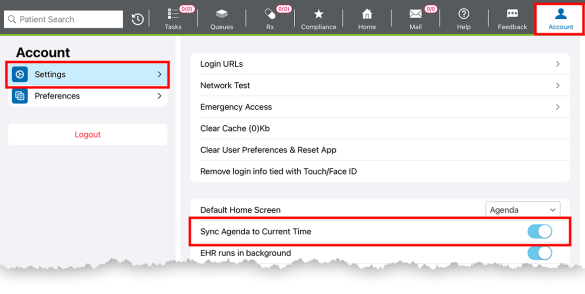
- Tap the Account action bar button.
- Tap the Settings tab.
- Tap the Sync Agenda to Current Time toggle to disable it.