
Understanding the OfficeMate–Encompass Workflow
Encompass works with OfficeMate to create a seamless patient workflow.
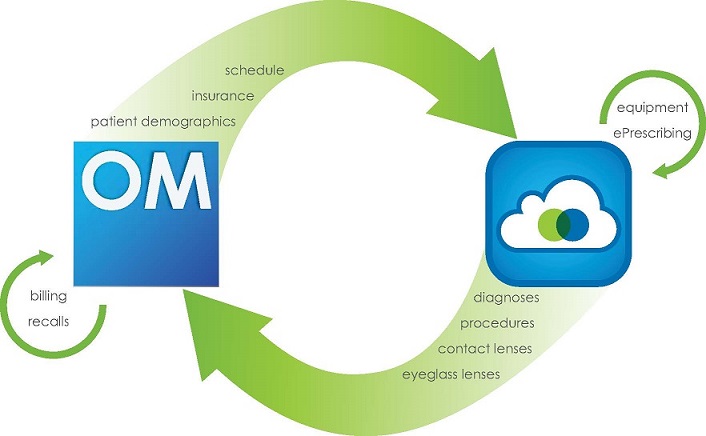
Information is passed securely from OfficeMate, which may be hosted locally or on a remote server, to Encompass in the cloud, and back to OfficeMate.
This topic includes:
OfficeMate Functions
Use OfficeMate practice management software to maintain any information that is collected outside of the exam room. Examples of information that you will enter and edit in OfficeMate that are shared with Encompass include:
- Patient Demographics: Names, addresses, phone numbers, and other demographic data
When you add a new patient in OfficeMate, the patient profile data and insurance information are sent to Encompass.
When you merge patient records in OfficeMate, the “current” Encompass is updated, and the “retired” record no longer appears in searches.
- Insurance: Carriers and plans, authorization, and eligibility
- Schedule: Appointments and confirmations
OfficeMate sends each day's schedule to Encompass. The patient names, service types, doctors, and appointment times are displayed in the Encompass Quick List.
Updates to the schedule made in OfficeMate are sent to Encompass, including new and changed appointments.
- Recalls: Recalls based on last visit, diagnosis, and interests
- Billing: Fee slips, insurance claims, and patient and insurance payments
Encompass Functions
Use Encompass to maintain any information that is gathered within the exam room. Examples of information that you record and edit in Encompass that are shared with OfficeMate include:
- Diagnoses: ICD codes
 Codes for the International Statistical Classification of Diseases. A standardized set of codes gives to every diagnosis, description of symptoms and cause of death attributed to human beings. ICD-10 is the current standard in the United States.
- Procedures: CPT codes Current Procedural Terminology. The numeric codes that are submitted to insurers for payment. Every billable procedure has its own individual CPT code.
- Contact Lens and Eyeglass Prescriptions Lenses: Measurements and lens products
- Prescription Notes
Suggested Workflow
Encompass and OfficeMate exchange specific pieces of information to ensure the patient workflow is a seamless experience. The following workflow represents a typical patient visit.
| Stage | This person . . . | Performs this task . . . | In this application . . . |
|---|---|---|---|
|
1. |
Front desk |
Record the patient’s demographics |
OfficeMate |
|
2. |
Front desk |
Record the patient’s insurance |
OfficeMate |
|
3. |
Front desk |
Schedule the appointment |
OfficeMate |
|
4. |
Doctor/technician |
Perform vision and ocular and exams |
Encompass |
|
5. |
Doctor |
Send prescriptions and charges, and finalize the visit |
Encompass |
|
6. |
Optician |
Eyewear/contact lens order |
OfficeMate |
|
7. |
Front desk |
Check out/fee slip |
OfficeMate |
|
8. |
Back office |
Billing |
OfficeMate |
|
9. |
Back office |
Recall |
OfficeMate |