
Mastering EncompassScribe Workflows and Verbalizations
Using EncompassScribe efficiently takes practice. Refer to this page as a cheat sheet to speed up your mastery of this exciting feature.
Click the (expand all) button at the top of this page to expand all the topics before printing.
Review these guidelines to gain a basic understanding of EncompassScribe:
- EncompassScribe is trained on conversations between providers and patients. Don’t try to give instructions to or navigate with EncompassScribe.
- You can create multiple recordings within a single visit. However, you can reconcile (approve) the AI output only once per visit.
- EncompassScribe captures only what you say. Every piece of data is extracted from the visit transcript. If you don't say it aloud, it won't be documented. EncompassScribe cannot see you point or gesture. EncompassScribe does not make clinical decisions for you.
- Laterality is important, so overstate where you are looking or what you are discussing.
- Diagnoses are the main anchor points. Plans are added to diagnoses to build the note.
At times, EncompassScribe seems like magic. However, there are some situations EncompassScribe cannot handle yet:
- Special plans that don't require a diagnosis (e.g. screening OCT, screening retinal photos)
- Some specific coding nuances (e.g. it won't document S-codes when using the Refraction plan)
- Vision exam or pretesting (e.g., refractions, keratometry)
The following buttons help you navigate through EncompassScribe:
- Record Visit opens the recorder.
- (Record) starts the real-time transcription.
- (Pause) pauses the recording and allows resuming the recording without reconsenting.
- (Stop) stops the recording and generates the AI output that you will review and approve in the Reconciliation screen.
- (Close) cancels the recording and closes the recorder—no AI output is generated.
- View AI Output, Output Ready, and View Reconciliation open the Reconciliation screen.
- Reconcile pushes the output accepted in the Reconciliation screen into the Visit Overview.
There are two approaches to verbalizing your visits:
- Natural conversation. You are able, and encouraged, to speak naturally to your patient. EncompassScribe has been trained to focus only on clinically relevant information.
- Dictation. If you prefer, you can use EncompassScribe at the end or after the visit without conversation, similar to dictation.
With either workflow, EncompassScribe performs best with the following structure in mind (think SOAP note):
- Exam and findings
- Diagnosis #1
- Discussion: explain the diagnosis, review supporting tests/imaging
- Plan: review your plan and recommendations (observation, medications, procedures, etc.)
- Diagnosis #2
- Discussion: explain the diagnosis, review supporting tests/imaging
- Plan: review your plan and recommendations (observation, medications, procedures, etc.)
- Follow-up
- Slit lamp is always on.
- Don’t forget about laterality.
For example, “In the right eye, there’s 2+ NS and 1+ cortical, and it looks like 3+ NS in the left eye.”
- Verbalize “Right only” or “Left only” to include only that eye. This is a good tactic for unilateral postop exams.
- Say “dilate” or “dilated” to turn on dilation. Without verbalizing dilation, you can still mention posterior findings, which will be captured as undilated.
For example, "C/D ratio or undilated macula."
- If “normal,” “quiet,” etc., or nothing is verbalized, your default normal findings will populate the exam.
EncompassScribe is trained with simple terms and synonyms. However, being more specific is better to reduce ambiguity.
- An AI-generated diagnosis summary is automatically produced with each diagnosis.
- Counseling plans are predicted when a diagnosis is further discussed with the patient.
- Mention imaging plans in context of the parent diagnosis. EncompassScribe needs to know which diagnosis to link the plans to.
“You have Dry AMD in both eyes. The retina scan today showed drusen in both eyes which is consistent with your Dry AMD.”
“We repeated your visual field today to track the progression of your primary glaucoma…”
- Specificity is recommended for close or ambiguous plans (for example, permanent punctal plugs vs. temporary).
- EncompassScribe will document something you did today versus something to be scheduled, provided you verbalize timeframes.
“That PCO looks like it’s bothering you and we can help. We will see you back in 2 weeks and perform the YAG laser at that visit.”
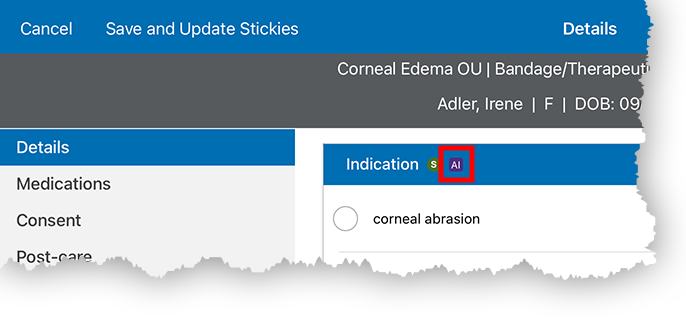
- You can easily identify which text boxes, check boxes, and drop-downs can be populated by EncompassScribe. Look for the AI icons scattered throughout Encompass to get a sense of which fields will be populated by EncompassScribe.
- Prescription Medication Management and OTC Treatment Regimen plans are brief AI-generated summaries of prescription medications and OTC recommendations managed in the current visit and linked to diagnoses. These plans, if you accept them, contribute to suggested billing codes.
- Medication prescriptions are automatically generated when a prescription is started, continued, or modified.
- There are two approaches to verbalizing prescriptions:
- Direct capture. Verbally specify all of the details (sig), and EncompassScribe will capture them for you.
For example, “1 drop in the right eye twice a day.”
- Enrichment. Mention the medication only (e.g., "latanoprost"), and EncompassScribe will automatically populate your last, or most commonly used, sig (e.g., 1 drop in both eyes every evening at bedtime).
- Direct capture. Verbally specify all of the details (sig), and EncompassScribe will capture them for you.
EncompassScribe suggests visit documentation based on your verbalizations. Here are general examples of things you can say.
| Phrase | EncompassScribe Action |
|---|---|
|
“dilated” or “dilation” |
Turns on the dilation portion of the exam |
|
“right only” or “left only” |
Turns off the contralateral eye in the exam |
|
Any discussion regarding a diagnosis |
Suggests a counseling plan for that diagnosis |
|
“prescription” or “send to the pharmacy” |
Suggests a prescription plan |
|
“OTC” or “over-the-counter” |
Suggests an OTC plan |
The following tables list common diagnoses and examples of colloquial phrases that EncompassScribe can recognize and translate into suggested visit documentation.
Refractive Errors
| Diagnosis | Potential Phrase |
|---|---|
|
astigmatism |
|
|
hyperopia |
|
|
myopia |
|
|
presbyopia |
|
Cornea, Ocular Surface, and External Disease
| Diagnosis | Potential Phrase |
|---|---|
|
allergic conjunctivitis |
|
|
blepharitis |
|
|
dry eye syndrome |
|
|
keratoconjunctivitis sicca |
|
|
meibomian gland dysfunction |
|
Cataract, Lens, and Postsurgical
| Diagnosis | Potential Phrase |
|---|---|
|
combined form of senile cataract |
|
|
nuclear cataract |
|
|
posterior capsular opacification |
|
|
postop cataract |
|
|
pseudophakia |
|
Glaucoma and Optic Nerve
| Diagnosis | Potential Phrase |
|---|---|
|
glaucoma suspect |
|
|
ocular hypertension |
|
|
primary open-angle glaucoma (POAG) |
|
Macula and Retina
| Diagnosis | Potential Phrase |
|---|---|
|
choroidal nevus |
|
|
dry macular degeneration |
|
|
epiretinal membrane |
|
|
wet macular degeneration |
|
Systemic Disease and Vascular Retinopathy
| Diagnosis | Potential Phrase |
|---|---|
|
hypertensive retinopathy |
|
|
proliferative diabetic retinopathy |
|
|
type II diabetes without complication |
|
Vitreous
| Diagnosis | Potential Phrase |
|---|---|
|
posterior vitreous detachment |
|
|
vitreous floaters |
|
The language presented here is for illustrative purposes. It is not intended to be an exhaustive list of possible phrases, nor is it intended to provide clinical guidance.
The following table lists common plans and examples of colloquial phrases that EncompassScribe can recognize and translate into suggested visit documentation.
| Desired Plan | Potential Phrases | Example with Context |
|---|---|---|
|
counseling (any diagnosis) |
No specific “buzz” or “trigger” words |
Discussion of the clinical nature of diagnosis or treatment options should trigger counseling |
|
refraction |
Glasses check, prescription check |
“We performed a refraction today.” “We’ll update your glasses.” |
|
OCT, retinal |
Mac OCT, retina scan, back of the eye scan |
“We got a scan of the back of your eye.” “Let’s look at a scan of your retina.” |
|
fundus photos |
Retinal photos, retinal pictures |
“Let’s get some photos of your retina.” “We took some baseline retinal photos today.” |
|
OCT, optic nerve |
Nerve OCT, RNFL, optic nerve scan |
“Let’s look at your optic nerve scan.” “Your optic nerve scan today showed…” |
|
automated perimetry |
Visual field, HVF, peripheral vision test |
“Let’s review your visual field test.” “Let’s repeat that visual field.” |
|
optical biometry |
A-scan, IOL master, biometric, Argos, Lenstar |
“We got some cataract measurements today.” “I’ll show you your Argos test to review.” |
|
glaucoma assessment |
glaucoma summary, glaucoma status |
“Let’s review the status of your glaucoma.” “Overall, the status of your glaucoma is…” |
|
YAG capsulotomy |
YAG caps, laser polishing procedure |
“We’ll perform laser polishing to take care of that film behind the lens.” |
|
intravitreal injection |
Eylea injection, Vabysmo injection, Lucentis injection, etc. |
“We’ll do an injection of Avastin today.” “Let’s proceed with a Lucentis injection today.” |
|
temporary vs. permanent plugs |
temporary, permanent |
“These plugs are designed to stay in.” “These plugs are temporary and dissolve over time.” |
|
IVFA (Fluorescein) |
Fluorescein, FA |
“We’ll run a special dye test.” “Let’s get that dye test to look at the vessels.” |
|
epilation |
remove eyelash with forceps |
“We’ll remove those lashes with some forceps.” “I’m happy to remove those lashes today.” |
|
B-scan |
B-scan, eye ultrasound |
“We’ll get a quick ultrasound of the eye.” “It looks like the ultrasound is stable.” |
|
corneal topography |
topos, corneal map |
“We got a topographic map of your corneas.” “Your corneal topos look stable.” |
|
selective laser trabeculoplasty |
SLT |
“We’ll do the SLT laser today.” “This laser will help lower the eye pressure.” |
|
order for surgery |
order for surgery, sign up for surgery |
“We’ll get you signed up for surgery.” “We’ll get you scheduled for cataract surgery.” |
The language presented here is for illustrative purposes. It is not intended to be an exhaustive list of possible phrases, nor is it intended to provide clinical guidance.