
What is EncompassScribe?
EncompassScribe is your AI-enabled clinical documentation support. It captures the conversation you have with your patient during the visit, it then transcribes that conversation, and, based on that transcribed conversation, it suggests exam documentation that you can approve and import into the visit as structured data. This means the data you approve is imported into the visit so that it's ready for billing, it's counted toward regulatory programs like MIPS, and it can be copied forward into the patient's next visit.
Best of all, you're in complete control. Simple controls enable you to start, stop, or pause the recording at any point during the visit. Additionally, you review, edit, and approve the suggested data before it's imported into the visit.
EncompassScribe doesn't make clinical decisions. EncompassScribe isn't a simple speech-to-text tool—it plucks clinical data automatically from your natural conversations with your patients, organizes that clinical information, and transforms it into structured data that drives downstream actions like billing and medication prescriptions.
Secure Recordings
Privacy is our priority. The recordings you capture in your exam lanes never leave your device and are permanently deleted as soon as the transcription is completed. Unlike some web-based ambient listening solutions that send your recordings to the cloud, EncompassScribe does not send your patients' voices to a third party for processing.
Flexible Workflows
Most doctors who record visits with the Encompass iPad app will likely use the iPad app to review and approve the suggested documentation. Likewise, most doctors who use the Encompass iPhone app will likely use the web application to review and approve suggested documentation. You aren't, however, restricted to those two workflows—you can mix and match!
The following graphic illustrates the flexibility.
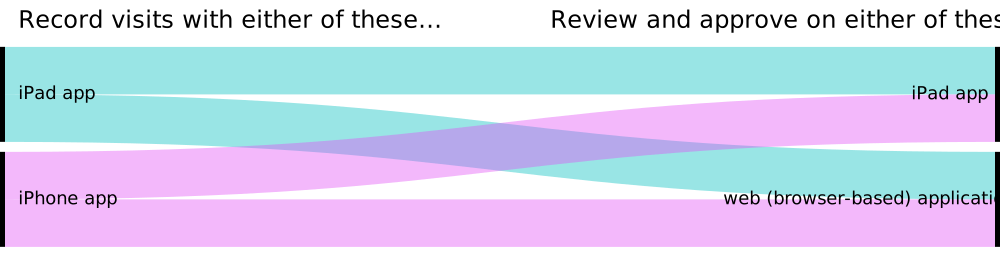
For example, if you don't have an iPad that meets the recording requirements, you can record the visit with the iPhone app and then review the suggested documentation in the iPad app or in the web application.