Setting Up VSP Claim Submissions
You can select whether you want to submit VSP claims immediately when you generate the order invoice, or delay submission to allow time for review.
- On the Encompass home screen, click Administration.
The Company: Setup screen opens.
- On the top menu bar, click Billing & MVC and select Insurance Integrations.
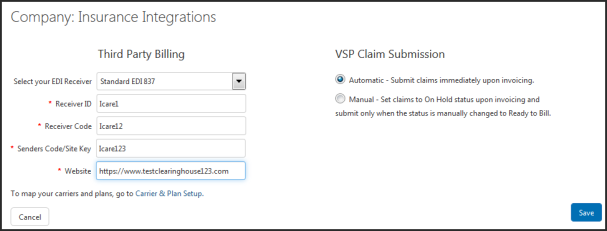
The Insurance Integrations screen opens.
- Perform one of the following:
- Select Automatic to immediately submit VSP claims at the time the invoice is generated.
- Select Manual set VSP claims to On Hold status upon invoicing and submit only when the status is manually changed to Ready to Bill.
- Click Save