
Understanding the Paybill URL
This feature is an add-on solution and requires setup by Eyefinity and may include additional cost. For information on how to get started, see our website.
The Eyefinity PatientNavigator Paybill URL is an optional way for your practice to accept patient payments; however, this URL is used for when a balance is owed after claims processing is complete. The Paybill URL is brandable with your logo, making it easy for the patient to ensure they are in the right place.
The patient goes to the Paybill URL, is prompted to verify their identity, and then sees the balance owed. The PayBill URL displays the total patient balance on the order after insurance claim processing. This is the same balance as what displays for the order on the Patient Insurance Balance tab in Encompass.
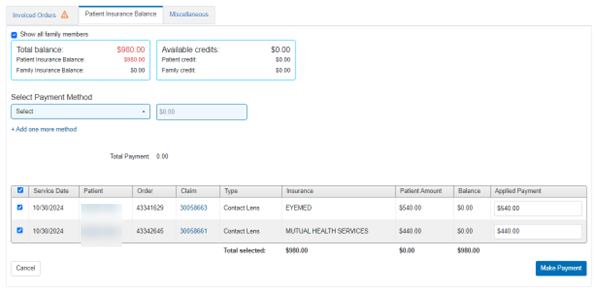
The balance owed can include balances for more than one claim on an order. The patient can also use the Paybill URL to pay any family balances due after claims processing. If the balance is on multiple orders, the patient needs to enter each order number to pay the balance for each order.
In Encompass, the Patient Insurance Balance tab only includes balances on the order with the Claim Status "Billed to Patient". If a patient attempts to make a payment via the Paybill URL before the Claim Status is set to "Billed to Patient", the patient sees a balance of zero (if there is no retail/uninsured balance). This is intentional to avoid overpayment by the insurance carrier and patient.
As a best practice, we recommend you only provide the Paybill URL when sending out patient statements after claims processing is complete.
The highlight below shows the difference between your Eyefinity PatientNavigator URL and Paybill URL:
-
PatientNavigator URL: https://patientnavigator.eyefinity.com/orderstatus/{Customer ID}
-
PatientNavigator Paybill URL (new): https://patientnavigator.eyefinity.com/orderstatus/{Customer ID}/order/paybill