
Eyefinity Practice Management 10.14 Release Notes
Release Date: December 12, 2019
Eyefinity announces the newest version of Eyefinity Practice Management. This updated version improves upon your system's robust attributes and offers new features and expanded functionality.
This section includes:
Performance Improvements
The speed and performance of the following areas of Eyefinity Practice Management has been improved:
- Invoice generation and printing
- Patient search
- Material Orders product search
- Administration product search
Administration Enhancements
Eyefinity Practice Management 10.14 Administration includes enhancements to the following areas:
- Select Insurance Plans to Include PQRS Codes on Claims
- Expanded Number of Periods for Recall Schedules
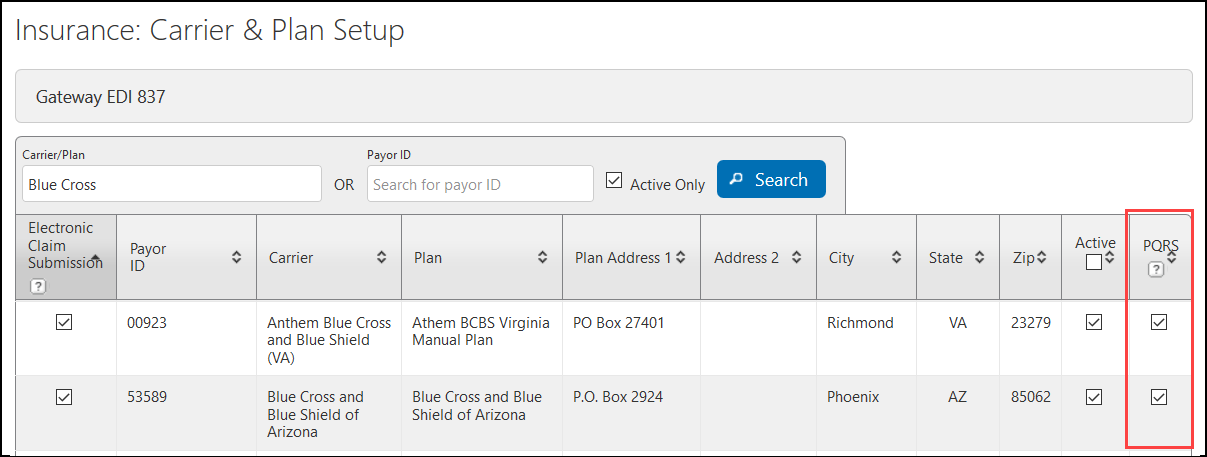
Select Insurance Plans to Include PQRS Codes on Claims
A new PQRS check box has been added to Carrier and Plan Setup to enable you to select which insurance plans include PQRS codes on exam claims. When you select this check box for a plan, the PQRS codes you enter when creating exam orders using the plan are automatically added to the claim.
Expanded Number of Periods for Recall Schedules
You can now enter a three-digit number for the Number of Periods in the Recall Schedule window. Previously, this field was limited to two digits. This change enables you to set a larger interval for your scheduled recalls. For example, you can now enter 104 weeks to set a 2-year recall period for a 24-month eye exam. For more information, see Setting up Recall Schedules.

Fixed Issues
Front Office
- The VSP integration now works correctly for twins and triplets. Previously, the system failed to obtain VSP insurance information and authorizations for dependents who share the same date of birth.
- You can now save and invoice orders with TriZetto eligibility information that includes a primary care physician.
Claims Management
- The Claim Adjustments screen now correctly displays line item Payment Amounts when the Pre-Populate Payment Amount check box is deselected in the Settings window.
Administration
- Changing selections in the Works at Office(s) drop-down list in Edit Provider no longer deselects the Eyefinity EHR check box for the provider. Previously, deselecting an office in the drop-down list and clicking Save caused the Eyefinity EHR check box to be deselected.
- Errors no longer occur when editing or deleting custom frames.