
Encompass 10.55 Release Notes
Release Date July 29, 2026
Eyefinity announces the newest version of Eyefinity Encompass. This updated version improves your system's robust attributes and offers new features and expanded practice management functionality.
Watch the What's New video below to see highlighted features in action.
Release Highlights
We heard you! This release includes the following high-impact updates requested by Encompass users.
Subscriber Name Displays on the Add Dependent Screen
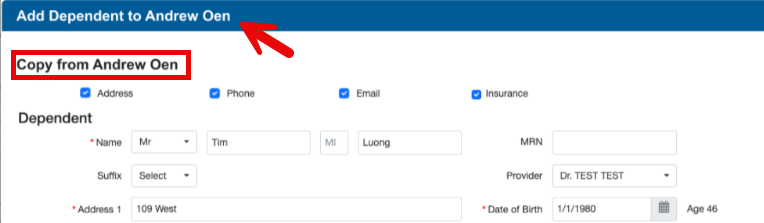
We've added the Subscriber Name to the Add Dependent screen so you can confidently and quickly add dependents without interrupting your workflow.
The Add Dependent screen header now includes the Subscriber Name and the name displays after Copy from, giving you confidence while entering the dependent information.
New Comprehensive Production Dashboard
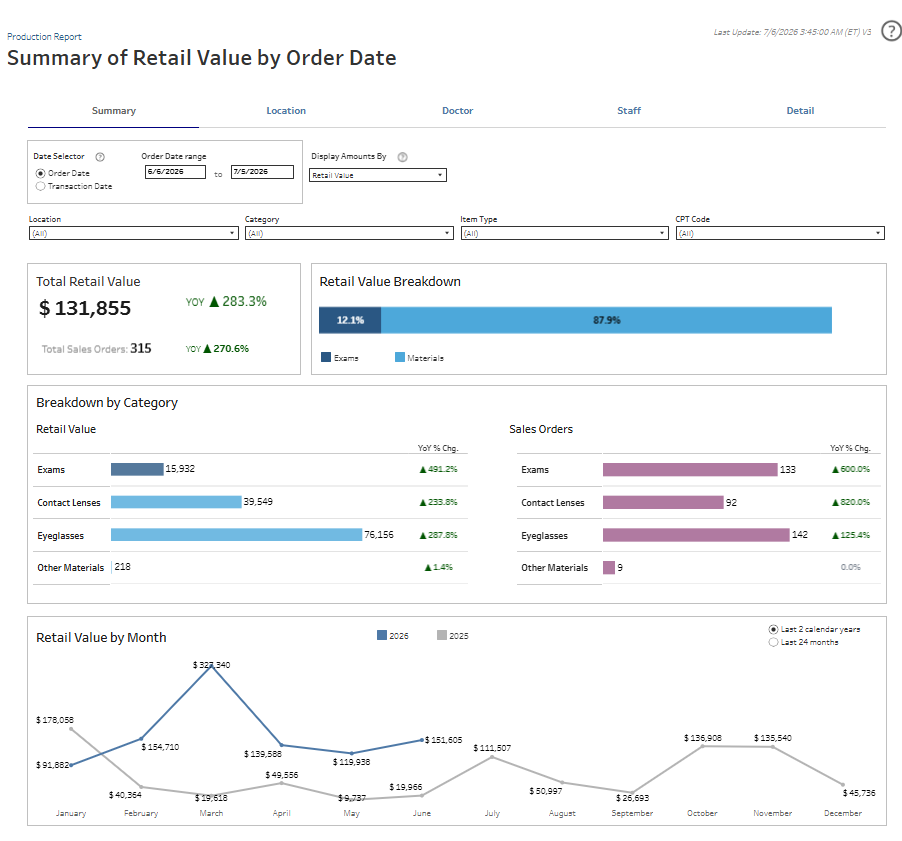
Eyefinity is happy to announce our newest dashboard, the Production Dashboard. This comprehensive Production Dashboard, helps you:
-
Understand performance ... fast - Measure total production value in terms of revenue and volume at a glance.
-
Measure value your way - View production by retail value, net sales, or payments received.
-
Tie production to outcomes - Align payments to original order date to understand true value generated.
-
Spot trends early - Identify productivity patterns and seasonal shifts over time.
-
Gain deeper insights - Drill into production by CPT code and specific materials.
-
Smarter comparisons - Evaluate performance across offices, doctors, and staff.
-
Drive accountability - Support incentive and compensation decisions with trusted insights.
-
One source of truth - Replace multiple legacy reports with a single, authoritative production view.
To access the Production Dashboard, select Reporting and then Analytics & Insights and then Production. For more information see, Production Dashboard.
Front Office Enhancements
This release includes the following Front Office enhancements:
Select Multifocal Lens Types with Greater Precision
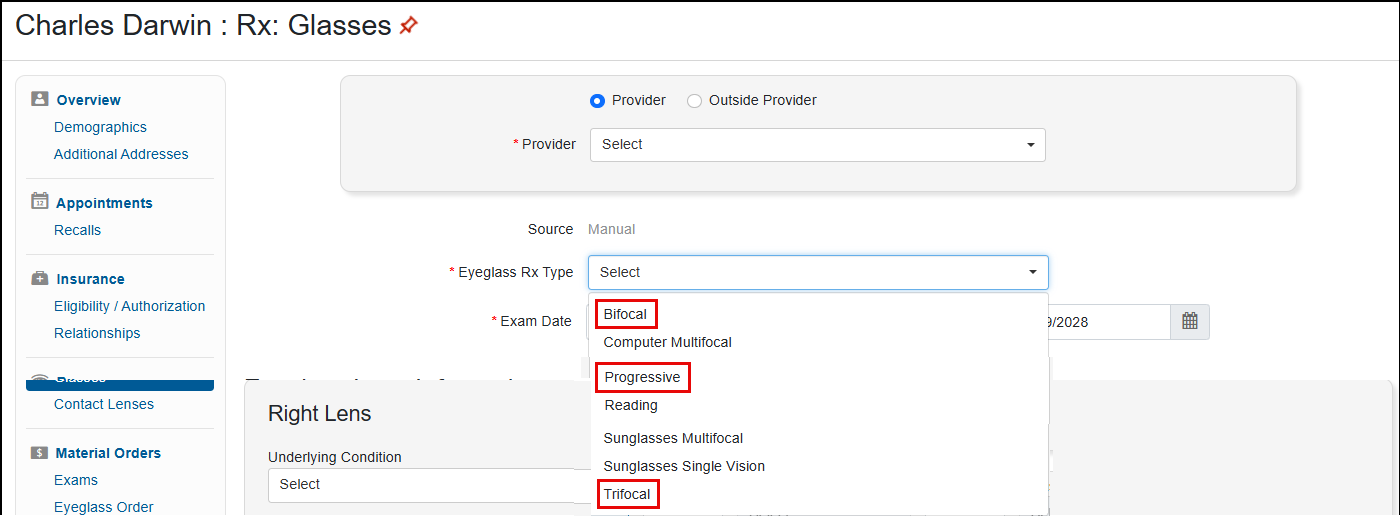
We've added three new options to the Eyeglass Rx Type drop-down list in the Rx: Glasses screen. When entering eyeglass prescriptions, you can now select the following types:
-
Bifocal
-
Progressive
-
Trifocal
With this update you can be more specific about the type of multifocal lenses on the prescription, preventing staff confusion when creating orders.
This update applies only to prescriptions entered manually. These Rx types will be added for prescriptions imported from EHR in Encompass in a later release.
See the Next Eligible Date for VSP on Eligibility and Scheduler Screens and Keep Your Patients in the Know
If using the VSP Retail integration, we have enhanced the VSP Real Time Eligibility integration to make it easier to understand benefit eligibility with dates.
If using the VSP In Network integration, these changes do not apply.
When checking VSP eligibility, if the patient is not eligible for a service, the service/material displays on the VSP e-Eligibility page with a red X icon and with the Available on date shown below the icon.
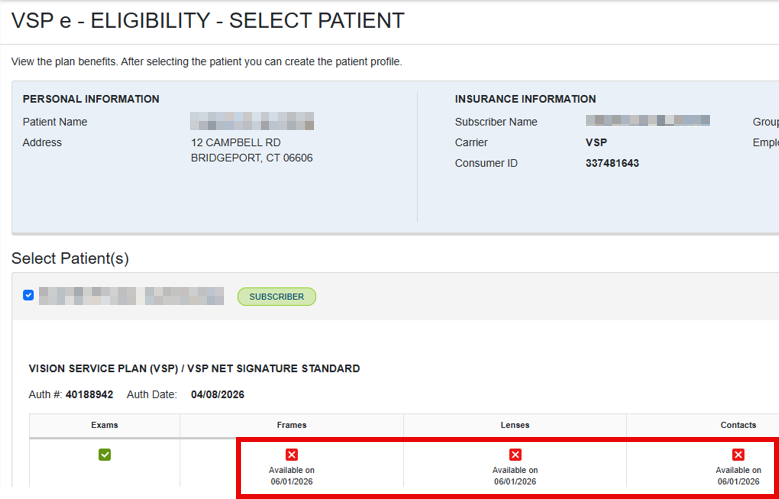
Now you can explain benefits and renewal timing to your patient with confidence and exact eligibility dates; reducing confusion at checkout.
Available On Date Added to VSP Bulk Authorizations
If you use the VSP In Network integration with VSP Bulk Authorizations, the Available on date has also been added to the VSP Bulk Authorizations page, giving you visibility into VSP eligibility prior to the appointment. This allows you to set expectations early and avoid check-in delays or reschedules due to unavailable benefits.
Claim Management Enhancements
This release includes the following Claim Management enhancement:
Easily Run the Aged Claims Report with Clearer Filters
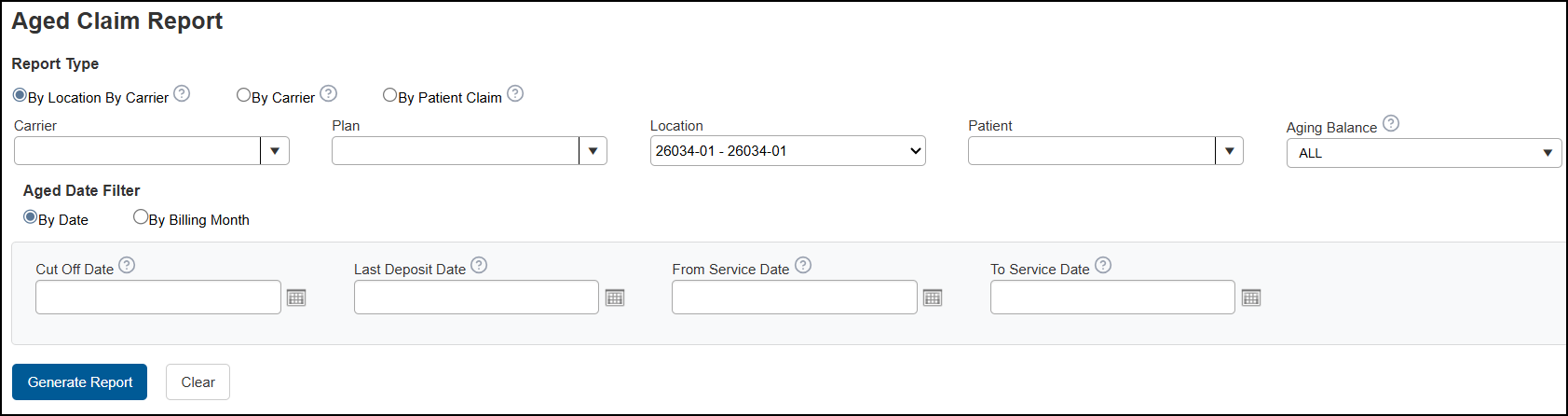
We've updated the Aged Claims Report filtering options to be easier to understand, so you can generate the report with greater confidence. With this release, you'll see the following changes:
-
Report Type option buttons have replaced the Total By drop-down list. The options themselves haven't changed. By Location By Carrier is now selected by default.
-
The date filters are now located in an Aged Date Filter section. The By Billing Month option is selected by default, with the current month shown in the date field.
-
The Aging Type field is now called Aging Balance. This update was made for clarity; the options in the drop-down list have not changed.
-
Tooltips have been added to most fields. Hover your cursor over a tooltip to see information on how the filter works.
Carrier Payment and ERA Reset Confirmation Message Standardized
We updated the Reset Confirmation message that displays on the Carrier Payment and ERA screens so it's consistent in all locations where the message displays. With a predictable and consistent message, it's easier for you to take the appropriate action.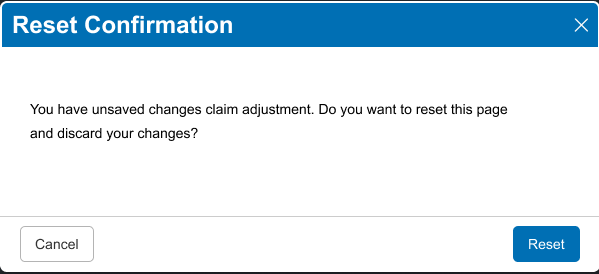
The Reset Confirmation message now includes:
-
The X in the upper right cancels the reset and closes the message.
-
The Cancel button on the bottom left also cancels the reset and closes the message.
-
The Reset button on the bottom right confirms the reset and closes the message.
Reporting Enhancements
This release includes the following Reporting enhancements:
Mobile Number Added to Patient Marketing Dashboard to Support SMS Campaigns
We added the mobile number to the patient contact data on the Patient Marketing Dashboard. Including the mobile number supports more effective SMS campaign targeting.
Patient-Friendly View of the Accounts Receivable Dashboard
We enhanced the Accounts Receivable Dashboard to add an optional, patient-friendly view. View the AR by Patient layout with simplified totals and contact details to streamline staff workflows and improve collections.
We also fixed the AR Trend to correctly reflect average days outstanding and ensure the claim notes display correctly.
Patient Engagement Enhancements
Eyefinity's Patient Engagement Solutions may include an additional fee and require Eyefinity setup. For more information on what's offered and pricing, go to eyefinity.com. Select Products and then Patient Engagement or select the Solution you are looking for from the list.
We can Customize PatientNavigator and EncompassMessage at the Office Level
Eyefinity now offers more configuration options for PatientNavigator and/or EncompassMessage at the office and company level; for example: product features and unique URLs.
Contact Eyefinity to learn more.
Scheduling Notifications Process in Priority Order
To ensure time-sensitive messages, like same-day appointment reminders, are sent before those of lower priority, scheduling notifications are now processed and sent based on the priority order listed below:
Notification Priority Order
-
Appointment Reminder (Same Day) – runs outside office hours; sent 2 hours before the appointment.
-
Order Confirmation – In Process – if triggered after office hours, sent the next day.
-
Appointment Reminder (1-Day)
-
Birthday Notification
-
Appointment Reminder (2-Days)
-
Missed Appointment
-
Order Ready for Pickup – if triggered after office hours, sent the next day.
-
Order Ready for Pickup – PatientNavigator – if triggered after office hours, sent the next day.
-
Appointment Reminder (3-Days)
-
Recall: Last Exam (Due) 1 Year
-
Recall: Last Exam (Overdue) 2 Years
-
Recall: Last Exam (Overdue) 3 Years
-
Recall: Scheduled Patient Recall (Due)
-
Appointment Reminder (5-Days)
-
Appointment Reminder (7-Days)
-
Appointment Reminder (2-Weeks)
-
Appointment Reminder (3-Weeks)
-
Payment Due Reminder (15 Days)
-
Payment Due Reminder (30 Days)
Text and email messages are only sent during office hours unless otherwise noted in the list above. Recalls and other automated messages complete by end of day.
Patient Engagement also includes the following enhancements:
EncompassMessage Enhancements
Say More with Increased Size of Two-Way Texts
For EncompassMessage users, we have increased the character limit of texts from 160 to 320, allowing you to say more in a single text.
View the Complete Conversation in Two-Way Text with the Automated Messages Added to the Display
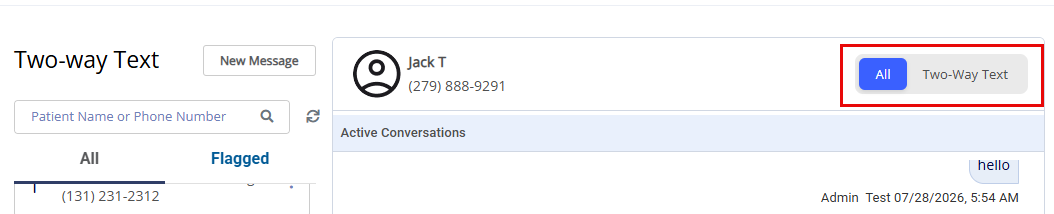
You can now view the complete conversation on the Two-way Text page with both user-entered and system automated messages displayed in the conversation.
You can also filter the conversation to display only user-entered messages using the toggle added to the top right of the conversation. Select Two-Way Text for user-only or All for both user and system created messages.
Automatically Thank Customers and Prompt Them to Leave a Review
A new Online Review or Survey template is available, with text and email content, that allows you to thank your patients for their purchase and invites them to answer a survey or leave a review.
Once you set an order to Delivered, the system sends the message after a configurable number of days. Only one request is sent per patient, per day.
This template defaults to inactive; you need to customize the template with the link to your online survey/review and any additional personalization you want before making it active. See Customize a template.
Separate Canceled Appointments and Missed Appointments Templates to Fit Your Needs
In response to customer feedback, we added a dedicated Canceled Appointment template that follows the same delivery rules as the Missed Appointment template, ensuring patients receive an appropriate notification when an appointment is canceled. We also updated the Missed Appointment template to remove all references to canceled appointments, so each communication now reflects the specific appointment outcome.
These changes provide clearer, more accurate messaging for both canceled and missed appointments. Please review and customize the templates as needed. For additional guidance, see Customize a template.
System Retries Notification/Update if API Fails
When EncompassMessage is sending a patient notification or updating Encompass with the appropriate status and the API fails, the system will send the notification/status update again.
PatientNavigator Enhancements
Get Paid Faster: Automate Outstanding Balance Notifications with PatientNavigator
Eyefinity is excited to introduce a new enhancement to PatientNavigator designed to help optometry practices streamline the collection of insurance outstanding patient balances and improve cash flow.
PatientNavigator now includes a configurable message template that automatically notifies patients with an outstanding insurance balance via text and/or email, prompting them to contact the practice and complete their payment.
If the patient has a balance and you set the claim status in Encompass to "Billed to Patient", then the notice is automatically sent the day after the claim status change.
Admins for Multiple Locations Get Alerts for Unread Messages for All Locations so You Can Triage Better
For PatientNavigator Admins managing multiple locations, you can now view unread alerts for all locations. The message list groups unread items by location and sorts the items by highest priority for faster triage.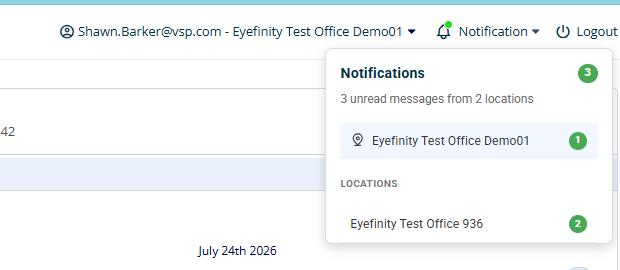
Admins see only alerts for the locations they are authorized to manage.
This feature must be requested and turned on by Eyefinity.
Coming Soon
One of Our Most Requested Patient Workflow Enhancements is Coming Soon
Many of you have asked for a better way to bring patient information submitted online directly into Encompass. We're excited to share that we're developing a new patient readiness product experience designed to help practices prepare for appointments before patients arrive.
By capturing patient forms online ahead of the visit and automatically populating information into Encompass, practices can review and confirm patient information in advance, reduce manual data entry and rework, and help keep check-in moving quickly and efficiently.
The experience also gives practices a centralized place to review patient-submitted information before appointments, helping teams improve data accuracy, streamline workflows, and prepare for the day ahead.
We're currently testing these capabilities with a small group of early adopters and gathering feedback to help shape the experience before broader release. We look forward to sharing more information about this new add-on service as we work toward an anticipated Fall 2026 launch.
Fixed Issues
This release includes fixed issues in the following areas:
Front Office
-
When fully returning contact lens orders where the lenses have two different power values, both lenses are now correctly removed from the inventory stock order, ensuring that it closes correctly after the return. Previously, only one contact lens was removed from the stock order, leaving it open.
-
We fixed an issue where double-clicking Process Order Now in the Order Review screen could create duplicate sale or return transactions.
-
Unknown errors no longer occur when converting a multi-focal prescription to a single vision reading prescription during eyeglass ordering when the prescription is for one eye only (the other eye is set to Plano, Balance, Prosthesis, or No Lens).
-
The Updated On column on the Patient Appointments screen now shows the correct AM/PM indicators.
-
We fixed an issue where clicking +Check for VSP Insurance would sometimes add duplicate VSP plans to a patient’s account, causing the same authorization number to be pulled for both plans, and exam and material orders to appear successful in Encompass while only one order was actually sent to VSP.
-
You can now successfully enter more than one Modifier Code in the Add VSP Medicaid Modifiers/Dispensing Fees window during pricing.
-
We fixed an issue where rechecking a prescription linked to an EHR exam caused the exam to disappear as a Pending Exam on the patient account, preventing it from being invoiced.
-
Frame-only orders with no lab are now correctly put into "In Process" status when placed on hold during invoicing. Previously, the orders would be put into "Ready" status.
-
We corrected a problem where updated frame measurements on an order were not reflected in the Order Summary and Lab Order printouts, causing the DBL/Bridge size to display the frame default instead of the values entered. The DBL/Bridge size now prints correctly on both summaries and lab orders, matching the measurements saved on the EG order.
-
When sending a contact lens order to CLX, if there is an error, the error message will now display as expected.
Claim Management
-
We fixed an issue where clicking the Reference Number link in the Carrier Payments screen incorrectly changed any ampersands (&) in the carrier name into an encoded value (&) in the Related Claims search panel, causing claim searches to fail.
-
Claims for insurance carriers that have the NPI Type Group in the provider's Insurance Details window no longer incorrectly show the provider's first name in the First Name field in Box 33. Previously, when the NPI Type for the office was set to Individual, the provider’s first name appeared alongside the correct entity name, causing claim rejections.
-
We fixed an issue where the CPT code for an exam would not appear on the primary claim when multiple PQRS codes were also included. Previously, the exam would appear only on the secondary claim.
Administration
-
VSP doctors added using the + VSP Provider button in Provider Setup are now available to select when creating VSP orders.
Reporting
-
The Monthly Production Summary and Monthly Production by Provider reports no longer fail to generate due to an invalid miscellaneous payment order number causing a data overflow. We added validation to prevent oversized order numbers from blocking report generation.
Patient Engagement
-
If a service template does not have a service group, then the Online Schedule will not look to the template for appointment availability. Previously, appointments showed as available, when they were not.
-
When an appointment is confirmed, it displays on the Appointment Confirmations page.
-
Service templates are respected for the Normal Hours (or other rotations) even when there is a service template with a new additional date range that begins later in the week.
-
The Appointment History screen displays the correct time when an appointment is created or updated. Previously, the system displayed the wrong AM/PM indicator.
EncompassMessage
-
Sent messages can now be viewed in EncompassMessage; previously, the sent messages did not display.
-
When an appointment is confirmed via text or email, Encompass is updated and the patient will no longer receive reminders. Patients will receive the same day notification.
-
When a patient replies "C" to confirm an appointment, the confirmation list only shows active, scheduled appointments. Previously, canceled appointments also displayed.
-
When a patient replies "C" to confirm their appointment, they can successfully confirm the appointment. Previously, the message "Sorry we are experiencing an issue, please call the office" displayed.
-
Missed appointment reminders are only sent when the patient misses the appointment. Previously, some patients received the notification even though they attended their appointment.
-
Once an appointment is canceled or rescheduled, no appointment reminders are sent to the patient. The patient only receives reminders for the new appointment date.
-
EncompassMessage sends out all expected recall messages based on the Encompass Scheduled Recall settings. Previously, only one recall message was sent.
-
Appointment reminders are sent based on active settings and the appointments on the calendar. Previously, no appointment reminders were being sent.
-
When composing a message to a patient, the system stays focused on the message even when additional incoming messages are received.
-
On the two-way text page, we improved the patient search to search and return the patient when a partial name is entered.
-
When a 5-day appointment reminder email is created for a patient's scheduled location, the full and correct address for the location displays. Previously, the address that displayed was a combo from the multiple offices.
PatientNavigator
-
If the patient Eyewear Ready notification is delivered successfully, Encompass is updated to Notified; however, if the delivery fails, the order status does not update.
-
Practice Admins can now edit all schedule notifications. Previously, the "Order ready for pickup" schedule notification could not be edited.
-
If a patient attempts to pay an invoice after a successful payment is made, the message "Payment is already made for this order" displays.
Encompass 10.55.1
Release Date July 29, 2026
This release includes the following fixed issues:
-
The on-hand totals on the Physical Inventory Variance Detail (INV105) report and the Physical Inventory Variance Summary (INV104) match; previously the on-hand totals on the INV104 report were doubled.
-
The on-hand quantity on the Physical Inventory Variance Detail (INV105) report and the Physical Inventory Variance Summary (INV104) reflects the actual quantity at time of inventory freeze; previously the on hand quantity had multiplied.
-
Only items with an actual on hand quantity and matching physical count quantity display on the Physical Inventory Variance Detail (INV105) report; previously the report included items with 0 on hand quantity and 0 physical count quantity.