
15.3.4957 Release Notes
Released March 3, 2023
This page describes the enhancements, fixes, and known issues in the latest OfficeMate/ExamWRITER release.
- General Enhancements
- OfficeMate Enhancements
- ExamWRITER Enhancements
- Equipment Interface Enhancements
- Regulatory Enhancements
- Fixed Issues
General Enhancements
- You can now control whether or not the FTC Contact Lens Rule disclosure appears at the bottom of printed contact lens prescriptions. This is so providers who have implemented other solutions to satisfy the FTC requirements can print contact lens prescriptions without the disclosure text and signature lines. Here's how to turn off the FTC disclosures, which are enabled by default:
- Open OfficeMate Administration.
- Click the Setup menu and select Preferences.
- Click the Misc tab.
- Locate the Print Contact Lens Release Disclosure on Rx setting and select No.
- Click OK to save your changes. This change applies to all providers in the practice.
OfficeMate Enhancements
- Once a payment is reversed in Receipts and Adjustments, that payment can no longer be reversed again or edited. Previously, practice staff could reverse a payment more than once if they made a mistake, but this practice led to patients having negative balances.
ExamWRITER Enhancements
- The Middle Initial field has been expanded to accommodate the full middle name. This change is required to meet ONC requirements for patient matching and corresponds to changes made to OfficeMate in the December 2022 release.
Equipment Interface Enhancements
- The equipment interface will no longer display a success message when images or data are sent to the patient's chart. The success message is now suppressed by default to reduce the number of steps required to capture and send data. To re-enable the success message, double-click the Eyefinity Equipment Interface Setup icon on your Windows desktop and select the Display Success Message check box.
- We resolved an issue that occurred while using the Topcon CV-5000S and caused the manifest near visual acuity values to populate the autorefraction section of the exam.
- We updated the Marco RT-5100 (EPIC 5100) integration to allow ++ and -- DVA values.
Regulatory Enhancements
- MIPS quality measure 117 is no longer eligible for claims-based submission. We removed the autocoding of 2022F, 2023F, 2026F, and 3072F. These codes will continue to be sent to VSP for HEDIS reporting.
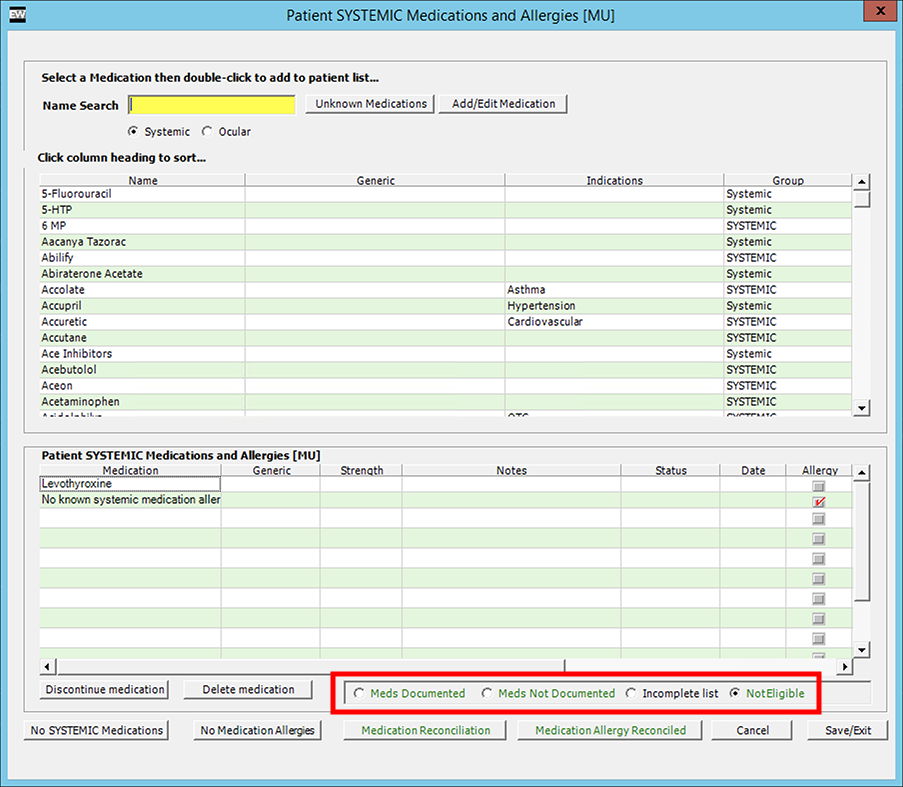
- MIPS quality measure 130 is no longer eligible for claims-based submission. We removed the automated G-codes from the Meds Documented (G8427), Meds Not Documented (G8428), and Not Eligible (G8430) options located at the bottom of the Patient History > Systemic Medications and Allergies screen. These options still count toward the EHR submission method.
- We added the following data elements to the Vital Signs section of CDA files exported from ExamWRITER. These pediatric data are not documented in eyecare, but the elements are required for compliance.
- Head circumference percentile
- BMI percentile
- Weight for length percentile
Fixed Issues
- We fixed an issue that caused some users to receive an error, "Database error - Data table MAPSnomed is Empty!", when opening ExamWRITER.
- We corrected an issue that caused the Products and Services window to display the attributes for the previous ophthalmic lens when the user used the Next and Previous buttons to navigate between lenses.
- We resolved an issue that prevented users from decrypting a database, generating a new key, and encrypting the databases again. A workaround that involved closing and reopening OfficeMate Administration after regenerating the key is no longer necessary.
- We fixed an issue that caused error -2146233088 while printing welcome letters.
- We fixed an issue that caused error -2146233088 while adding diagnosis codes to a fee slip. This error occurred in rare instances of the database missing the latest CMS 5010A ANSI claim changes.
- We corrected the format of medication prescription information saved in CDA files. Specifically, the dose information was not saved in a compliant format. We also corrected an issue that resulted in the stop date, status, and fill instructions not being saved in the CDA.
- We tightened security around receiving VSP authorization information.
- OfficeMate now accepts eight-digit authorization codes and supports leading zeros.
- We corrected the following SNOMED codes related to medication allergies:
- Rash (297982009)
- Watery Eyes (420103007)