
15.3.6417 Release Notes
Released February 23, 2026
This page describes the enhancements, fixes, and known issues in the latest OfficeMate/ExamWRITER release.
- OfficeMate Enhancements
- OfficeMate Fixed Issues
- ExamWRITER Enhancements
- ExamWRITER Fixed Issues
- Equipment Interface Fixes and Enhancements
- Regulatory Enhancements
- Fixed Issues
- ePrescribing Updates
OfficeMate Enhancements
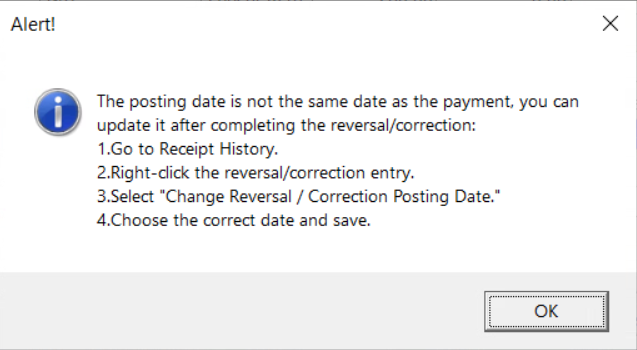
- We updated the alert that appears when you make a payment correction or reversal on a different posting date than what was originally entered. The new message instructs you on how to update the date after completing the correction or reversal.
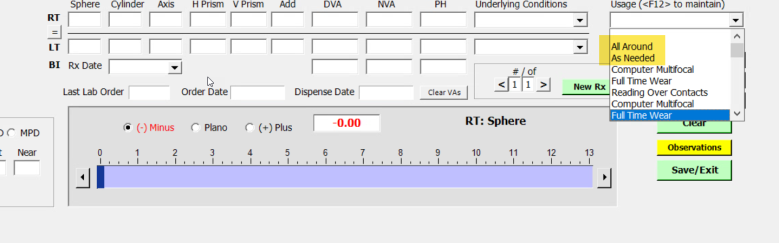
- We added the options 'All Around' and 'As Needed' to the Usage drop-downs for both contact lens and eyewear orders to align patient information flowing between Encompass EHR and OfficeMate/ExamWRITER.
- We increased the character limit of the Payor ID field to 10 characters and added a tooltip that states "TriZetto claims allow 5 digits."
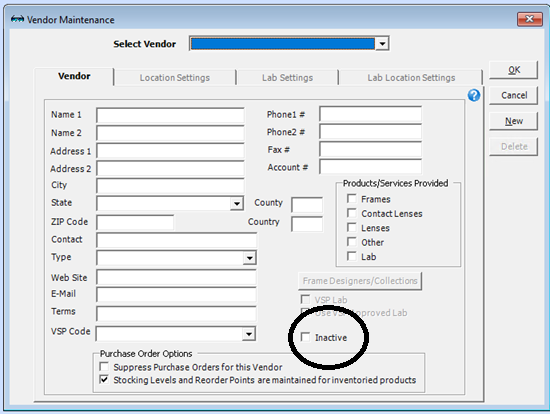
- We added an Inactive checkbox to the Vendor Maintenance window, giving you the ability to inactivate vendors without removing historical data from reporting. You can only inactivate a vendor if they are not associated with any of the following:
- Lab orders/prescriptions
- Purchase orders
- Fee slips
- Inventory transactions
OfficeMate Fixed Issues
- We fixed an issue that caused incorrect Product Attributes fees to appear in the Total Fee area of the Product Details tab and on respective fee slips. The correct amounts now show in those locations.
- Taskbar icons for Administration, the Appointment Scheduler, and ExamWRITER now display their proper icons. Previously, some Windows 11 users were experiencing generic icon images for these applications after installing version 15.3.6200.
- We hid the 'insurance_chargeback' column that was mistakenly displaying on the Apply to Insurance tab in the Receipts & Adjustments window.
- We corrected an issue in which confirmed appointments were being deleted by the Appointment Scheduler.
- We improved the performance of the Contact Lens Loader, which now loads new lenses and deletes discontinued lenses more quickly.
- We fixed an issue that made the columns on the Contact Lens Listing report overlap. The columns and text are now spaced appropriately.
- We corrected an issue that inserted an extra letter 'C' in front of the Ref # field when the posting date for a receipt is not the current date.
- We fixed an issue that allowed multiple instances of Quick List screens to open every time it was selected from the Tasks icon or Tasks menu.
- We updated the Change Password link located under Setup to the correct help center article.
- We corrected an issue that allowed vendors and labs to be deleted in Administration even when they were associated with orders. Now, you cannot delete vendors and labs if they have been associated with orders.
- We improved automatic window sizing for items in VSP Product Mapping in Administration.
- Patient Statements longer than one page now include the patient's name and contact information at the top of each page.
ExamWRITER Enhancements
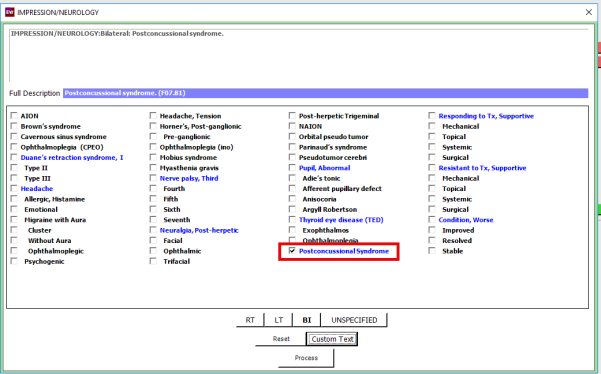
- We added Postconcussional Syndrome with autocoding to both Impression > Headache and Neurology to help you document when a patient has a concussion that is affecting their vision.
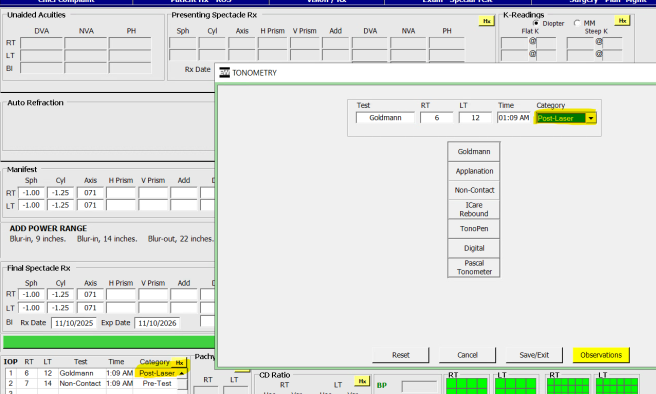
- We added the option 'Post-Laser' to the IOP drop-down menu to help you document exams more accurately.
ExamWRITER Fixed Issues
- The diagnosis code area on the Clinical Summary is now aligned correctly. Previously, an issue was pushing this section into other sections of the Clinical Summary, making it difficult to read.
- We corrected an error that prevented selections made under monovision for contact lens prescriptions from pulling into OfficeMate.
- We corrected an issue that prevented the Patient Data Request menu from turning green when there are requests pending.
Equipment Interface Fixes and Enhancements
- We corrected an issue with the Zeiss i.Com interface that caused incorrect rounding of sphere data upon import. Previously, a value of -0.96 might round down to -0.75, but now it correctly rounds up to -1.00.
Regulatory Enhancements
- We removed references to MIPS Quality Measure 14: Age-Related Macular Degeneration (AMD): Dilated Macular Examination. This measure was retired.
- We fixed an error in the structure of payor information in CDA files, which are once again valid.
Fixed Issues
- We updated the link to the Knowledge Base in the Help > Knowledge Base selection in all programs. The previous link was broken due to a change in the structure of URLs.
ePrescribing Updates
- Due to underutilization across the customer base, the following ePrescribing features will be retired as of March 26, 2026:
- Patient Scorecard
- Patient Education Material and Support Programs within the Patient Support features