
15.3.6554 Release Notes
Released May 20, 2026
This is a preliminary version of the release notes. More details will be added as the official release date approaches. The tentative release date and features are subject to change.
IMPORTANT: ePrescribing users must upgrade to this release by June 15, 2026 in order to continue using the features, which will no longer function in older versions of ExamWRITER after this date.
This page describes the enhancements, fixes, and known issues in the latest OfficeMate/ExamWRITER release.
- OfficeMate Enhancements
- OfficeMate Fixed Issues
- ExamWRITER Enhancements
- ExamWRITER Fixed Issues
- Regulatory Enhancements
- Fixed Issues
- Known Issues
- ePrescribing Updates
OfficeMate Enhancements
- If your passwords are out of sync between Eyefinity and OfficeMate, a prompt is now provided for you to update your password.
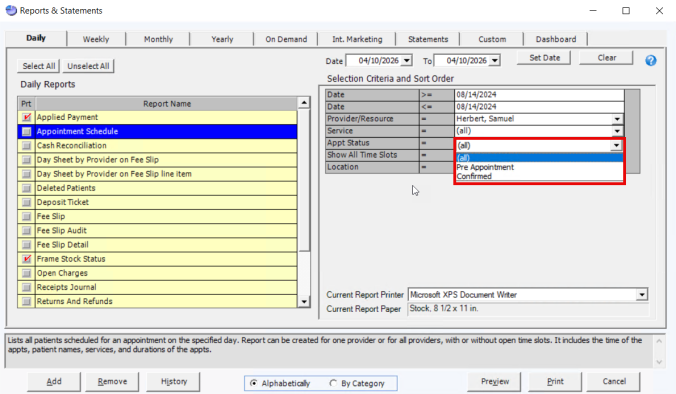
- We expanded the Appointment Schedule report to include reports for pre appointments and confirmed appointments. To use this new feature when running this report, select 'Confirmed' or 'Pre Appt.' under the Appt Status drop-down menu.
- To give you more options to communicate with patients when running the Internal Marketing report, we added a Cell Phone column to populate with patient cell phone numbers.
- We added a new Taxonomy field to Provider Setup to allow providers to specify their individual taxonomy code. When populated, this code will be used on all insurance claim submissions instead of the default Optometry taxonomy code.
- For non-VSP eyewear orders, the Mount field is no longer mandatory. When this field is left blank, a prompt now appears with the text "Mount is not populated, continue with Rx order?". To continue with order completion and lab submission, click Yes. The Mount field remains mandatory for electronic lab orders and VSP orders.
OfficeMate Fixed Issues
- When recording a payment reversal, clicking Record now locks the system to prevent duplicate clicks and multiple instances of payment reversals being submitted.
- When the Scheduler is opened from the Patient Center, tabs are now displayed only for the locations selected to appear in the Scheduler.
- We removed the Frames CD version text at the top of the Tasks > FrameMate screen, as it is no longer in use.
- We updated the sorting method on the Rx Order Status screen to sort chronologically including the year. Previously, items on this screen were only being sorted chronologically by month and day.
- The Scheduler now supports dragging and dropping resource templates to update their placement, with changes saved automatically.
- We corrected an issue that allowed users to change the product type when using the Advanced Search feature in the Product window.
- We resolved an issue that produced an error when clicking the New button on the Quick List multiple times.
- We fixed an issue in the Internal Marketing report that displayed an error message when entering any number in the Number of Referrals field.
- You must now click the F2 Find button in the Rx/Orders window to search for patients. The ability to drag a patient name from the Quick List to the Rx/Orders window is no longer available.
ExamWRITER Enhancements
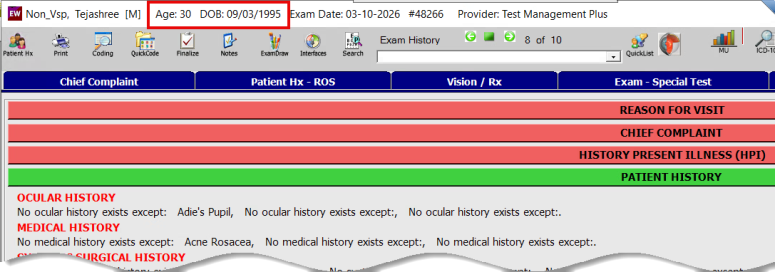
- We added the option to display Date of Birth (DOB) at the top of patient exams in ExamWRITER to make it easier to differentiate among patients with the same name. The default setting is No, but you can change it by going to Admin > Setup - ExamWRITER > Preferences > Defaults.
ExamWRITER Fixed Issues
- We corrected an issue that allowed users to upload incorrect file types to lab results. The unexpected file types caused an error for staff attempting to open those files later. Now, you can only upload the following file types:
- CSV
- JPG
- TFF
- PNG
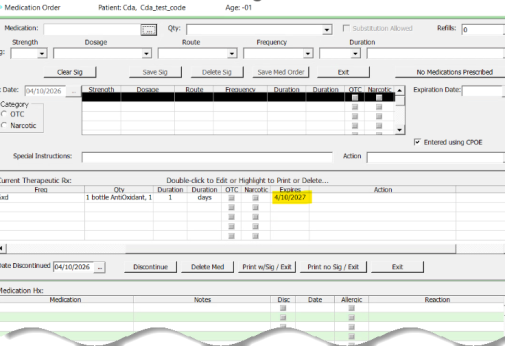
- We removed the time stamp in the Medication Order window > Expires column. Now, only the date remains to indicate a medication's expiration parameter.
Regulatory Enhancements
- We updated the 2026 MIPS Calculator for Improvement Activities, Quality, and Promoting Interoperability - including the addition of a new Public Health Reporting measure using TEFCA - for Home Office and ExamWRITER.
Fixed Issues
- We fixed some broken links throughout OfficeMate and ExamWRITER.
- We fixed an issue that prevented you from selecting the Product Type on fee slip in the Product Type window.
Known Issues
We are aware of the following issues from this release verion and are working to address them as quickly as possible;;
- New patient records created from the Quick List are saved only after attempting to create them for a second time.
- The Appointment Scheduler report is only printing 12-13 appointment per page, causing more pages to print than necessary.
- Coding at the bottom of a currently open exam doesn't update to a different exam when using the Exam History arrows to move between multiple exam in a patient record.
-
Copying forward from a closed or finalized exam to a new exam is carrying over the CPT codes for billing from the original exam.
-
We will update the Join a Support Session link on the Help menu bar.
ePrescribing Updates
- We retired the two remaining features of the Patient Advisor Toolbar - Electronic Prior Authorization (ePA) and Clinical Messaging - to a new ePA solution and Decision Support window. To learn more, see Using Electronic Prior Authorizations.
- We updated URLs for the ePrescribing Single Sign On (SSO) as part of our migration to a modern cloud infrastructure.