
15.3.6702 Release Notes
Released August 25, 2026
This is a preliminary version of the release notes. More details will be added as the official release date approaches. The tentative release date and features are subject to change.
This page describes the enhancements, fixes, and known issues in the latest OfficeMate/ExamWRITER release.
- OfficeMate Enhancements
- OfficeMate Fixed Issues
- ExamWRITER Enhancements
- ExamWRITER Fixed Issues
- Equipment Interface Enhancements
- Regulatory Enhancements
- Fixed Issues
- Known Issues
OfficeMate Enhancements
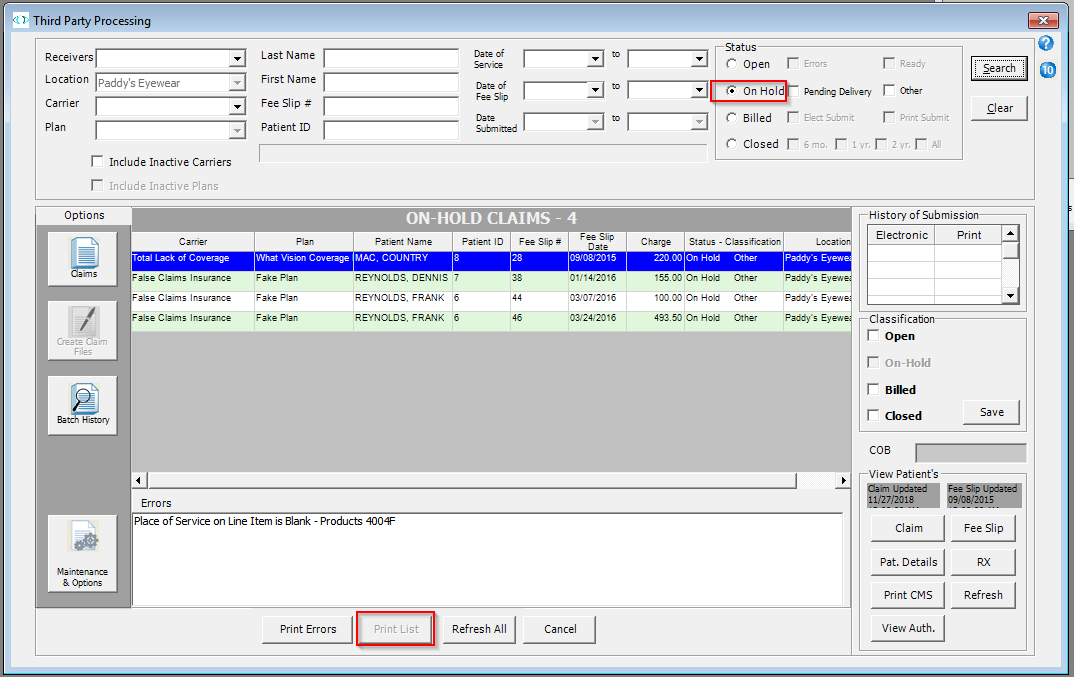
- The Print List button under Third Party Processing is now enabled for claims with 'On Hold', 'Billed', and 'Closed' statuses. Previously, this button was only enabled for claims with an 'Open' status.
OfficeMate Fixed Issues
- The File Export option on the Internal Marketing report now functions correctly. Previously, the first attempt at selecting this option resulted in no action being taken at all, and a second attempt resulted in an error message.
- The Reports window now opens without delay.
- We fixed an issue where renaming postcards under Administration > Tasks > Maintain Documents > Setup > PostCards renamed the folder the postcard is saved under, rather than the postcard itself. With this fix, the postcard name is saved as expected.
- We fixed an issue where renaming and saving postcards under Tasks > Maintain Documents > Setup > PostCards closed the application unexpectedly when trying to rename another postcard.
- We corrected a typo in the Patient PHI Disclosures section in Patient Demographics > HIPAA tab.
- We fixed an issue causing an error message to appear in the Reports window when selecting the 'By Category' radio button and the Lists selection. Choosing these options now results in a functional report compilation.
- We corrected an issue that intermittently prevented insurance web addresses from displaying in the Insurance tab of patient records.
- In the eyewear lab order, we updated the font size in the fields of the RT and LT rows so the phrase 'Not Recorded' fits inside the boxes. Previously, the font was too large and spilled into the area below the appropriate box.
- We corrected an issue in the Scheduler where the language drop-down menu displayed all available language options. The selection has been pared down to the same language selection appearing in the Patient Demographics section.
- We fixed an issue that was occurring with patient insurance authorizations where changing anything about the authorization sometimes changed the Issued Date. Now, it remains the same no matter which changes may be made to the details of an authorization after it was created.
- Selecting the 'Reapply Payment with Original Date' radio button in the Apply Credits window when editing fee slips with multiple items is now working as expected. Previously, an error saved any edits with the current date rather than the original date.
- We fixed an issue causing an error message to appear when clicking on the Contact Lens Loader.
- We corrected an issue that removed selections in the following locations:
- Scheduler > Demographics tab > State drop-down menu
- Scheduler > Insurance tab > Relationship to Insured drop-down menu
ExamWRITER Enhancements
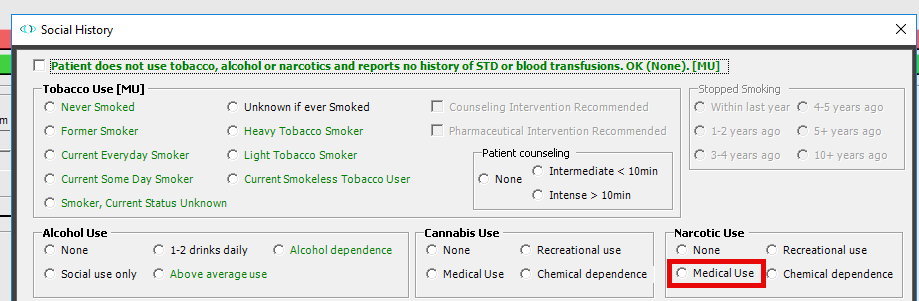
- We added a Medical Use radio button under Patient History > Social > Narcotic Use to help document patient history more accurately.
- We added Accommodative Estropia to the following locations in ExamWRITER:
- Impressions > Binocular Vision > Stabismus, estropia
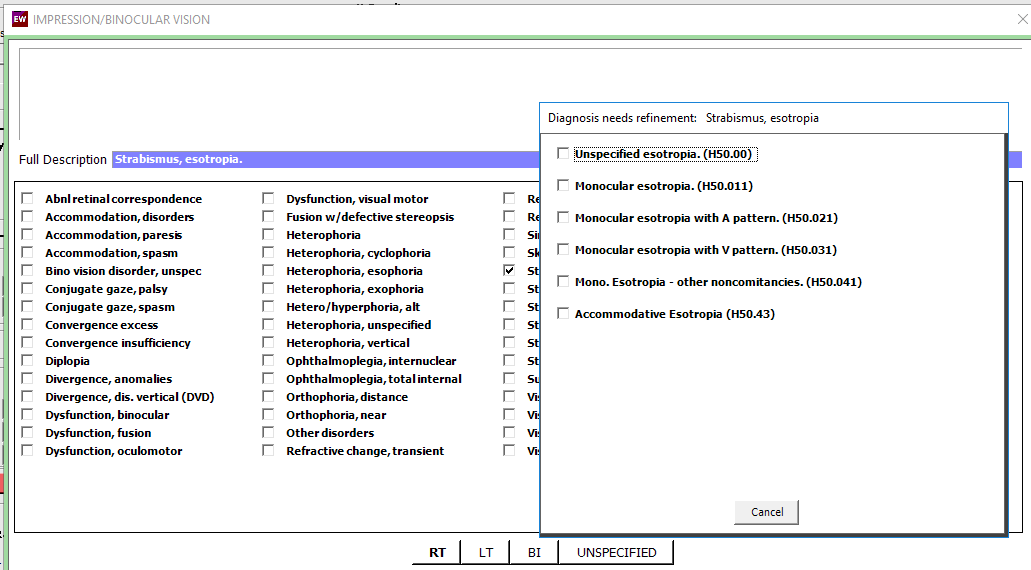
- Special Testing > Sensorimotor 92060 > Stabismus, convergent
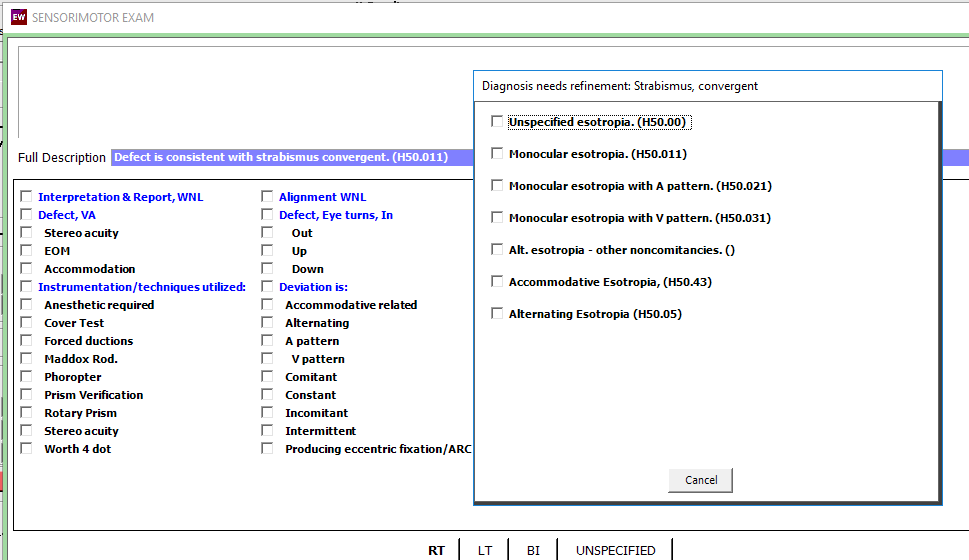
- Impressions > Binocular Vision > Stabismus, estropia
- We updated the ADD field so that when documenting refractions for patients under 40, the autocoding defaults to Accommodative Insufficency. For patients over 40, the autocoding here will continue to default to Presbyopia.
ExamWRITER Fixed Issues
- The refresh function under Administration > ExamWRITER Find Exam now works as expected. Previously, attempting to type in a new name after clicking Refresh resulted in no new letters appearing in the text box.
- You can no longer right click and select Create Lab Order on the Patient Information Center > Spectacle Rx or Contact Lens Rx tabs > patient history section. This action is only available from within the patient exam.
- The 'Exam is Billable/Reportable [MU]' checkbox in the Exam Finalization window is now automatically checked on exams that are copied forward. Previously, this checkbox was not checked unless corrected manually.
-
We fixed an issue under Exam > Coding > Select Diagnosis and Procedures Codes > Linked Codes tab where double clicking in any of the CPT or Procedure fields with text already present appeared to let users edit the text. These fields are not meant to be editable, and now no longer appear as if they can be edited.
-
Deleting medications from the Patient History in exams no longer removes them from patient records. Medications remain listed in the Patient Hx > Medications section of patient charts.
Equipment Interface Enhancements
- We added the following devices to our Equipment Interface:
- Essilor AKR300
- Essilor AKR800
- Essilor AKR800nv
- Essilor ALM800
Regulatory Enhancements
- We updated ICD-10 codes and descriptions to the most current ones for 2027 per CMS to ensure claims are not rejected. For more information, see 2027 ICD-10 Updates.
Fixed Issues
-
We corrected a data-mapping issue where qualifier and date information weren't transferring correctly to Box 15 in ANSI claim files.
Known Issues
- We're aware of an issue originating in the early adopter phase of the August 2026 release where the State and Relationship to Insured drop down menus under Scheduler > Insurance tab are blank, preventing you from selecting values for either field.