
What's New in AcuityLogic 8.37 for Cloud Users
Cloud Release Date: February 11, 2026
Eyefinity announces the newest version of AcuityLogic. This version resolves known issues in previous versions and offers new features and expanded functionality.
Topics include the following:
For more information on AcuityLogic features, training, and integrations, contact your account representative, or call Eyefinity at
Admin Enhancements
Admin includes enhancements in the following area:
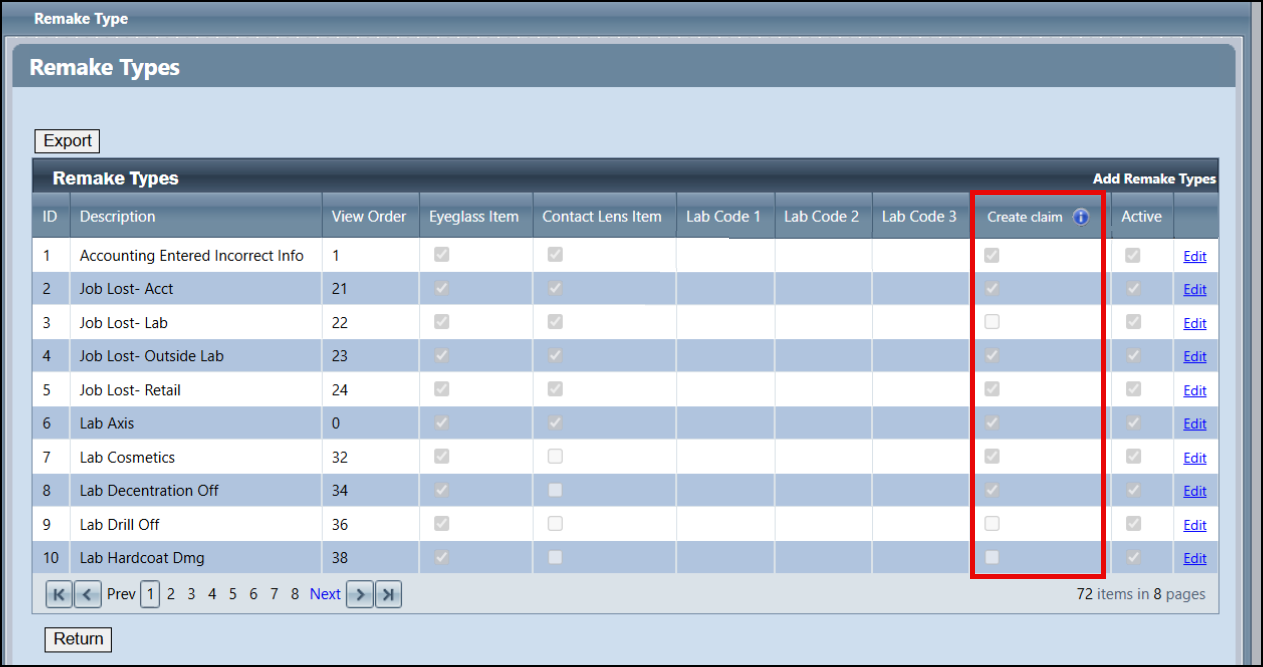
Change to Remake Types Setup
We've replaced the Do not create claim check boxes in the Remake Types setup screen with Create Claim check boxes. Now these check boxes indicate which remake types will generate claims, where previously they indicated which types would not generate claims.
With this release, we have automatically updated the check boxes to maintain your existing functionality — a claim is created when the box is selected and there is a change in the receivable amount. No action is required on your part unless you would like to make changes to how your remake types currently work. See Setting Up Remake Types for more information.
Billing Enhancements
Billing includes enhancements in the following areas:
- Retry Failed Claims Up to 12 Months Old
-
Improved Carrier Payment and Patient Payment Editing Windows
Retry Failed Claims Up to 12 Months Old
The Retry Claims feature now works for failed claims that are up to 12 months old. Previously, you could only retry claims that were older than 90 days.
Claim Detail Loads Faster
We've improved the Claim Search screen so that it loads Claim Detail information more quickly, eliminating extended "hangs."
Fewer Failed Claims
We've improved the claim generation process to prevent claims failing due to missing Insured ID or SSN information. Previously, claims would sometimes fail to generate because the system was expecting a SSN instead of the provided Insured ID, or vice versa.
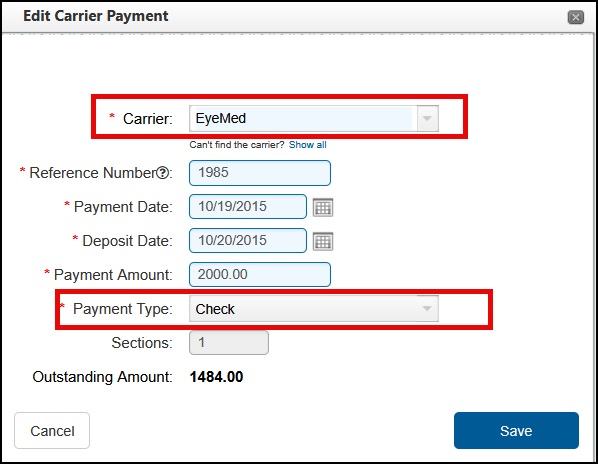
Improved Carrier Payment and Patient Payment Editing Windows
We've made the following updates to the carrier payment and patient payment editing windows:
-
The windows have been renamed Edit Carrier Payment and Edit Patient Payment to correctly reflect that you are editing a payment, not entering a new one.
-
In the Edit Carrier Payment window, if any amounts have been applied to claims, the Carrier and Payment Type fields are no longer editable. This change prevents errors due to incorrect or mismatched information.
Correct a Patient's Social Security Number from the Patient Profile
You can now correct a patient's social security number from the Patient Profile tab. This feature is similar to that on the Insurance tab.
From the Patient Profile, click the Show SSN button that displays next to the SSN field. The field is editable and you can now enter the correct social security number.
If integrated with Eyefinity's EHR, correcting the social from the patient profile ensures the proper information is transferred to EHR.
Fixed Issues
-
AcuityLogic 8.37 fixes issues in the following areas:
-
When mapping products, you can now map and price Other items (exam, accessories, fees) and search for an item or select from the drop-down without receiving an error.
-
We corrected an error that displayed while activating diagnostic contact lenses; previously, when you selected the active checkbox, an error would display; however, the lenses would save as active.
-
You can now export the Item Sales Report (MN101) to CSV. Previously, the report wouldn't download.
Billing
-
Clicking Reset in the EDI Transmission screen no longer incorrectly causes the Create EDI File and Create and Send buttons to display.
-
The EDI Transmission screen now retains the Plan you select.
-
Clicking Reset in the Generate CMS Form screen no longer incorrectly causes the Generate Form button to display.
-
When you print the Billing Transaction Report (GB117) by billing month, all transactions associated with the monthly close are now included on the report. Previously, transactions that occurred before the monthly close date were not included.
POS
-
The "Please refresh the page and try again" error no longer occurs when applying payments to orders. Previously, this error would display when applying payment to orders where an adjustment had been made after invoicing.
-
When adding VSP insurance to an eyeglass order, the window prompting you to select a valid VSP lab now lists all valid labs. Previously, the drop-down list would be empty.
-
The Cylinder value now correctly copies from the right eye to the left eye when entering contact lens prescriptions.
-
Incorrect insurance information is no longer added to a patient's record via the VSP integration when there is another (different) patient in the VSP system with the same name and date of birth. The VSP integration now correctly checks the patient's SSN and Zip Code to confirm the match.
-
Packing Slips and Doctor Reports now print correctly. Previously, when attempting to print these two reports the print window would be blank.
-
When applying a payment to an order that was previously invoiced, the Order Date stays the same; previously, the date changed to the date payment was made.
Integrations
-
We updated the xlink job to ensure Claims in Ready to Bill are picked up by the integration and processed.
The following enhancement and fixed items are included in this release:
Fixed Issues
-
The counts and on-hand totals on the Physical Inventory Variance Detail (INV105) report and the Physical Inventory Variance Summary (INV104) match; previously, the on-hand totals on the INV104 report were doubled.
-
When you are using Eyefinity's Schedule Manager API and you have two templates, one immediately after the other, with different appointment durations, the system pulls the correct appointment duration. Previously, the last appointment slot of the first template was pulling the appointment duration from the next template.
-
When a patient's information is updated using the Patient Engagement API, the patient information is pushed to Encompass EHR and CRM (if in use).
-
The Contact Lens prescription and Eyeglasses prescriptions print with the birth date in the MM/DD/YYYY format. Previously, the Contact Lens prescription printed using the European date format.
-
When the last exam date and exam office exist in the data, the Exam Store displays in the patient search results.
-
When RX Universe indicates a frame is discontinued, the frame status is updated to discontinued in AcuityLogic.
-
Printed lab orders no longer display the same phone number for both Phone #1 and Phone #2.
-
The frame source on the lab order displays the correct frame source as entered on the order. Previously, when DC Provided was first selected, it printed both.