
What's New in Eyefinity Encompass 7.13
Released March 17, 2026
Training Sandbox Released February 13, 2026
This page describes the enhancements, fixes, and known issues in the latest Eyefinity Encompass™ release.
- Release Highlights
- iPad and Web Enhancements
- iPad-Only Enhancements
- Administration Enhancements
- Regulatory Enhancements
- Fixed Issues
- Known Issues
- Encompass 7.13.2.2 Update
- Encompass 7.13.3 Update
- Encompass 7.13.3.1 Update
- Encompass 7.13.3.2 Update
- Encompass 7.13.4 Update
- Encompass 7.13.5 App Update
- Encompass 7.13.5 Update
- Encompass 7.13.5.1 Update
- Encompass 7.13.6 Update
- Encompass 7.13.6 App Update
- Encompass 7.13.7.1 Update
- Encompass 7.13.2 iPhone Update
- Encompass 7.13.7.2 Update
- Encompass 7.13.8 Update
- Encompass 7.13.9 Update
- Encompass 7.13.7 App Update
- Encompass 7.13.3 iPhone Update
- Encompass 7.13.9.1 Update
- Encompass 7.13.10 Update
- Encompass 7.13.8 App Update
- Encompass 7.13.4 iPhone Update
- Encompass 7.13.11 Update
- Encompass 7.13.11.1 Update
- Encompass 7.13.9 App Update
- Encompass 7.13.11.3 Update
- Encompass 7.13.11.4 Update
- Encompass 7.13.10 App Update
- Encompass 7.13.5 iPhone Update
- Encompass 7.13.12 Update
Release Highlights
Here are the top highlights of this release:
- Refill a Prescription from within a Visit
- Mark Pupils, Motility, and Visual Fields as Normal with One Click
- Use Additional PDF Manager/Kit Smart Tags
- Select Specific Providers and Locations on CCDAs for Health Information Exchanges
- Quickly Select Polycarbonate for Glasses Prescriptions
Refill a Prescription from within a Visit
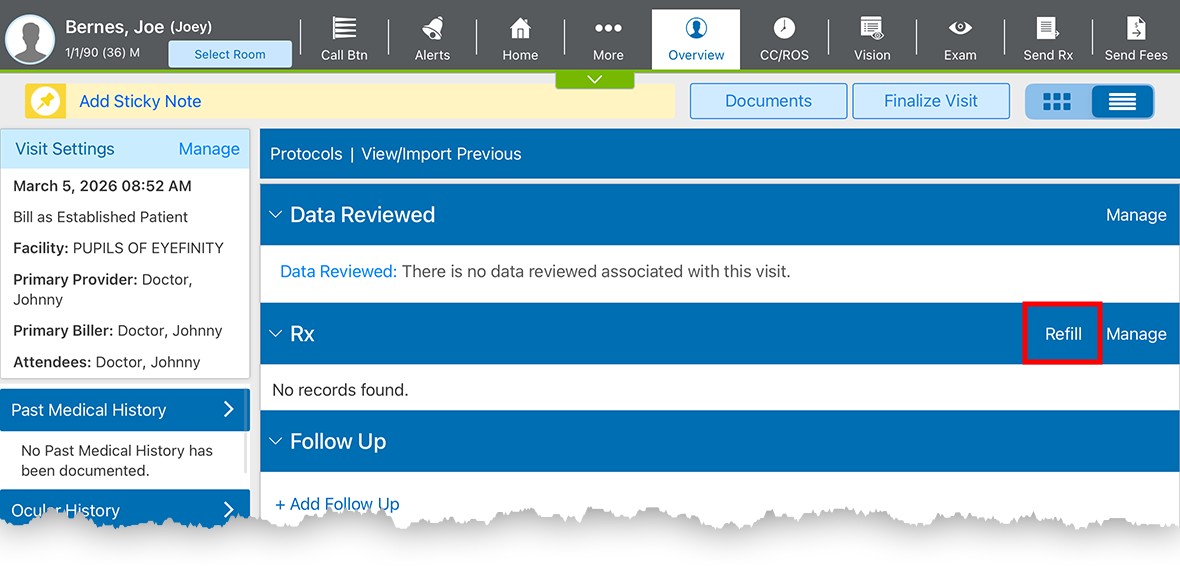
You can now refill prescriptions within a visit with a new Refill link appearing in the Rx section of the Visit Overview on the web, or in the Detailed Visit Overview in the iPad app. This option streamlines the process of prescribing routine medications for patients and allows you to seamlessly incorporate the prescription into billing for the visit. When you refill a prescription in a visit, the original diagnosis associated with the prescription plan from the previous visit is added to the current visit. If the diagnosis has already been documented in the current visit, the prescription is added to the Plan for that diagnosis. Printed prescriptions and e-prescriptions in a pending status can't be refilled in this workflow.
There are some limitations. You can only use this feature if
- prescriptions have been written in Encompass EHR by the provider conducting the visit;
- prescriptions have been electronically prescribed, sent to a pharmacy, and have an associated diagnosis when previously prescribed; and
- controlled substances and compounds are not included.
Mark Pupils, Motility, and Visual Fields as Normal with One Click
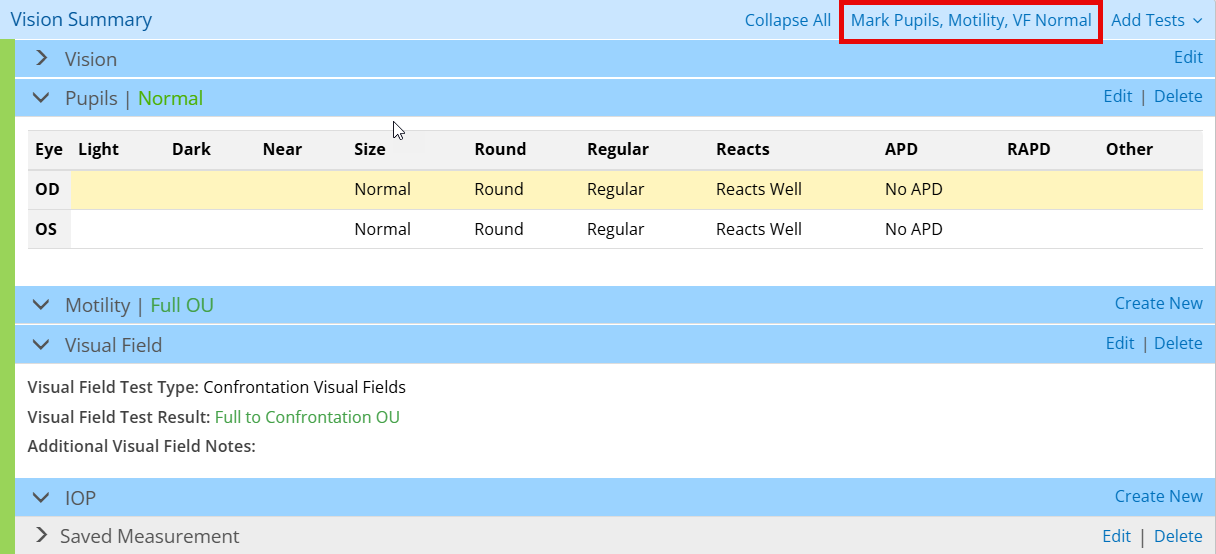
With just one click, you can now mark pupils, motility, and visual fields as normal when using the single screen workflow in the web application. Locate the new link in the Vision Summary section and save yourself multiple clicks.
Use Additional PDF Manager/Kit Smart Tags
We added additional PDF Manager/Kit smart tags for patient, visit, and workers' comp data. This will result in less administrative work for you as more precise data is pulled from patient records into the appropriate carrier-specific and state-mandated forms.
Select Specific Providers and Locations on CCDAs for Health Information Exchanges
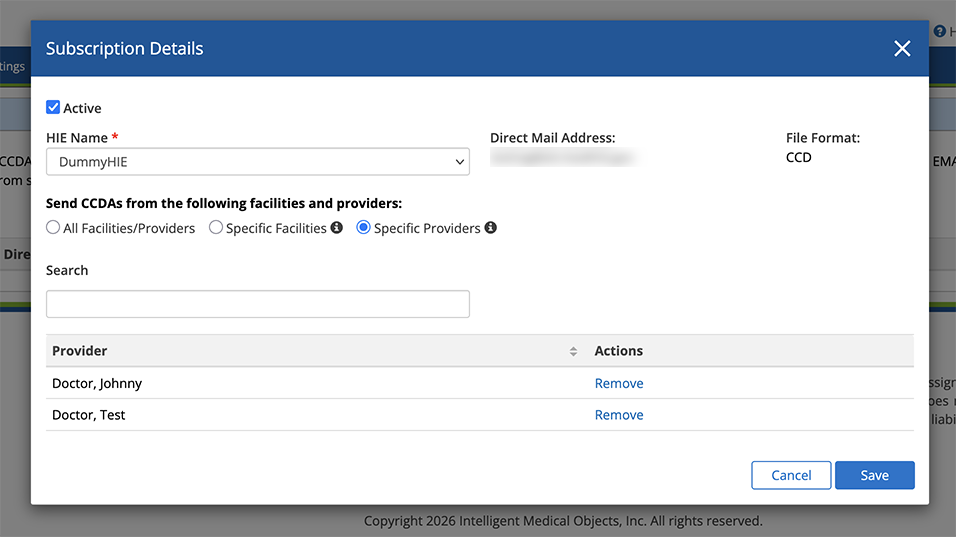
We added the ability to select specific provider or location CCDAs to automatically send as part of Health Information Exchanges upon visit finalization. Previously, the default setting automatically sent visits documented by all providers at all locations. To change this setting, follow the instructions below:
- Log in to the Encompass web application as an administrator.
- Locate the Transition of Care (HIE) section and click Manage Transition of Care (HIE).
- Select an HIE from the list, or click Subscribe to HIE to add one.
- Select the HIE Name and if you select specific facilities or providers, type their names in the search box, then click Save.
- If you select an existing HIE, click the edit link to update your preferences.
Quickly Select Polycarbonate for Glasses Prescriptions
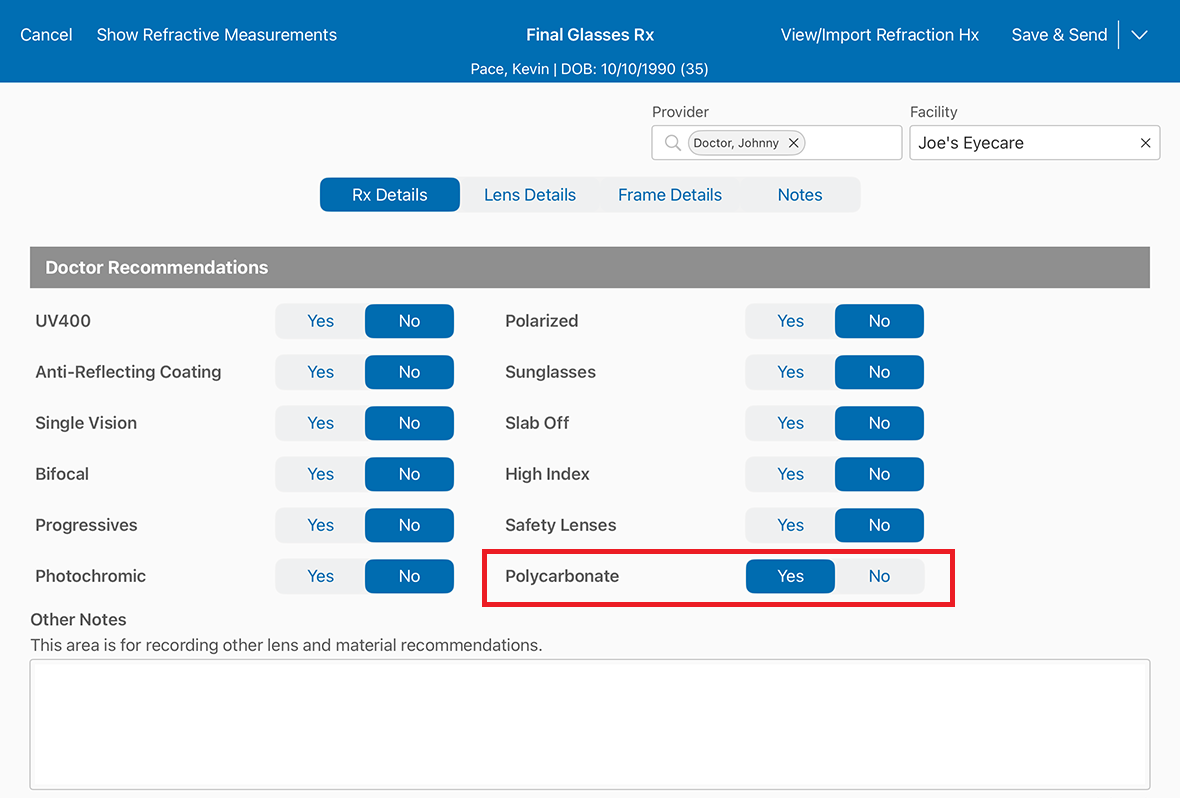
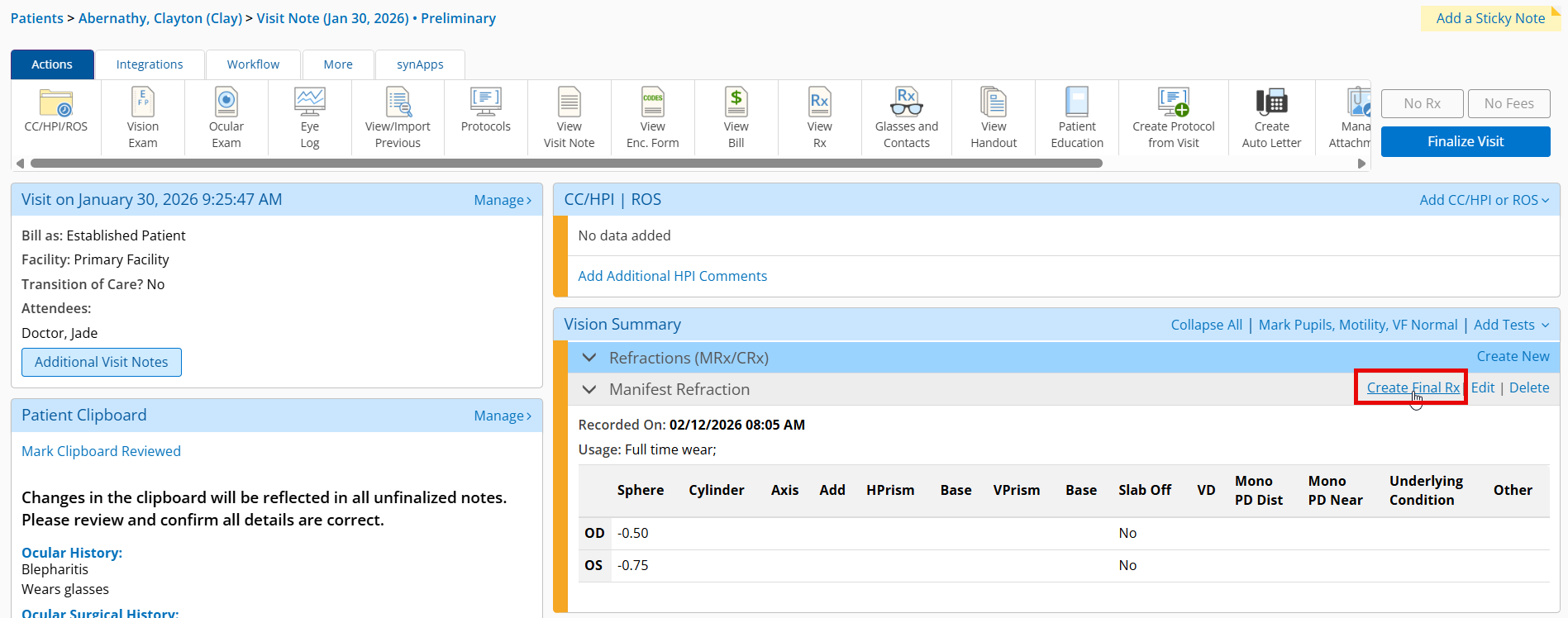
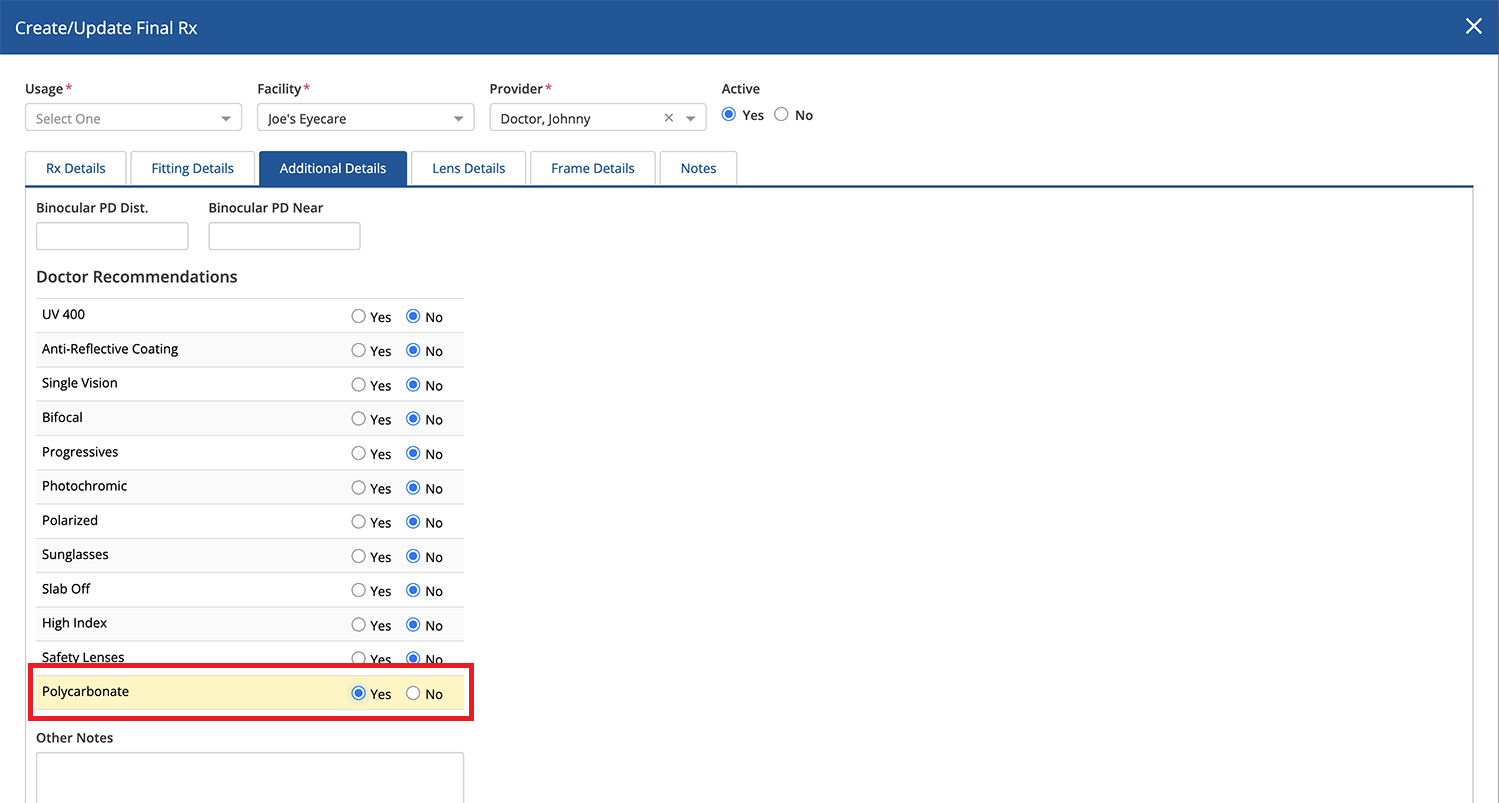
You can now send your recommendation for polycarbonate lenses to the practice management system. We added a Polycarbonate toggle in the Doctor Recommendations section of the Final Rx. You have multiple ways of quickly selecting polycarbonate lenses:
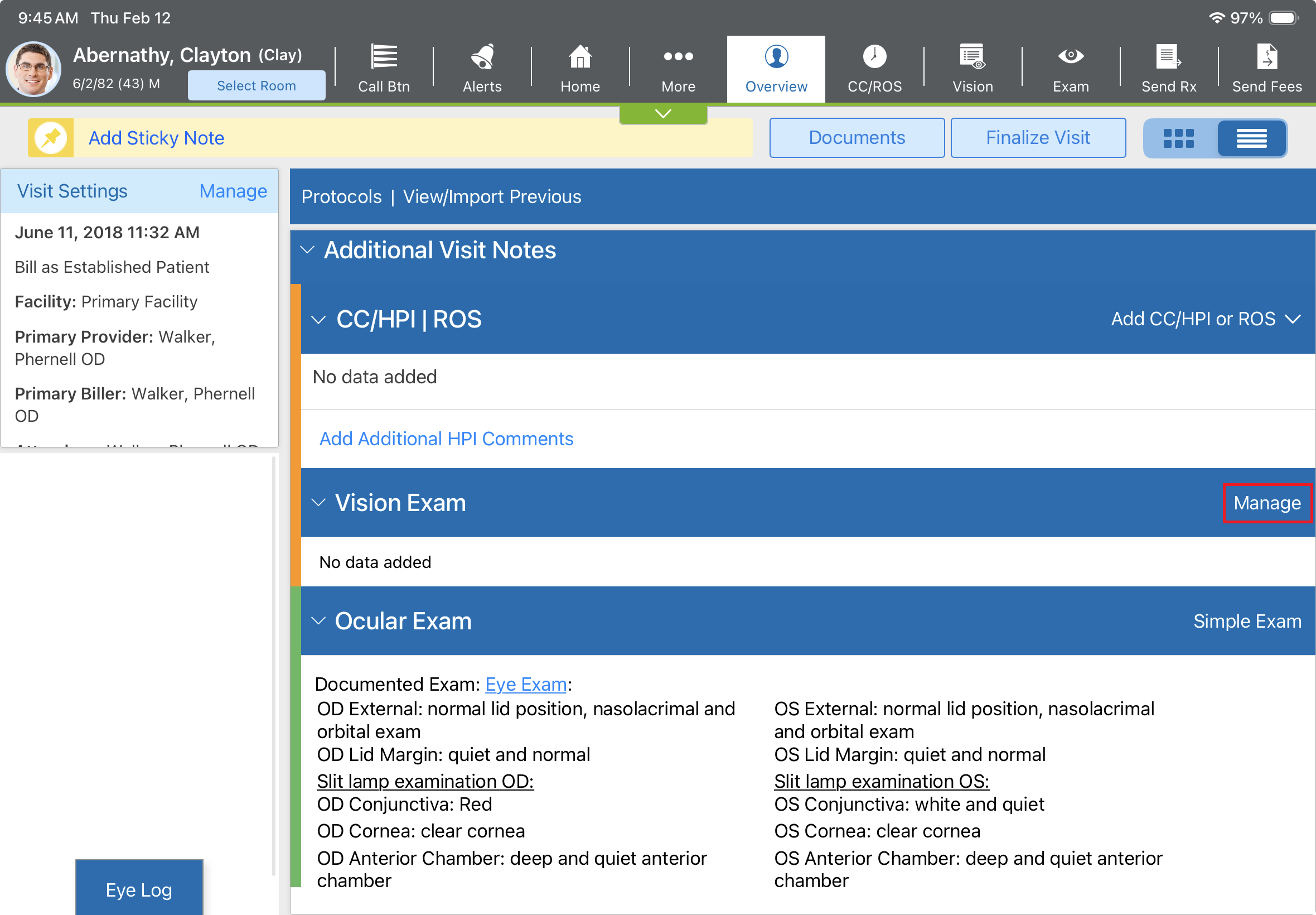
- Open the Patient Overview, locate the Vision Exam section, and tap Manage.
- Tap the Refractions tab and in the Add Refraction drop-down, select Final Glasses Refraction.
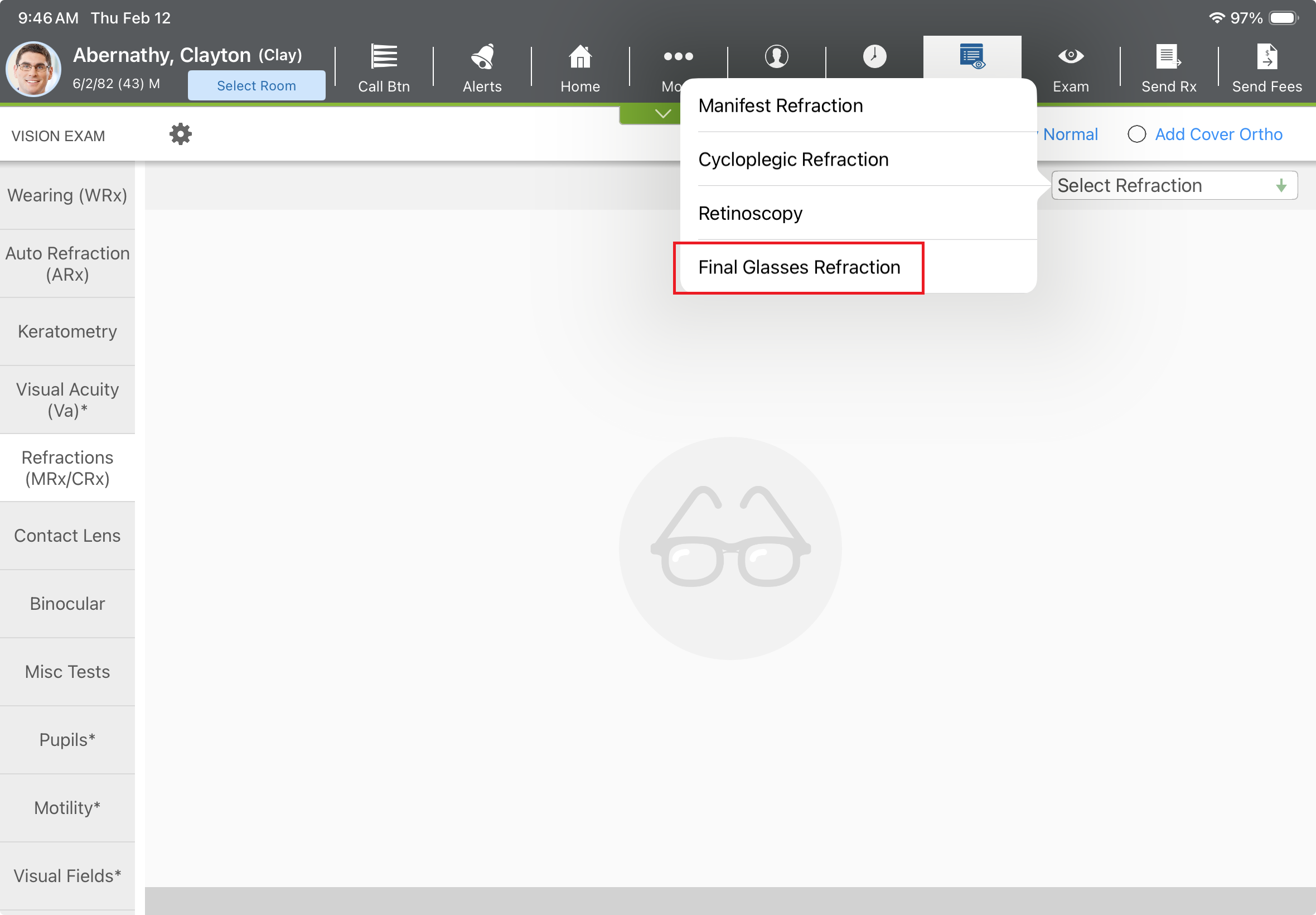
- Swipe up in the RX Details tab to locate the Polycarbonate toggle.
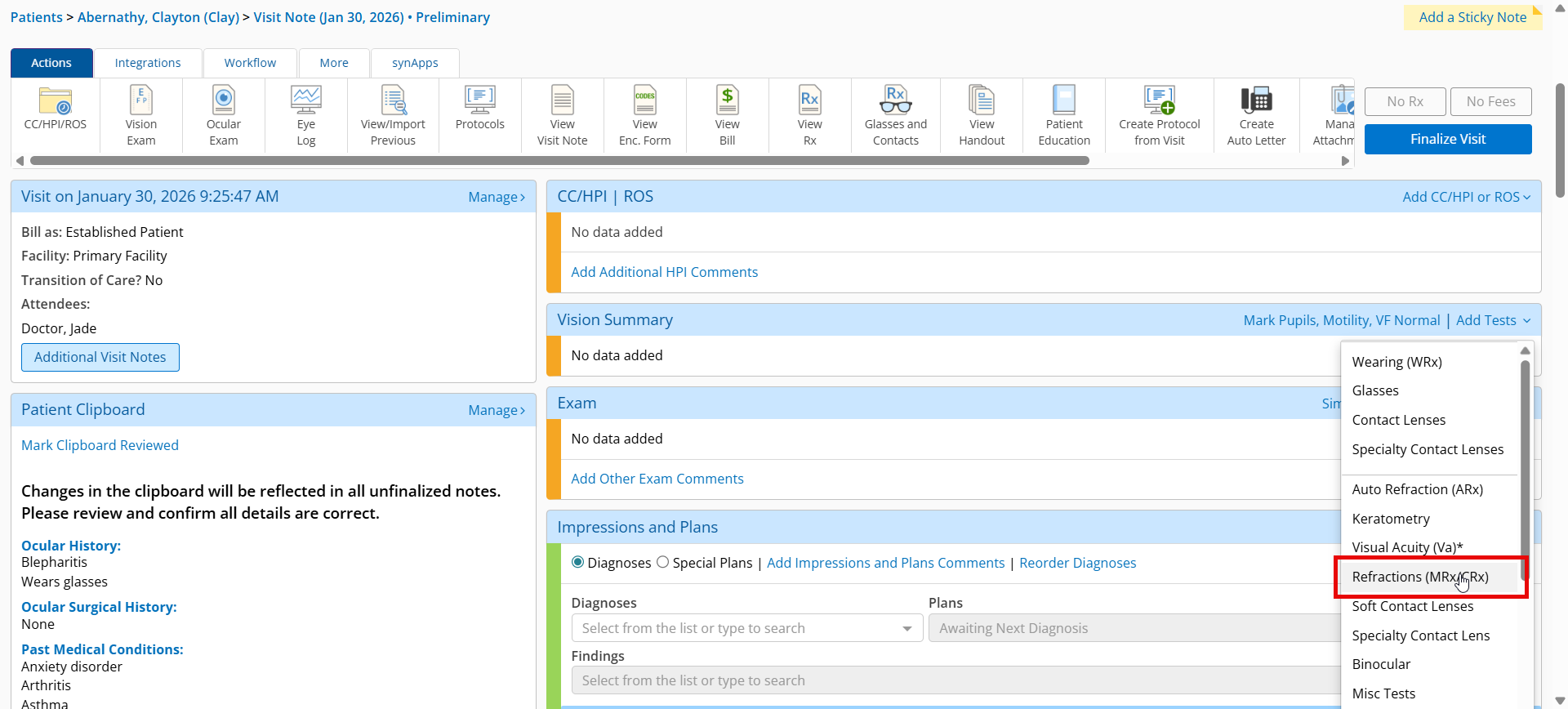
- Open a patient visit and locate the Vision Summary section.
- In the Add Tests drop-down, select Refractions to enter a new refraction and click Create Final Rx
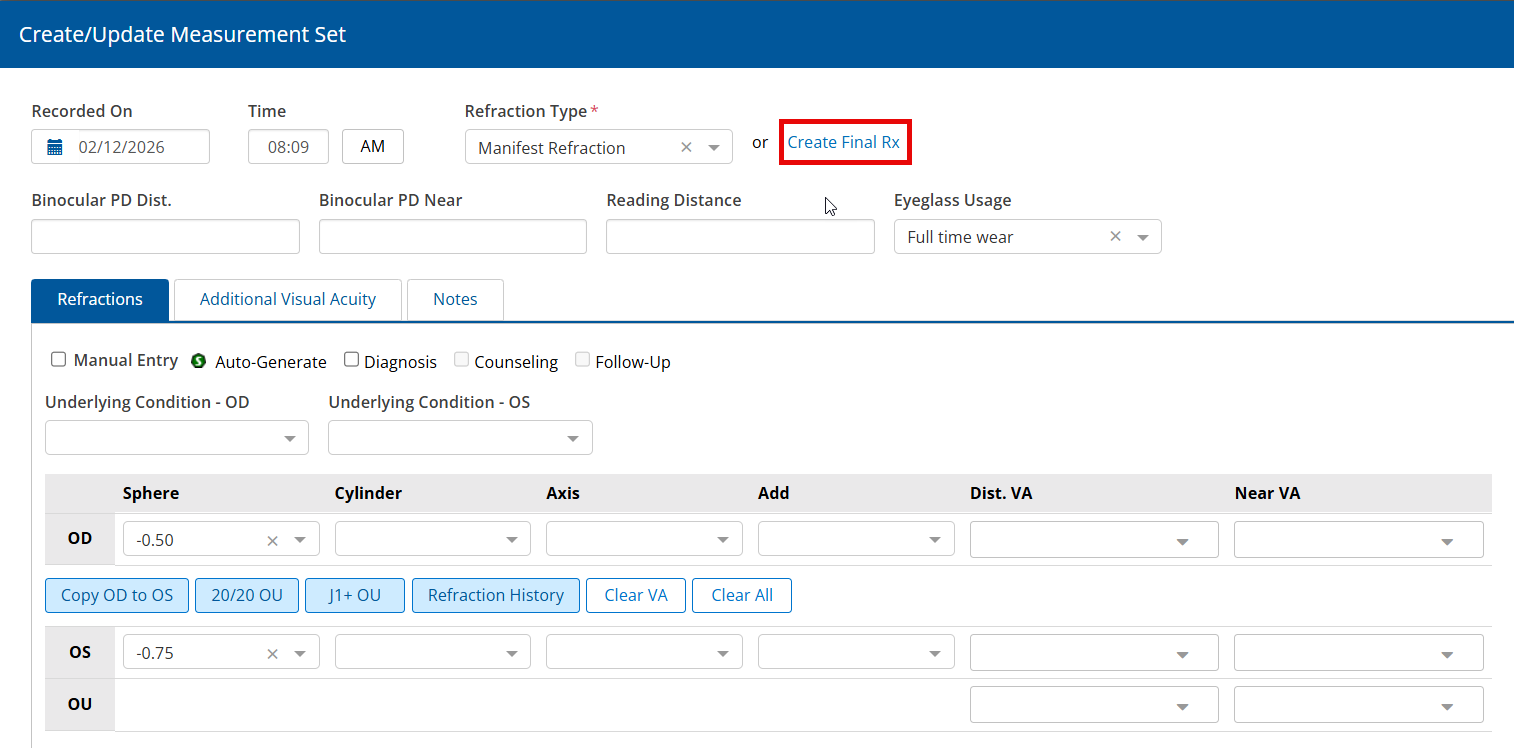
OR
Select an existing manifest refraction and click Create Final Rx.
- Click the Additional Details tab and scroll down to locate the Polycarbonate toggle.
iPad and Web Enhancements
The following enhancements apply to both the iPad app and the web application:
- Streamline Sending of Medication Prescriptions
- Reference Lab Result Data in the CC/HPI Section
- Create Filtered Referral Notes
- Add New Diagnoses in the Associate and Send Window
Streamline Sending of Medication Prescriptions
To streamline the sending of prescriptions, you can now send both controlled substance and noncontrolled medications in the same workflow. Previously, controlled and noncontrolled medications had to be prescribed separately, requiring you to go through the complete workflow multiple times. If one of the prescriptions is a controlled medication, the prescribing doctor must enter their EPCS credentials to send the prescriptions to the pharmacy.
Reference Lab Result Data in the CC/HPI Section
You can now reference lab result data directly within the CC/HPI section of a patient visit. Previously you could only reference lab results entered manually, but not results sent electronically.
Create Filtered Referral Notes
You now have the ability to create a filtered referral note in Direct Mail if there is Sensitive Health Information (SHI) in a referral plan you add to a visit. Referral notes containing SHI will be filtered out, enabling you to send the rest of the information without impediment. The CCD containing the filtered referral note will exclude the reason for the referral if that reason is sensitive.
Add New Diagnoses in the Associate and Send Window
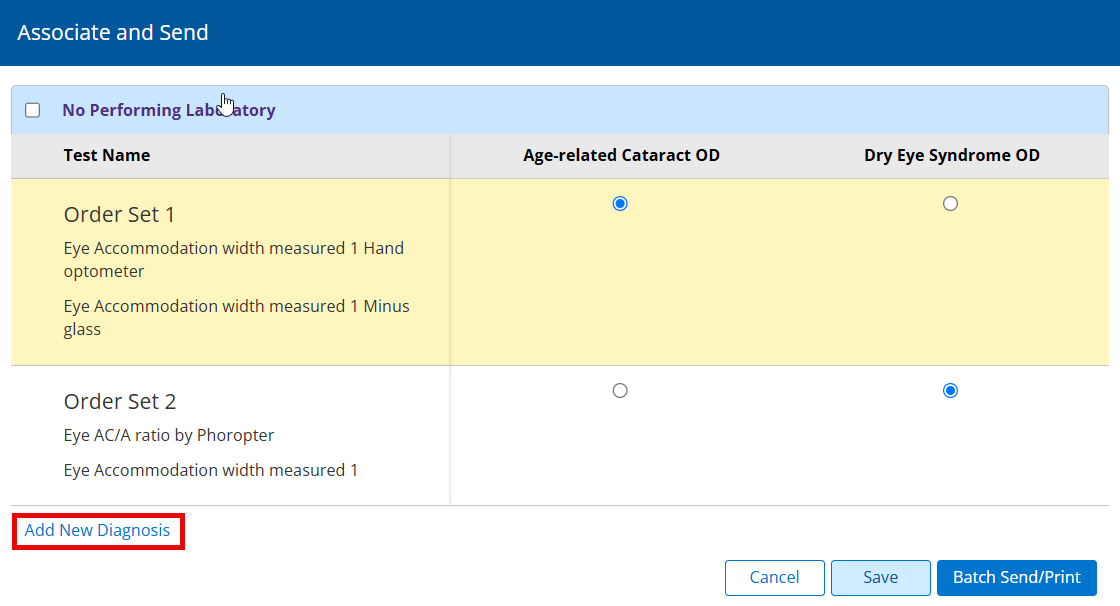
We added the ability to add a new diagnosis in the Associate and Send window when ordering labs to help you ensure accuracy and billing. Previously you could only select diagnoses that were already documented in visits, or you had to exit the orders log workflow and return to the visit overview to add a new one. New diagnoses added through the Add New Diagnosis link in the orders log workflow are saved to the visit.
iPad-Only Enhancements
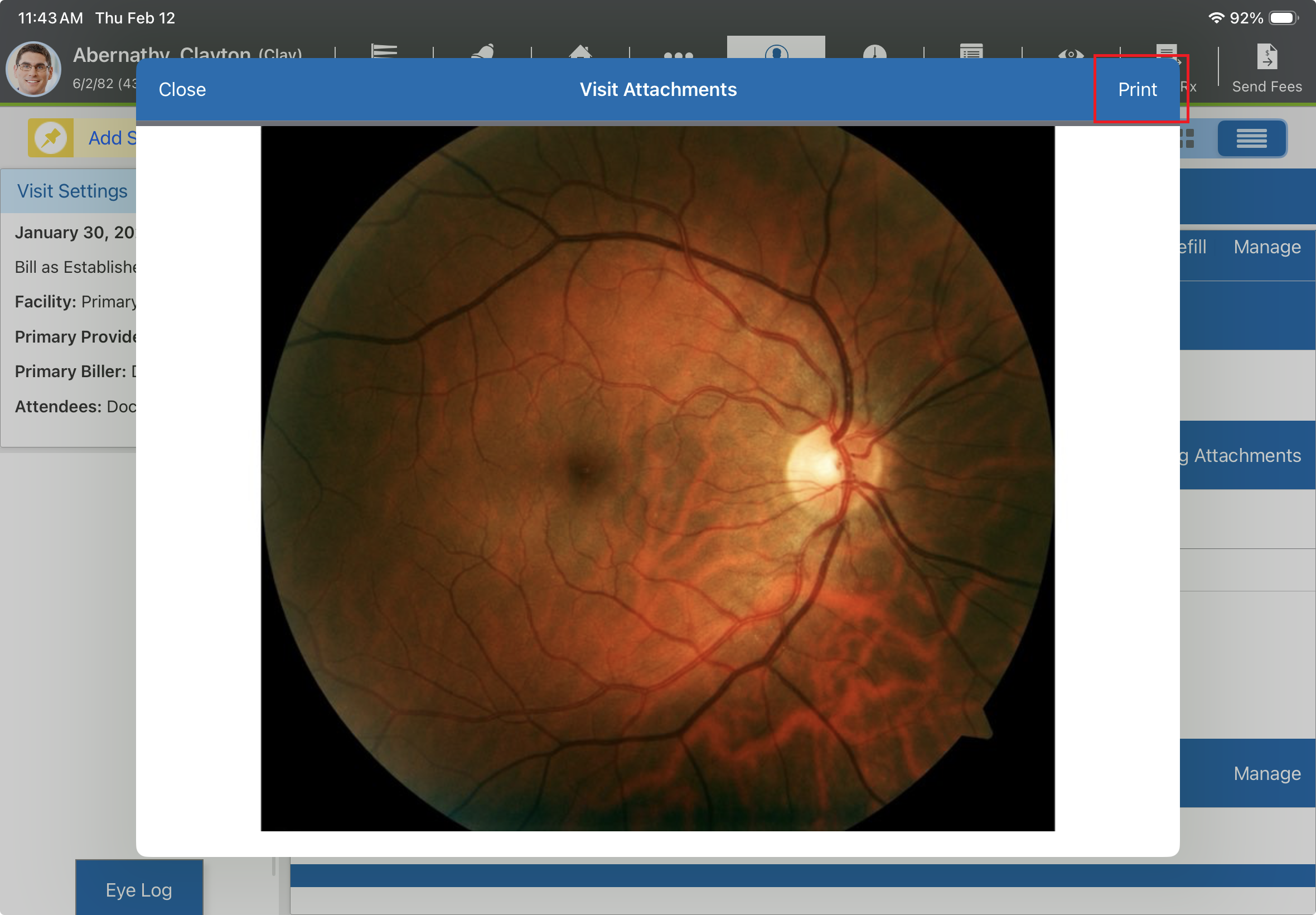
- You can now print results directly from your iPad by tapping Print when you open an attachment.
- To match the same functionality available on the web application, you can send multiple images from Image Management on your iPad to Encompass EHR.
- Signatures, text, and drawings on patient consent forms are now rendered permanent upon saving to the patient chart. This adds a measure of security that mitigates the risk of manipulation of this information after saving it.
Administration Enhancements
- You can control whether or not Managing Provider Facility, Provider, and Performed Date fields on inbound faxes are visible to make it easier to classify and find faxes. You can change these settings by following the instructions below:
- Log in to the Encompass web application as an administrator.
- Locate the Firm Settings section and click Manage Firm Preferences.
- Locate the Document Management/Received Faxes section and click the Enable Required Provider, Managing Provider Facility, and Performed Date checkbox to turn these required fields on or off as desired.
- You can now specify which doctors can edit finalized visits. To do so, follow the instructions below:
- Log in to the Encompass web application as an administrator.
- Locate the Firm Settings section and click Manage Finalized Visits.
- Locate the Manage Finalized Visit Notes Editing section and search for or locate users.
- Click the Enable or Disable link next to the user's name to change their ability to edit finalized visits.
You can enable or disable multiple users at once by selecting the checkboxes next to user names and clicking Enable Selected Users or Disable Selected Users at the top of the list.
Additionally, you can turn the editing of finalized visits functionality on or off by selecting the Enable Editing checkbox at the top of the Manage Finalized Visit Notes Editing section.
- We removed the option to prevent users from finalizing visits, a feature we added in the 7.11 release, when there are missing or invalid ICD-10 codes. A warning will display to alert you of missing or invalid ICD-10 codes, but you'll be able to bypass it to finalize visits.
- Provider NPI is now a required field for changing a user's role to "Doctor." This will help you ensure that the correct provider with the proper credentials is selected when updating permissions within your practice.
Regulatory Enhancements
-
We made the following changes to CCD
 Continuity of Care Document. An electronic docment that summarizes the patient's health information, used when care is being transferred from one provider to another. files:
- Added a Social Observation section under Social History
- Changed the smoking status subcategory title from 'Code' to 'Smoking Status'
- MIPS and MVP Promoting Interoperability and Improvement Activities categories have been updated for the 2026 performance year.
- We updated the code data for the following:
- National Coverage Determination (NDC)
- Healthcare Common Procedure Coding System (HCPCS)
- Remittance advice remark codes (RARC)
Fixed Issues
- We fixed the sticky functionality in OfficeFlow to make it easier to quickly switch between the provider vs. room view. To further facilitate this process, we also added All Occupied Rooms, Preferred Rooms, and Preferred Providers shortcut links to the OfficeFlow filters bar. Technicians will see Preferred Providers, while doctors will see their own name.
- We corrected an issue occurring in the iPad app that made the Send Charges button disappear after overriding bills. Now you'll be able to send charges on overridden bills once more.
- Provider selection drop-down menus in the MIPS dashboard now show Taxpayer Identification Numbers (TINs) for providers who have been disabled in the system and have no encounters for the previous year.
- We fixed an issue that showed orders for surgery as sent when they were never actually sent and still required additional work.
- We fixed an issue where overriding the bill in a visit note resulted in the Send Fees button no longer displaying.
- We partially resolved an error that occurred when users try to open Image Management within the Encompass app. Some users may occasionally experience errors. We're working to completely resolve the issue.
Known Issues
We're investigating these issues and working to resolve them as soon as possible.
- We're aware of an error impacting users of a specific version of the Equipment Interface. Resolving this error requires you to uninstall and reinstall the Equipment Interface in Windows:
- In the Windows task bar, search for Add or Remove Programs.
- Uninstall the Eyefinity EHR Equipment Interface. If multiple instances are present, uninstall all instances.
- Reinstall the Eyefinity EHR Equipment Interface by following the instructions: Installing the Equipment Interface.
Encompass 7.13.2.2 Update
Released March 19, 2026
This hot fix resolves the following issues:
- We fixed minor issues that were occurring with Interfax and the Firm Admin calendar.
- We corrected an issue that prevented selections made on the Assign to Staff drop-down in chart notes from saving properly.
Encompass 7.13.3 Update
Released March 20, 2026
This web update includes the following enhancements and bug fixes:
- We fixed an issue with the Quick List that only displayed the first page with no option to navigate to subsequent pages.
- We resolved a rare issue where a patient's birth sex was reverted to 'Unknown' without action taken by users to change it.
- We fixed an issue where all body locations associated with a diagnosis were deleted when removing one body location under Impressions and Plans. Now, only the selected location is deleted when removing body locations.
- We resolved an issue that removed the patient name from the subject line of intramails sent from specific tabs in the patient's chart.
Encompass 7.13.3.1 Update
Released March 22, 2026
This hotfix sets the MIPS registry submission deadline to March 26, 2026.
Encompass 7.13.3.2 Update
Released March 26, 2022
This hotfix includes minor bug fixes and performance improvements.
Encompass 7.13.4 Update
Released March 27, 2026
This hotfix includes minor bug fixes and performance improvements.
Encompass 7.13.5 App Update
Released March 20, 2026
This optional app update resolves the following issues:
- We corrected an issue that caused crashes to occur when using custom keyboards with iPads.
- We fixed an issue that prevented the body location for a chief complaint from displaying on the body atlas in the ocular exam.
Encompass 7.13.5 Update
Released April 1, 2026
This medical update includes the following content:
- We updated the HCPCS codes to reflect the CMS quarterly update for the following Repair Note plan:
- Ac wrap (Q4422)
- Biobrane (A2043)
- Biolab tri wrap fl (Q4423)
- Biolab wrap flow (Q4418)
- Biolab wrap flw lt (Q4419)
- Biolab wrap solo (Q4421)
- Curamatrix (Q4440)
- Dermbnd chn, chx (Q4429)
- Dermbnd dln dl+ dlx (Q4427)
- Dermbnd sln sl+ slx (Q4428)
- Dermbnd tl+ tlx (Q4426)
- Foundation drs+ duo (A2041)
- Foundation drs+ solo (A2042)
- Instagraft (Q4439)
- Novashield or novogen wound matrix (A2045)
- Pretect (Q4438)
- Renati ac membrane (Q4436)
- Renati membrane (Q4435)
- We added a Medication Discarded/Wasted free text field in the Details tab for the following plans:
- Intravitreal Triesence
- Intravitreal Injection
- We added the following wound care options in the Details tab of the Incisional Biopsy plan:
- Neopolydex ointment
- Erythromycin ointment
- We fixed an issue where the 79 modifier did not append to the CPT 66030 code while a patient was in an active Global Period.
Encompass 7.13.5.1 Update
Released April 3, 2026
This hotfix includes minor bug fixes and performance improvements.
Encompass 7.13.6 Update
Released April 8, 2026
This medical update includes the following content:
- We fixed an issue that prevented diagnoses from bundling correctly when documenting the Comprehensive Eyelid/Periorbital Repair Procedures plan.
- We added the following options to the Intravitreal Injection of: drop-down menu in the Intravitreal Triesence plan:
- Charity Triesence NDC 82667-0800-01
- Charity Triesence NDC 00078-0897-78
- We added the following options to the Comprehensive chemodenervation plan:
- Botox
- Botox 50u
- Botox 100u
- We added a Sculptra plan to the list of plans available to you to select.
- We updated the Medicare Advanced Beneficiary Notice PDF to the version expiring in 2029 for the following plans:
- Medicare ABN
- Medicare ABN (Spanish)
Encompass 7.13.6 App Update
Released April 14, 2026
This optional update resolves an issue that reset height and weight values documented as '0' to a blank field upon resuming an exam.
Encompass 7.13.7.1 Update
Released April 14, 2026
This web update replaces the 'Enable Edit Finalized Visits' checkbox in the Firm Preferences section with a Manage Finalized Visit Edits section under Firm Settings.
Encompass 7.13.2 iPhone Update
Released April 14, 2026
This release includes beta support for EncompassScribe on iPhone 13 or later.
Encompass 7.13.7.2 Update
Released April 17, 2026
This hotfix fixes a bug that prompted users to select a medical domain for visits in the Quick List when a medical domain was already selected. This bug impacted only those practices where doctors are assigned to different medical domains (i.e., optometry and ophthalmology).
Encompass 7.13.8 Update
Released April 22, 2026
This medical release includes the following content:
- We corrected an issue where photos uploaded as attachments in patient results distorted the images in full screen mode.
- We enabled billing for modifiers in the Selective Laser Trabeculoplasty plan.
- We added the ability to generate a '-54' code in the Selective Laser Trabeculoplasty plan and a 'Comanagement CPT Code' drop-down selection in the Comanagement plan for Selective Laser Trabeculoplasty.
- We added the following Alcon IOL selections to the 'Intraocular lens used' field within the IOL tab of the Cataract extraction plan:
- Alcon PXCAT0
- Alcon PXCAT3
- Alcon PXCAT4
- Alcon PXCAT5
- Alcon PXCAT6
- Alcon PXYAT0
- Alcon PXYAT3
- Alcon PXYAT4
- Alcon PXYAT5
- Alcon PXYAT6
- We added 'Zeiss' as a selection in the IOL Make drop-down menu in the IOL Exchange plan.
- We added the Prescription Medication Management plan to all diagnoses so you don't have to do a complete plan search to find it each time you want to associate it with a diagnosis.
- We added the following selections to the Risk Factors section of the Glaucoma risk factors plan:
- age >40
- diabetes mellitus
- elevated intraocular pressure (IOP)
- hypertension (systemic or nocturnal)
- long-term corticosteroid use (topical, inhaled, oral, or injected)
- myopia (associated with open-angle glaucoma)
- pseudoexfoliation, pigment dispersion, or chronic uveitis
- thin central corneal thickness (CCT)
- verticalization of the optic cup
- When you select the Prescription Medication Management plan, the medication name, dosage, and order information now populates in the Initiate Treatment portion field of the plan.
- We added the following selection under the 'What best describes your droopy eyelid?' section of the Droopy Eyelid CC/HPI selection: "described by the patient as a functional deficit/disturbance due to eyelids drooping which affects ability to do daily activities."
- We added a 'Surgeon Performing Repair (Optional) field to the Case Summary tab of the Repair Note plan.
- We replaced casual language in the Diagnosis Summary with professional language to help you capture diagnoses more accurately when using EncompassScribe.
- We added prompt rules to preserve grading and scale designations in numerical units rather than rendering them as whole words when using EncompassScribe.
Encompass 7.13.9 Update
Released April 24, 2026
This express release includes the following updates and improvements to support EncompassScribe beta:
- We corrected an issue that prevented the EncompassScribe tab from displaying under Preferences for users signed up for the EncompassScribe trial.
- We resolved an issue where EncompassScribe sometimes missed the quantity of a medication.
- We corrected an issue that prevented approved follow-ups from saving to the visit.
- We added follow up reasons to the visit.
- We resolved an issue where plans requiring a body location that should have required a body click weren't flagged as needing laterality or body location.
- We fixed the visual alignment of exam sections.
- When you record a visit with multiple diagnoses, the batch body picker now selects the procedure that requires a location even if it's not the first diagnosis listed.
- We resolved an issue where EncompassScribe sometimes missed the addition of labs or tests from saving to visits.
- We completed styling updates for the reconciliation screen to ensure a matching experience between web users and iPad users.
- We corrected an issue where EncompassScribe sometimes duplicated custom morphologies in the visit note.
- We resolved an issue where EncompassScribe sometimes omitted chief complaint follow-up information from the visit context.
- We added missing tool tips to the Rx and Plans fields.
- We corrected an issue that displayed an error code when attempting to view EncompassScribe output for review.
- We resolved an issue where follow-up information was sometimes duplicated in the visit after reviewing EncompassScribe output.
Encompass 7.13.7 App Update
Released April 24, 2026
This hotfix includes minor bug fixes and performance improvements.
Encompass 7.13.3 iPhone Update
Released April 24, 2026
This hotfix includes minor bug fixes and performance improvements.
Encompass 7.13.9.1 Update
Released April 28, 2026
This hotfix includes minor bug fixes and performance improvements.
Encompass 7.13.10 Update
Released May 6, 2026
This medical update includes the following content:
- We added the following medication options under the Postop Cataract plan:
- Prednisolone/moxifloxacin/bromfenac (combo)
- Prednisolone/bromfenac (combo) eye drops
- We updated bilateral diagnoses to be billed together rather than as individual lateralities when modifier 50 is used for applicable plans
- We updated applicable impressions from a Right/Left/Bilateral toggle option to the appropriate body atlas option when selecting a body location
- We added Hylenex Injection - Insurance to the list of plans.
- We removed Normal as an option for Results - OD/OS in the Findings tab for the following plans:
- OCT, Optic Nerve
- Automated Perimetry
- We removed Normal as an option for Disc Photos Optic Nerve - OD/OS in the ON tab of the Disc Photos plan.
- We added the Dictated Exam - AI option for EncompassScribe trial users.
- We fixed an issue where History of Present Illness (HPI) pulled from previous findings sometimes did not display in the visit note output for EncompassScribe.
Encompass 7.13.8 App Update
Released May 12, 2026
This optional release includes the following content:
- We corrected an issue on the single screen visit overview that caused the detailed visit overview to skip and jump when swiping up and down.
- For EncompassScribe beta users, selected body locations now save for plans even when they're not required by the plan. Previously, body locations sometimes weren't being saved if the plan didn't require them.
- For EncompassScribe beta users, we fixed an issue where body locations weren't being suggested in transcription output but upon reconciliation, suggested body locations were shown in duplicate. Now, suggested body locations are only listed once if not suggested initially in the output.
Encompass 7.13.4 iPhone Update
Released May 12, 2026
This release includes the following content:
- We added a delay to the live transcription feature in EncompassScribe to improve battery performance. The live transcription now updates every 5 seconds.
Encompass 7.13.11 Update
Released May 12, 2026
This express release includes the following content:
- We fixed an issue for iPad users where values remained in the RNFL Thickness tab after selecting Delete and saving in the Pretesting Exam.
- We fixed an issue where reports received electronically did not display in the patient portal 72 hours after receipt.
- We resolved an issue for EncompassScribe beta users where prescriptions with quantities and units already documented in the visit weren't recorded in the transcription output.
- We fixed an issue for EncompassScribe beta users where saving body locations during reconciliation caused an error.
- We added a disclaimer to the login screen instructing users to contact the practice for assistance with the login process.
Encompass 7.13.11.1 Update
Released May 13, 2026
This hotfix includes the following content:
- We resolved an issue for web EncompassScribe beta users where ePA wasn't calculating correctly.
- We corrected an issue for iPad EncompassScribe beta users where follow-up visits were sometimes duplicated rather than accepted and replaced.
- We fixed an issue for web EncompassScribe beta users where conflicting exam sets were combined upon reconciliation, rather than replacing one with the other.
- We resolved an issue for web EncompassScribe beta users where procedures requiring a body click that has already been documented in an exam still require a click in reconciliation.
- We added a feature for web EncompassScribe beta users that allows providers to prescribe oral medications for minors when using the tool.
- We corrected an issue for web EncompassScribe beta users where confirmed body locations weren't saved to the exam after reconciliation.
- We fixed an issue for web EncompassScribe beta users where existing CC/HPIs were sometimes deleted upon reconciliation.
- We corrected an issue for web EncompassScribe beta users where the Days Supply value for EPA medications wasn't being recorded after reconciliation.
- We updated interface style updates for the reconciliation screen for web EncompassScribe beta users to match the rest of the web application.
- We resolved an issue for web EncompassScribe beta users where follow-ups that already existed on visits were sometimes deleted after reconciliation.
Encompass 7.13.9 App Update
Released May 15, 2026
This hotfix includes minor bug fixes and performance improvements.
Encompass 7.13.11.3 Update
Released May 22, 2026
This hotfix adds back end data metrics to track EncompassScribe Trial usage.
Encompass 7.13.11.4 Update
Released May 26, 2026
This hotfix includes minor bug fixes and performance improvements.
Encompass 7.13.10 App Update
Released May 29, 2026
This optional update includes minor updates and performance improvements.
Encompass 7.13.5 iPhone Update
Released May 29, 2026
This optional update includes minor updates and performance improvements.
Encompass 7.13.12 Update
Released May 29, 2026
This medical update includes the following content:
- We moved the selection J9035 for Intravitreal Avastin to the top of the menu options for the Billing Code field.
- We fixed an issue that prevented MIPS Measure 499 data from saving to the visit note.
- We added the Locum Tenens Treatment selection to the Plans menu.
- We added 'Nasolacrimal Probing/Irrigation - no billing' to the Plans menu.
- We added Charity Triesence selections to the Intravitreal Injection of: menu in the Details tab of the Intravitreal Triesence plan.
- We inserted a double line break in the Impressions & Plans section between the 'Procedure: Intravitreal Injection of Eylea HD Identified Risk Factors:' line and the information about associated risk factors.
- We added a Medication Discarded field where you can input integers to the Intravitreal Triesence and Intravitreal Triamcinolone Acetonide plans.
- We removed the AI tag from the Identified Patient Risk Factors checkbox, as they are rarely used and were being inappropriately populated. You will continue to have access for manual entry.
- We corrected an error that prevented modifier 79 to append to CPT code 66030 for patients in an active global period.
- We added the following selections to the Wound Care drop-down in the Details tab of the Incisional Biopsy plan:
- Erythromycin ointment
- Neopolydex ointment
- We corrected an error that prevented the Periorbital Repair Procedures under the Excisional Lid Biopsy plan from bundling correctly.
- We added the SculptraInventory plan to the list of ophthalmology plans.
- We added Letybo as a selection to the Neurotoxin drop-down in the Details tab of the Cosmetic Neurotoxins plan.
- We added 'described by patient as a functional deficit/disturbance due to eyelids drooping which affects ability to do daily activities' as a checkbox selection under the 'What best describes your droopy eyelid?' question in the Quality section of the Droopy Eyelid chief complaint.
- We adjusted billing logic for the Subtenons Kenalog plan to accomodate customers who use multi-dose vials to ensure only the amount used is billed.
- We added a new Consultation - Aging Face, Follow Up' plan to save a different billable amount than the 'Consultation - Aging' plan.
- We linked the Prescription Medication Management plan to all diagnoses so you don't have to search for it every time you want to use it.
- You can now generate the modifier -54 for co-management within the Selective Laser Trabeculoplasty plan.
- We added Zeiss as a selection to the IOL Make drop-down in the Procedure tab of the IOL Exchange plan.
- We added the following Alcon IOL models to the Intraocular lens used field in the IOL tab of the Cataract extraction plan:
- PXYAT0
- PXYAT3
- PXYAT4
- PXYAT5
- PXYAT6
- PXCAT0
- PXCAT3
- PXCAT4
- PXCAT5
- PXCAT6
- We corrected an error that prevented HPI verbiage from a previous visit from importing into a new visit note correctly.
- We removed the 'Normal' checkbox selection from the following areas:
- OCT Optic Nerve plan > Findings tab > Results - OD and Results - OS fields
- Automated Perimetry plan > Findings tab > Results - OD and Results -OS fields
- Disc Photos plan > ON tab > Disc Photos Optic Nerve - OD and Disc Photos Optic Nerve - OS fields
- We added a new Hylenex Injection plan that allows you to bill CPT for the injection and use the J Code J3473 simultaneously.
- We added a Prednisolone/bromfenac (combo) eye drops checkbox to the 'What medication(s) do you currently use?' question in the Postop Cataract chief complaint window.
- We added photobiomodulation checkboxes to the following locations in the Counseling - Dry ARMD plan:
- in the Treatment Options Counseling Blocks section in the Treatment Options tab
- under the Decision OD and Decision OS fields in the Decision tab
- We corrected an error where information input into secondary diabetes chief complaints appeared as 'null' in the visit note.
- We corrected the misspelled Ptosis type of 'Apnoneurotic' to 'Aponeurotic' in the ICD-10 Expert window.
- For all eyelid diagnoses, we changed the default location setting in the diagnosis window to the body atlas to help ensure the correct ICD-10 code renders.
- We added 5-0 PGA as a selection to the Skin closure Sutures drop-down in the Procedure tab of the Ectropian Repair plan.
- We linked the Diagnosis Summary plan to all diagnoses so you don't have to search for it every time you want to use it.