
Involving Clinical Support Staff with EncompassScribe
Technicians, scribes, and other clinical support staff can also record parts of a visit to contribute to EncompassScribe's suggested documentation. This option is available only when the primary provider assigned to the visit is provisioned for EncompassScribe. Clinical support staff don't need their own EncompassScribe license, so their participation does not incur additional cost.
All EncompassScribe users must have devices that meet the system requirements. To learn more, go to Getting Ready for EncompassScribe.
What do you want to do?
Clinical support staff are not prompted to download and install the EncompassScribe model until they open a visit in which the primary provider is provisioned for EncompassScribe. However, you can proactively download the model manually prior to seeing patients for the day:
- Log into the Encompass iPad app.
- Tap the Account action bar icon.
The Account screen opens and displays the options within the Settings tab.
- Swipe up until you see Eyefinity AI Settings and tap that option.
- Tap Download to install the latest EncompassScribe model.
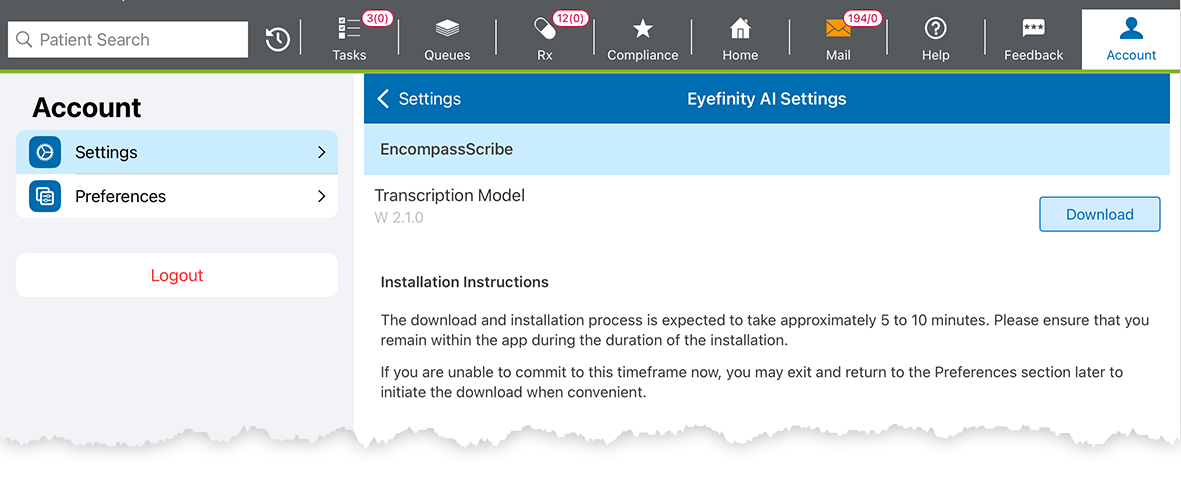
The model takes about ten minutes to download and process. You may continue to see patients and use the app while the model loads. When the loading message disappears, and the Delete button appears, the model is loaded and ready to use.
Clinical support staff can record visits, but they cannot review and approve the suggested documentation. EncompassScribe can stitch together and reconcile multiple recordings as it compiles its suggested documentation, so clinical staff and doctors don't need to pass the iPad or continue the previous recording.
- Log into the Encompass iPad or iPhone app.
- Navigate to a visit in which the primary provider is provisioned for EncompassScribe.
- Obtain the consent of everyone in the room to record the visit. To learn more, go to Obtaining Consent.
- Tap Record Visit.
- Verbalize the chief complaint and history of present illness information as well as any tests you run.
- Stop and Save the recording when you pass the patient to the doctor.
EncompassScribe processes the recording and saves the transcript with the visit. The transcript from the doctor's recording will be appended to the transcript from your recording, and all the transcripts from all the recordings will contribute to EncompassScribe's suggested visit documentation.