
Encompass 10.54 Release Notes
Release Date: April 28, 2026
Eyefinity announces the newest version of Eyefinity Encompass. This updated version improves upon your system's robust attributes and offers new features and expanded practice management functionality.
Watch the What's New video below to see highlighted features in action.
- Release Highlights
- Other Enhancements
- Fixed Issues
- Encompass 10.54.1
- Encompass 10.54.2
- Encompass 10.54.3
- Encompass 10.54.4
- Encompass 10.54.5
- Encompass 10.54.9
Release Highlights
We heard you! This release includes the following high-impact updates requested by Encompass users.
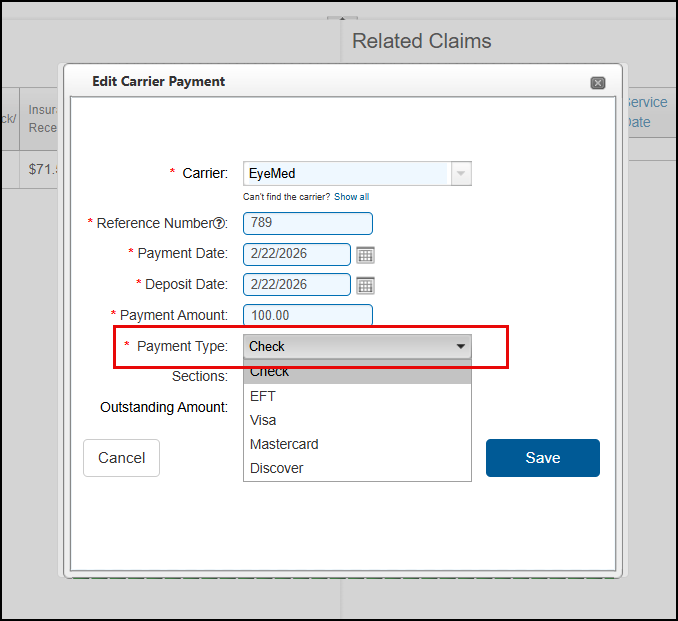
Edit Payment Type on Carrier Payments
Users with the Edit Carrier/Patient Payments security setting enabled can now change the Payment Type when editing carrier payments.
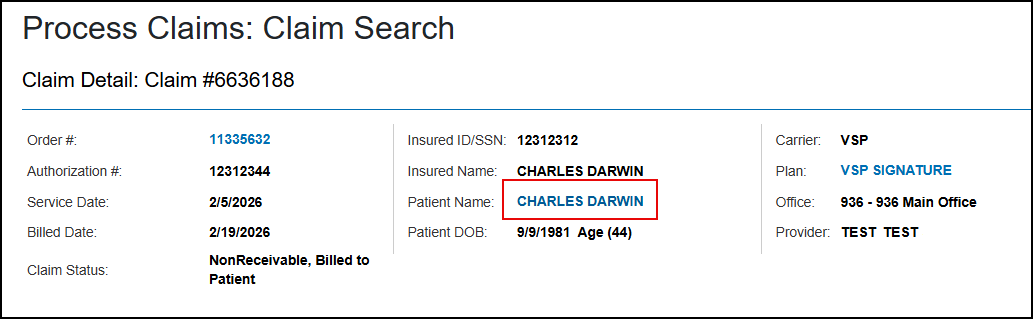
Access Patient Overview from Claim Detail
The Patient Name in the Claim Detail screen is now a link that opens the patient's Overview or Demographic screen, based on your company patient preference settings, in another browser tab. This update makes it quick and easy to refer to a patient's record when reviewing their claim.
Backdate VSP Authorizations Up to 180 Days
Compliance Notice: Backdating may only be used for legitimate administrative corrections. Misuse (including altering dates to obtain payment or bypass payer rules) may constitute fraud. You are responsible for ensuring compliance with all applicable laws and payer requirements.
If your office is a VSP in-network office, you can now enter backdated VSP authorizations for service dates up to 180 days in the past. Previously, authorizations beyond 30 days had to be retrieved from eyefinity.com and processed separately; this update removes that extra step, saving you time. You'll also no longer need to perform manual calculations for orders using these authorizations, making ordering faster and easier. In addition, it helps prevent claims from going on hold due to the error "CH6001 The Authorization # you have entered is not valid for this date of service."
Backdated VSP authorizations will display in the patient's Eligibility/Authorization screen and are available during eyeglass, contact lens, and exam ordering, as well as claim processing, even if they are expired. Previously, newly created backdated authorizations were hidden because they were past their expiration date.
This feature includes the following additional changes:
-
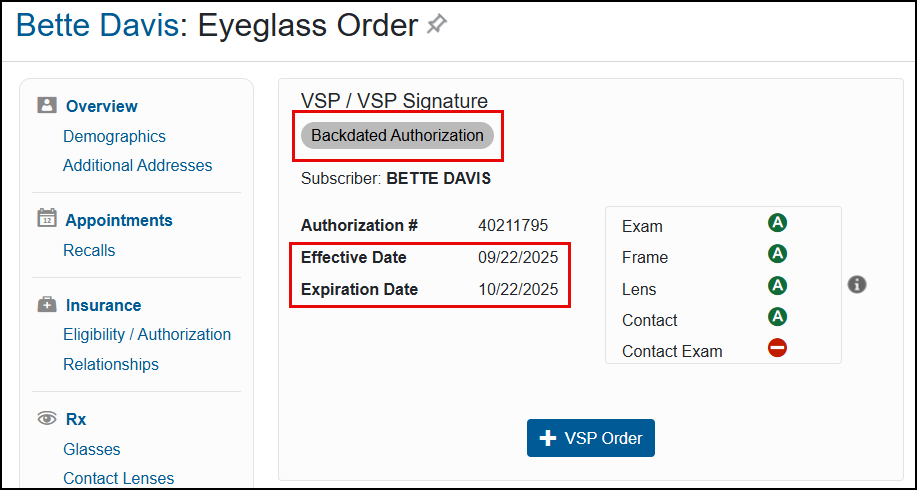
Throughout the system, you'll see all backdated VSP authorizations indicated with a new Backdated Authorization label.
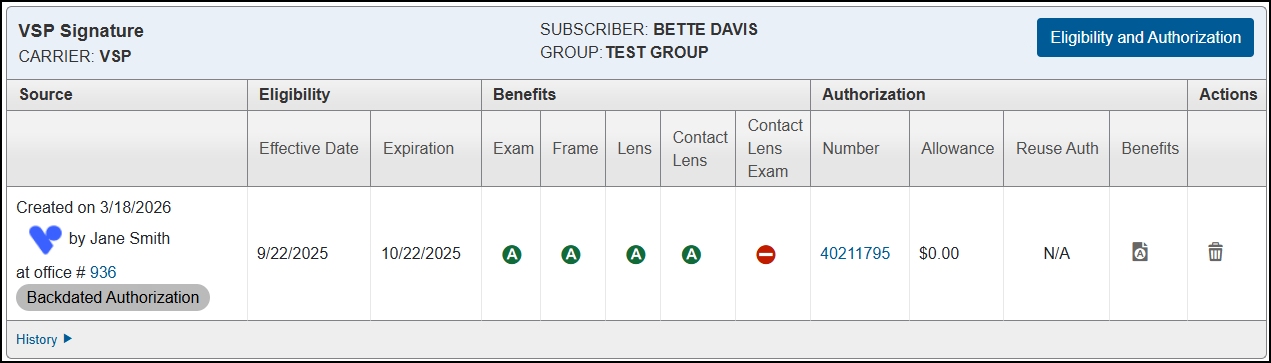
-
The patient Eligibility/Authorization screen displays the Effective Date and Expiration Date for the authorizations, along with the Created on date when the authorization was pulled.
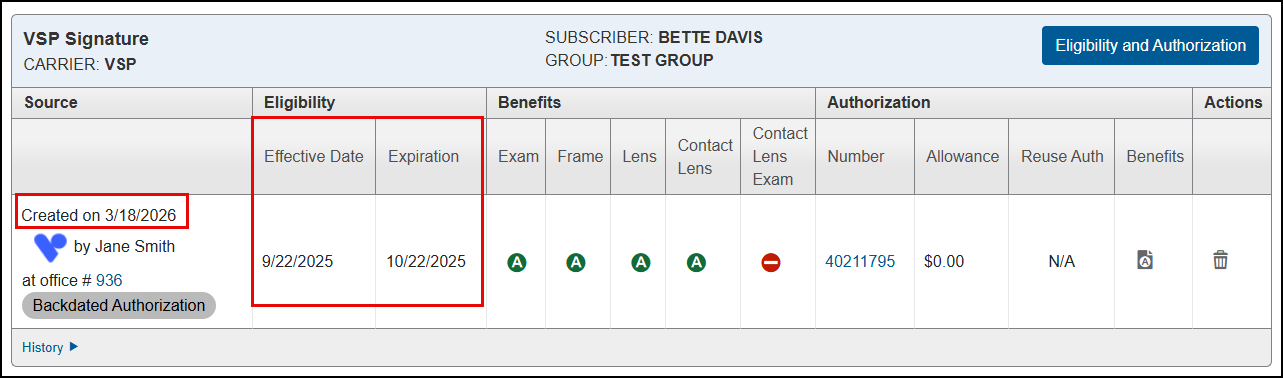
-
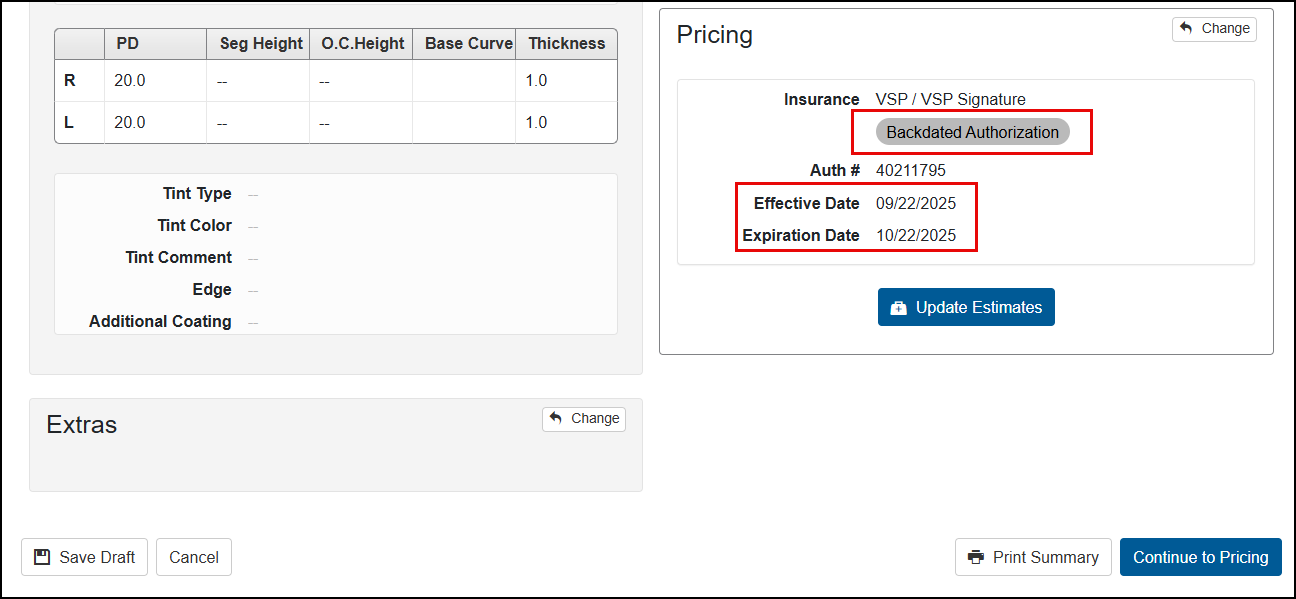
When selecting insurance for orders, backdated authorizations are indicated with the label, and the Effective Date and Expiration Date are shown.
The same information displays on the Order Summary screen.
-
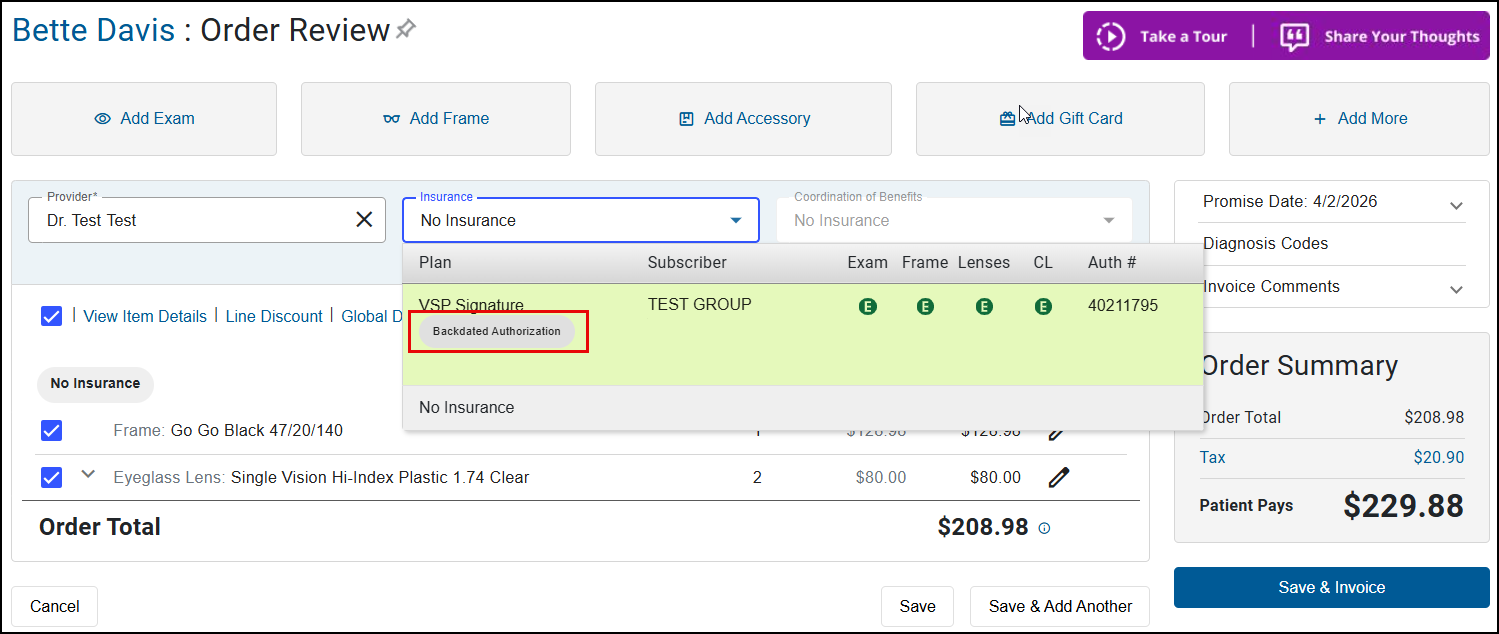
During pricing, the Insurance drop-down list in the Order Review screen indicates when an authorization has been backdated.
-
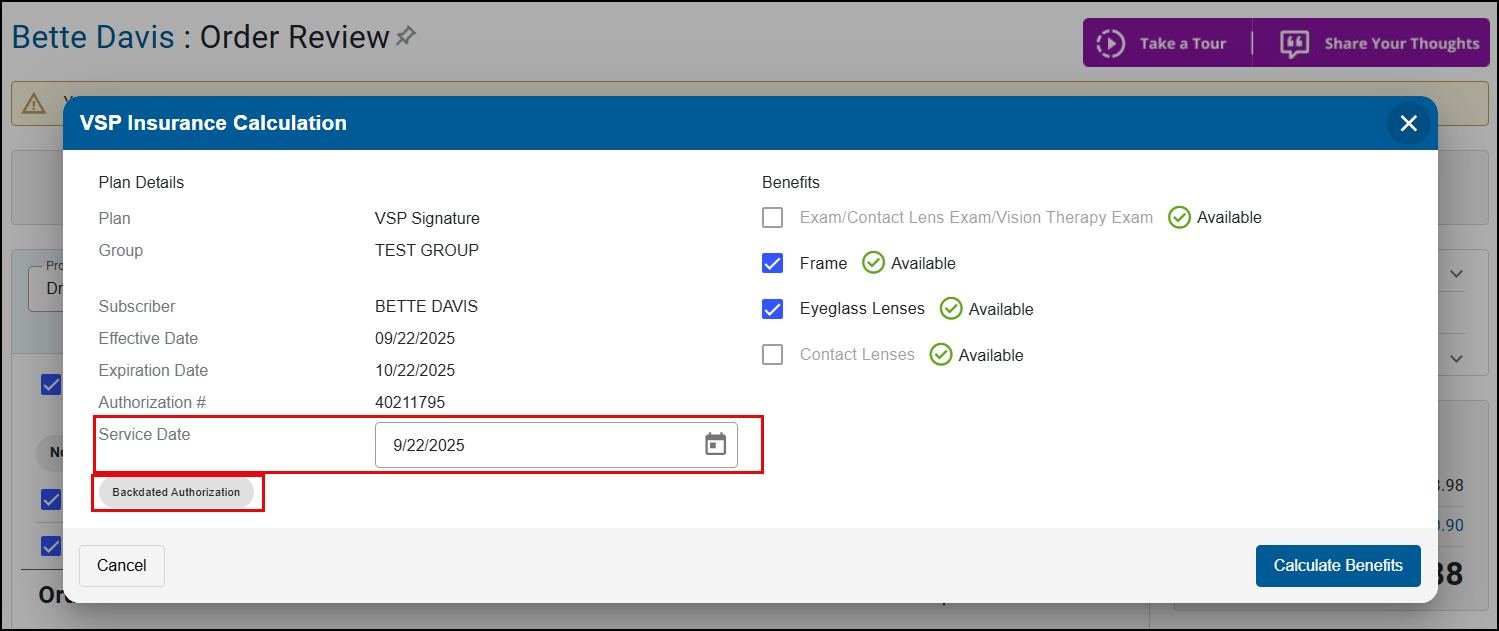
For backdated authorizations, the Service Date field in the VSP Insurance Calculation window defaults to the authorization's Effective Date. You can change it to another date between the authorization's Effective Date and Expiration Date, if needed.
-
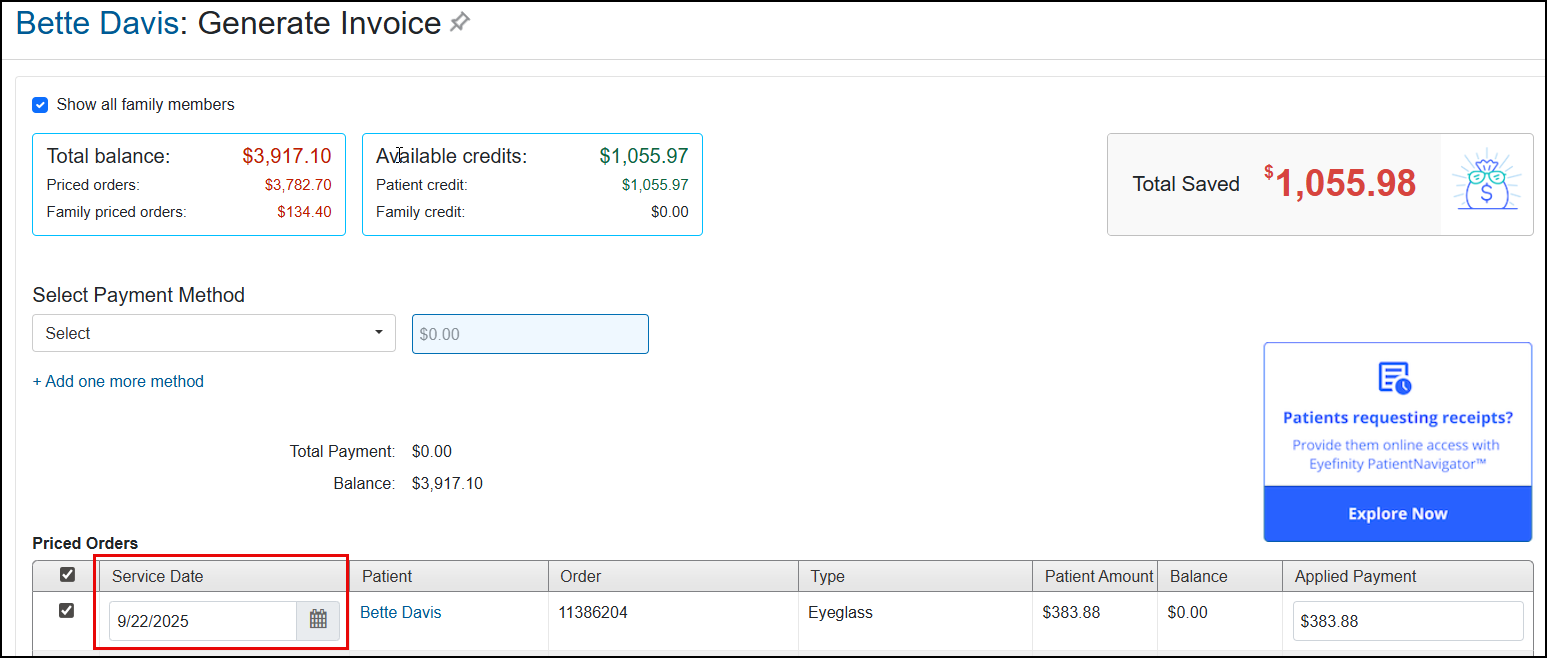
The order's Service Date field in the Generate Invoice screen also defaults to the authorization's Effective Date. The service date is editable and can be changed in the pricing page. If you are authorized (security permission), you can change it to another date between the authorization's Effective Date and Expiration Date.
-
Claims for backdated authorizations show the Backdated Authorization label in the Claim Detail and the claim Service Date defaults to the authorization's Effective Date.

Announcing our New Accounts Receivables Dashboard
The Accounts Receivable Dashboard provides you with a single, streamlined view of all outstanding insurance and patient balances. No more juggling multiple reports—this dashboard delivers meaningful aging indicators, billing performance insights, and actionable data to help you prioritize collections and improve cash flow.
Benefits include:
-
All receivables, one view – Insurance and patient balances in a single workspace—no report switching.
-
Spot risk early – Quickly identify aging and at‑risk balances across carriers, plans, patients, and locations.
-
Smarter follow‑up – Prioritize insurance work using sortable claim details like days outstanding, amount, and status.
-
Built‑in context – See latest claim notes so staff can act fast without rework or duplicate follow‑up.
-
Easy export – Download to CSV for follow‑up tracking and deeper analysis.
To access the dashboard, select Reporting and then Analytics & Insights. The landing page displays. From the left navigation, select Accounts Receivable.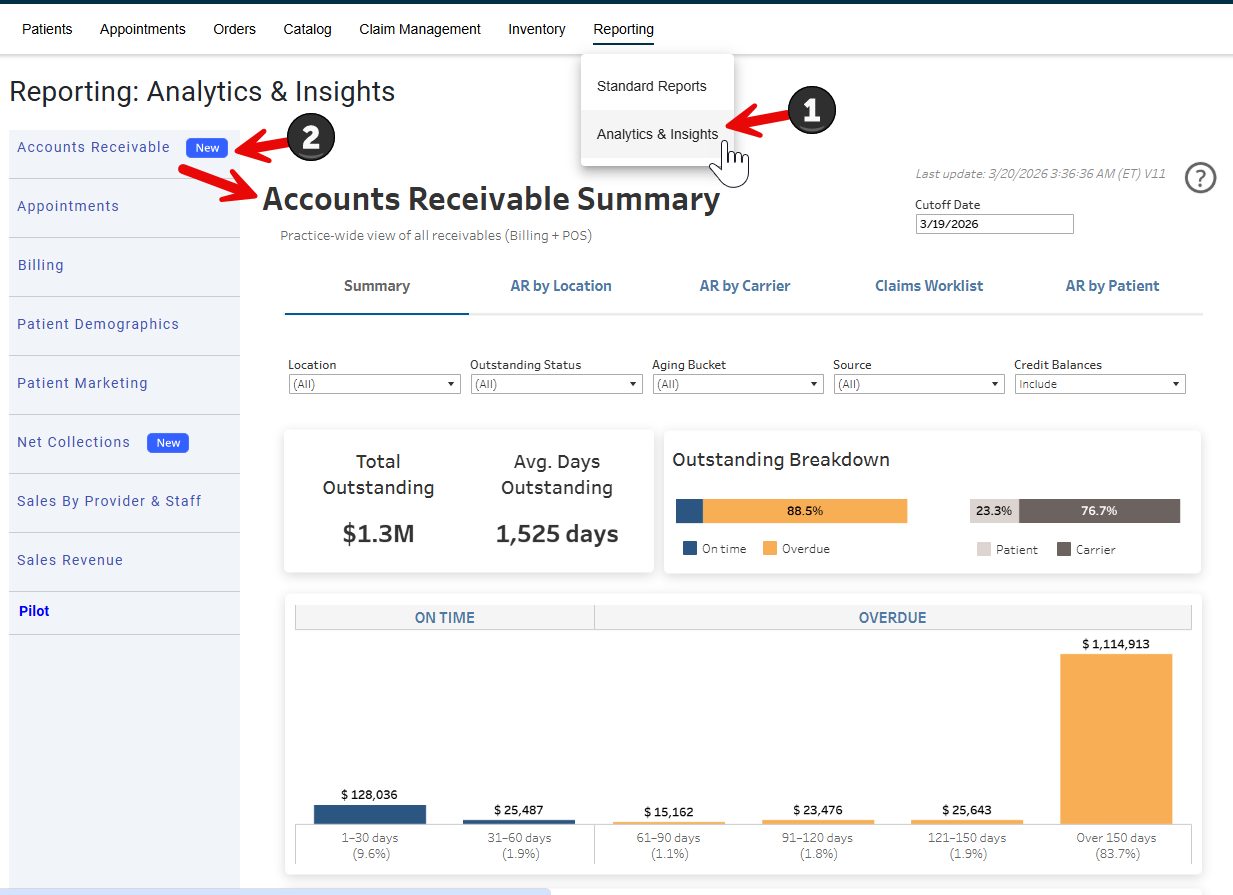
For more detailed instructions on using the dashboard, see Accounts Receivable Dashboard.htm.
Other Enhancements
This release also includes enhancements to the following areas:
System Enhancements
This release includes the following system enhancements:
Name Field Expansion Update
With this update, you can enter up to 30 characters in the First Name and Last Name fields throughout the practice management system. This change helps you maintain accurate records and provide better service for patients with longer names. Some areas where you'll notice this change are:
-
Patient Search
-
Patient Demographics
-
Appointment Calendar
-
Patient Insurance
-
VSP Member Search
-
Edit Claim
-
Batch Adjustments
We've also adjusted generated documents to accommodate names up to 30 characters, such as:
-
Front Office
-
Claim forms
-
Patient statements
-
Welcome Forms
-
Minor Consent Forms
Update TWAIN Driver to Version 19.2
For enhanced security, we are updating the TWAIN driver to version 19.2. This update will happen in waves through May 2026.
Front Office Enhancements
This release includes the following Front Office enhancements:
Order Date in Order Summary
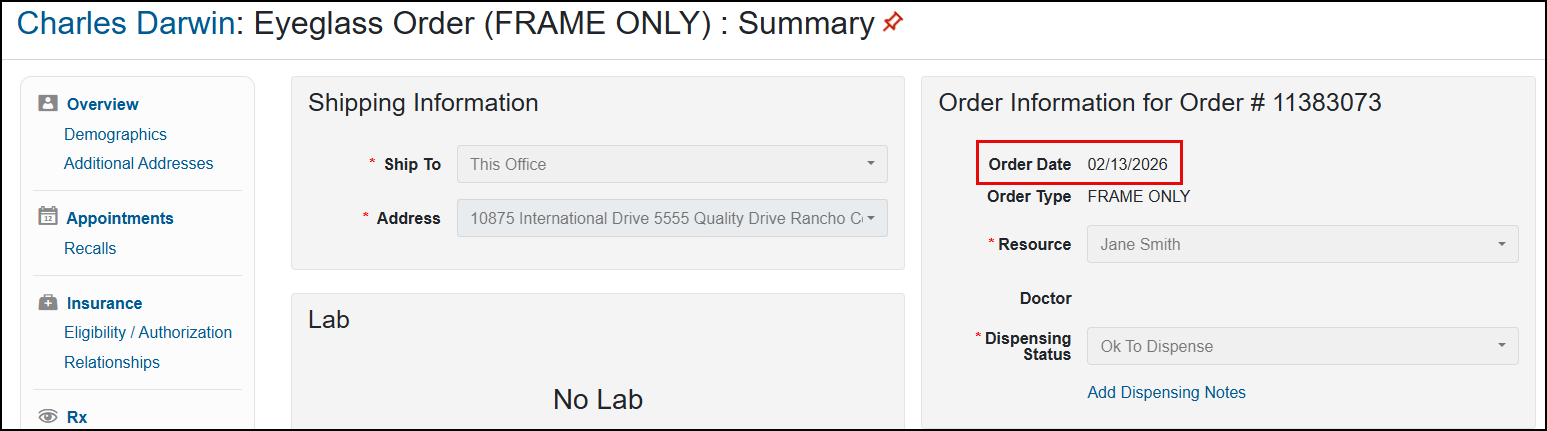
The Order Summary screen now displays the Order Date in the Order Information section, eliminating the need to look for this information elsewhere.
Search for Office Address in Order Summary
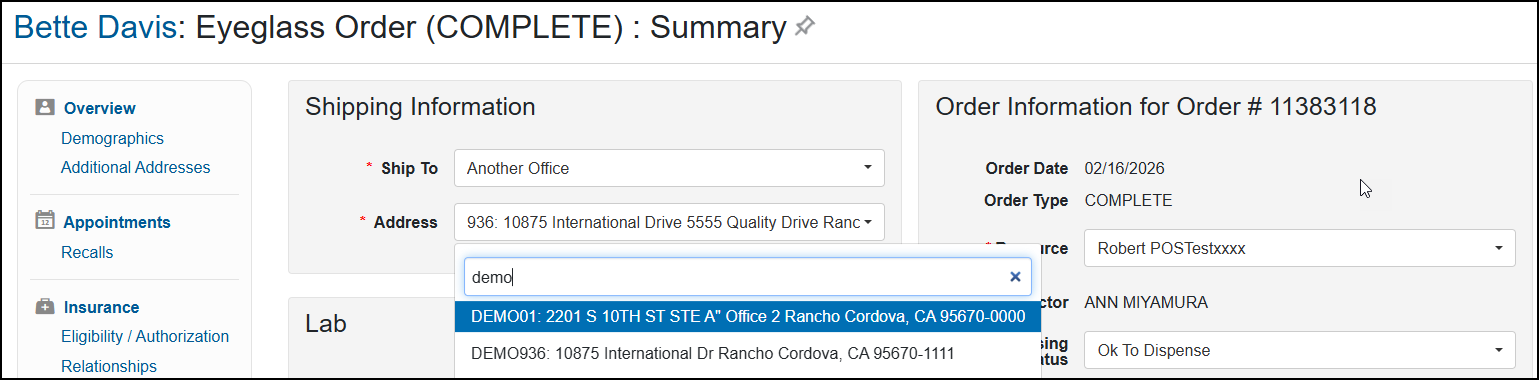
If your practice is set up to allow office information sharing, you can now search for the office address when you select Another Office from the Ship To drop-down menu in the Order Summary screen. This update makes entering shipping information faster and easier by eliminating the need to scroll through the address list to find the one you need.
To search for an office:
-
Click inside the Address field.
The Search Address field opens below.
-
Type the office number or some part of the office address.
Addresses matching your entry are shown in the drop-down list.
-
Click an address to select it.
Default Contact Lens Supplier on Prescriptions
When entering a contact lens prescription, the Supplier now defaults to the contact lens supplier your Administrator has set up for your office.
Improved VSP Authorization Override Confirmation Message
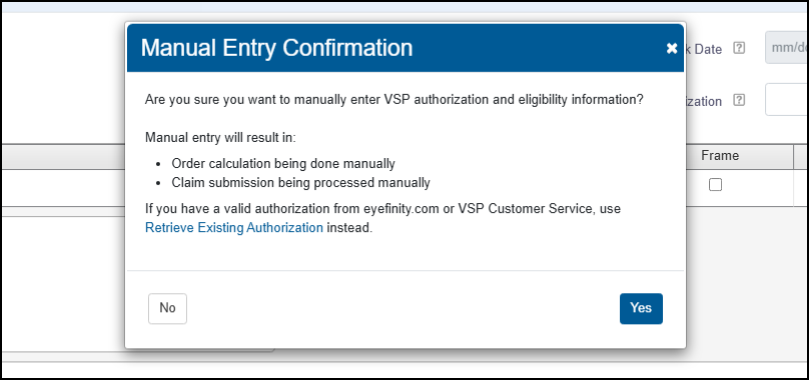
We've updated the confirmation message that displays when you click Override in the VSP Eligibility/Authorization window. This new message clarifies that automatic VSP calculations and electronic claim submission will not be available for orders using the authorization you are entering. It also reminds you to use the Retrieve Existing Authorization feature instead of Override if you have a valid VSP authorization that you obtained outside of Encompass.
Ledger Improvements
We've improved the order Ledger to more accurately display payment amounts when multiple orders are invoiced together, including partial and full payments across multiple patients and multiple payment methods.
Enhanced Daily Closing Note Security
To ensure security and prevent malicious code, the use of brackets and any text within them (for example: </br>, <b>, or <patient request>) is no longer allowed when entering Additional Notes during Daily Closing.
Claim Management Enhancements
This release includes the following Claim Management enhancement:
Improved Claim Search Performance
We've updated Claim Search to deliver faster results and smoother performance. We've also made searching by Reason Code or Insured Date of Birth more dependable, helping you find the right claim sooner.
Access the Analytics & Insights Dashboard from Claim Management
You can now access the Analytics & Insights dashboards from Claim Management. From the top navigation, select Reporting and then Analytics & Insights. The landing page displays.
Patient Engagement Enhancements
Patient Engagement includes the following enhancements:
-
"Reply C to Confirm" added to Appointment Reminder Text in EncompassMessage
-
Default Set of Notifications Provided to New EncompassMessage Customers
-
Turn Off Appointment Reminders for Staff and Providers in EncompassMessage
-
Make Sure a Message isn't Missed with Enhanced Two-way Text Message Controls in EncompassMessage
"Reply C to Confirm" added to Appointment Reminder Text in EncompassMessage
When a patient receives an text Appointment Reminder, it includes “Reply C to confirm” the appointment. For voice messages, the message includes “Please reply 1 to confirm”.
Default Set of Notifications Provided to New EncompassMessage Customers
We've enhanced the EncompassMessage start up experience by providing new customers with a default set of notifications already enabled. With these default notifications, you can begin using the feature from Day 1. See EncompassMessage Quick Start Guide.
Turn Off Appointment Reminders for Staff and Providers in EncompassMessage
Save your provider and staff members inbox space and some time by turning off appointment reminder notifications.
In EncompassMessage, you can now prevent appointment reminder notifications from being sent to a specific provider or staff member.
To turn off or enable patient engagement notifications, go to Admin and then the Provider/Staff screen. Go to the Electronic Patient Notifications option.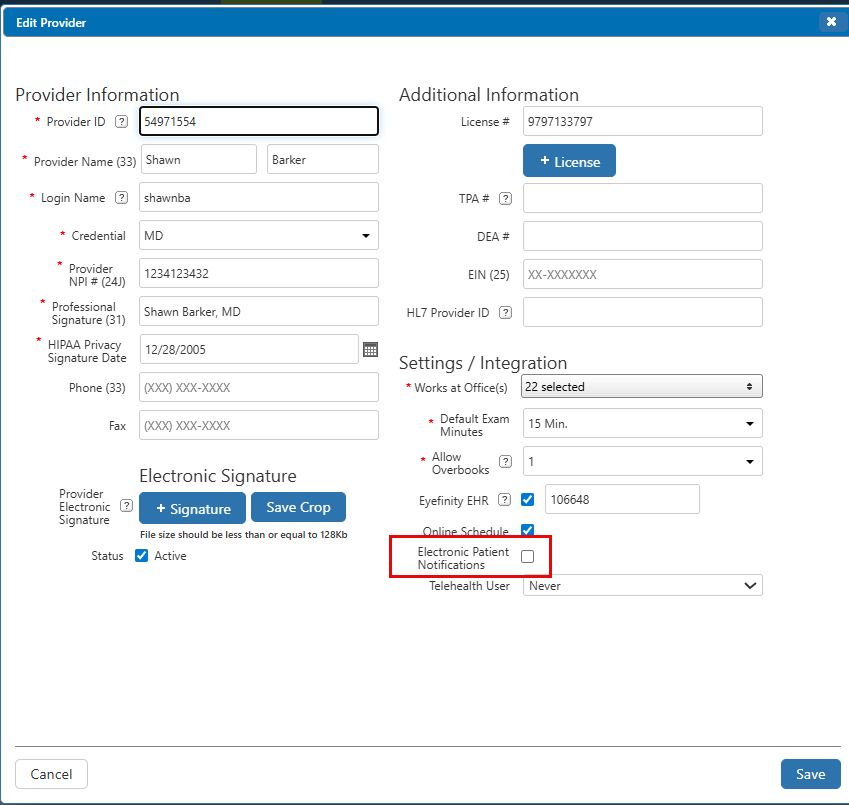
When the option is unchecked, as shown above, notifications are turned off. When the option is checked, notifications are turned on.
Make Sure a Message isn't Missed with Enhanced Two-way Text Message Controls in EncompassMessage
With our enhanced message controls in EncompassMessage, you can make sure no conversation is missed.
From the Two-Way Text page, you can now mark a conversation as read, unread, or flag the message to revisit at a later time.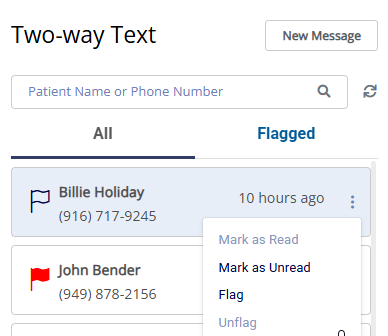
Click the three dot icon for the message to display the menu. Select from the options:
-
Mark as Read
-
Mark as Unread
-
Flag – turns the flag on the left of the conversation red.
-
Unflag – clears the color from the flag.
Updated Schedule Notification Names in EncompassMessage
We added two new recall schedule notifications and updated the Schedule Notification names to make it easier to identify the purpose.
Two New Automated Notifications Added to EncompassMessage
Automatically wish your patients a happy birthday or follow up if a patient misses an appoint with our new scheduler templates: Happy Birthday and Missed Appointment.
We made these templates active for you and recommend you review the template to personalize it or turn it off if you prefer.
Birthday notifications are sent daily for anyone who has a birthday on the current date.
For missed appointments, the system looks for appointments marked No Show or Canceled and then sends a notification the next day to those patients.
These reminders are active for all customers and any new customers.
New Fields Added to Prescription in PatientNavigator
Online prescriptions now include the patient's date of birth and the provider's Professional Signature and License #.
Take Control of Your Contact Lens and Eyeglass Order Notifications in PatientNavigator with EncompassMessage
For those practices who have EncompassMessage and who do not want PatientNavigator to send notifications for contact lenses and/or eyeglasses, you can now turn notifications off. This is especially useful for customers with a contact lens supplier that already sends notifications to the patient.
To turn off contact lens and/or eyeglass order notifications, edit your company settings in PatientNavigator Admin. In the Features Settings section, you will see the Contacts Order Notification and Eyeglasses Order Notification options.
If the box is clear, the notifications are turned off.
If the box is checked, the notifications are turned on.
Fixed Issues
This release includes fixed issues in the following areas:
Front Office
-
The system now applies the correct tax rate to frame-only orders.
-
A prompt now displays to remind you to add the required Technical Add-on to lenses when performing VSP calculations.
-
VSP calculations for contact lens orders with a quantity greater than 12 months are now completed successfully. Previously, the calculation would fail and the charges would be applied 100% to insurance, with $0.00 patient out-of-pocket.
-
We corrected an issue causing order errors starting with LABVAl2; previously, the system looked for additional values that are not required for single lens orders.
-
Line-item discounts applied to an order before insurance now reduce the retail amount used for the insurance calculation (including the default insurance reimbursement/allowance). After benefits are applied, the discount is shown correctly on the Order Review screen.
-
Line-item discounts no longer cause one-cent rounding errors on order totals.
-
Global discounts applied before adding insurance are now automatically removed when you perform the insurance calculation. You’ll see a confirmation message giving you the option to proceed with the calculation or cancel it.
-
The system now prevents you from creating remakes of returned orders.
-
We've fixed the alignment of the Doctor Signature on printed prescriptions.
-
The Invoice Status on the Invoiced tab in Material Orders now correctly reflects when a contact lens order was partially returned.
-
The patient receipt and invoice now show the correct balance for partial returns/refunds where a payment was applied to the remaining balance.
-
The printed ledger now correctly uses the order’s invoice date—rather than the transaction date—as the Order Date.
-
The "Invalid Data - Invalid ExpirationMonth Format" error no longer occurs when processing a refund using Worldpay .
-
Canceled appointments are no longer included on patient invoices.
-
When you change the date of service while invoicing an order, the date of service updates and is saved. Previously, dates prior to the current date didn't save.
-
We corrected an issue that was preventing claims from being created and causing balances to remain on patients' accounts when orders were returned. The issue was caused when the patient's insurance record included a phone or fax number longer than 15 characters.
-
The system validates the replenishment rules set up by your administrator any time you enter or reselect a frame on the eyeglass order. For those processes that bypass the frame selection page (ex: one click remake, copy order, remake on non-frame items, etc), the replenishment rules are not validated. This will be addressed in a future release.
Claim Management
-
The system no longer duplicates the patient charges when there are two claims in Billed to Patient status for the same order.
-
Claims for medical plans now include the Surgery Date, Surgery Eye, and Relinquished Care Date entered on the authorization.
Administration
-
When setting up frames in Admin, once you click Search and the system begins the search, and then you click on one of the filter fields, the system prevents additional search queries from being sent until it returns the results for the first search. This prevents a loss in system performance.
Patient Engagement - Encompass Message
-
As part of creating a set of default group message templates, we updated the text within the following templates: Office closure, Doctor out of office, and Customer Service Feedback.
-
When a notification delivery errors out, we now update the Bad Phone # field in Encompass.
-
Appointment reminders are not sent for canceled appointments and if an appointment is rescheduled, the reminder is only sent for the rescheduled date and time. Previously, reminders were sent even if an appointment was canceled or rescheduled.
-
When a patient replies to a notification to confirm an appointment, if the API errors out, the patient receives a message saying "Sorry, we're experiencing a temporary issue." and instructing them to call your office.
Encompass 10.54.1
The 10.54.1 release fixes the following issues:
-
You can now edit a remake; previously, when trying to edit a remake, the details of the order did not display.
-
For users on the legacy pricing screen, you can now print an invoice for one click remakes. Previously, an error displayed when trying to print.
Encompass 10.54.2
Release Date: April 30, 2026
The 10.54.2 release fixes the following issues:
- You can now successfully print contact lens prescriptions.
- Errors no longer occur when accessing patient insurance information from the Insurance screen. Previously, newly entered insurance records could not be viewed or edited.
Encompass 10.54.3
Release Date: May 7, 2026
The 10.54.3 release fixes the following issue
-
Sales adjustments are now correctly reflected on all patient statements and ledgers. Previously, if the patient had an outstanding balance and their statement included an order with a sales adjustment, the printed balance would be incorrect.
-
When searching for claims in Ready to Bill status, you can now select claims that have a non-receivable line items from the search results. Previously, these claims were shown in the list, but were "grayed out" and not selectable.
Encompass 10.54.4
Release Date: May 28, 2026
The 10.54.4 release fixes the following issue
-
We fixed the following issues with Hard/Specialty Contact Lens prescriptions imported from EHR:
-
Rx Notes for incomplete prescriptions now display the transmitted Rx details correctly instead of showing an error message.
-
Lens measurements are imported correctly, without decimal and rounding errors.
-
-
Authorizations obtained via eyefinity.com that are not backdated are no longer incorrectly marked with the Backdated Authorization label in Encompass.
-
We fixed a problem that was preventing some offices that use WorldPay from processing refunds to Cash or Mail Check. Previously, the system would incorrectly activate the credit card device and display a "Credit Card Transaction Failed" error message.
-
For offices that don't have tax rates set up in Administration, taxes manually added to Frame Only orders during pricing now calculate correctly. Previously, the Tax Amount would display $0.00 regardless of the tax rate percentage entered.
-
We fixed a display issue where receivable amounts appeared duplicated on the Claim Search screen after multiple balance transfers between insurance and patient.
-
Unknown errors no longer occur when opening carrier payments that have been posted to external claims.
Encompass 10.54.5
Release Date: June 15, 2026
The 10.54.5 release fixes the following issue:
-
The Contact Lens Rx and Exam Details pages now show all prescription and exam coding information in Chromium-based browsers (newer Chrome and Microsoft Edge versions). Previously, some prescription and exam details were missing when users viewed billed exam history in affected browser versions.
Encompass 10.54.9
Release Date: August 31, 2026
The 10.54.9 release fixes the following issue:
-
We fixed an issue where Claim History timestamps in Claim Management could display several hours off after performing adjustments to transfer insurance over-payments to patients. Claim History now reflects the correct office-configured time zone across billing transactions and status changes.