
Maintaining Product Attributes
Attributes are inherent characteristics of a product. For example, you could describe an ophthalmic lens as polycarbonate, polarized, and with scratch coat and antireflective coat, and each of those attributes translates into a billable code (V-code) on the insurance claim. Add-ons are not attributes.
OfficeMate allows you assign multiple attributes to a product, which enables you to find products by attribute, assign a cost to each attribute, and add billable codes to each attribute.
Product attributes are used in inventory counting, insurance claims, retail and third-party pricing, and reporting. Once your products are assigned attributes, it is possible to update the costs and fees of many products at once based on their attributes.
Set up the product attributes in the Products window. The attribute information in the Products window is later matched against the insurance plan’s allowable benefit when the fee slip is created. Each attribute associated with a product that falls within the plan’s allowable benefits translates into increased revenue for your practice.
- Open the Products window. For more information, see Opening the Products Window.
- Select a product from the Product Type drop-down menu.
Frame and lens add-ons are included in the Other and Lens Treatment product types.
- Complete one of the following tasks:
- Click New Product to add a new product. For more information, see Maintaining Product Attributes.
- or press Enter to search for and find an existing product. For more information, see Finding Products and Services.
Click Copy to copy the product details and then make changes to them to record a new product.
- Click Next and Previous to add or modify the previous or next product in your database.
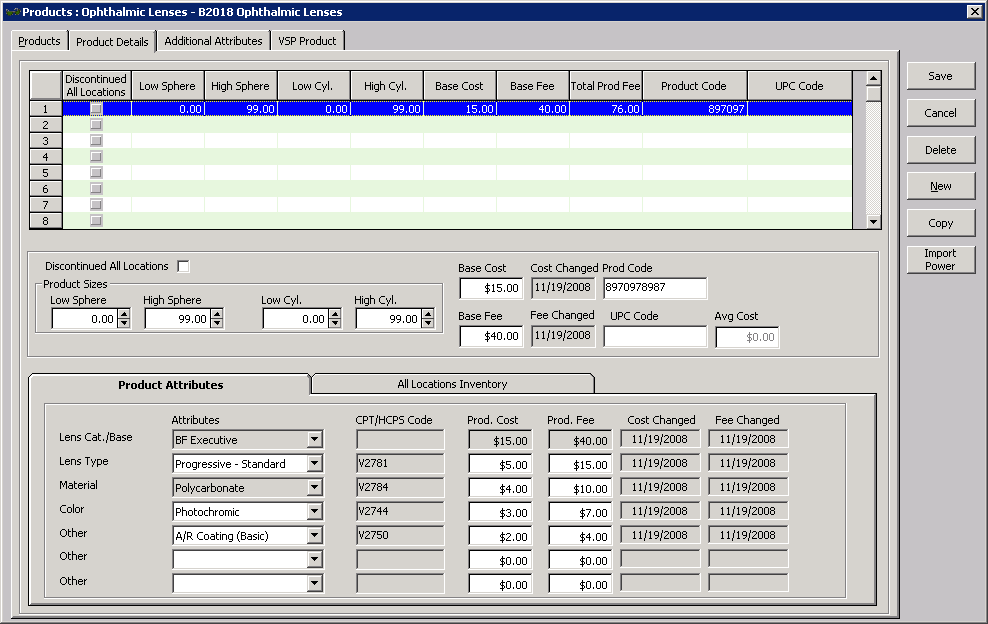
- Click the Product Details tab.
- Select a product from the list.
- Select the product’s attributes from the Attributes drop-down menus.
The CPT/HCPCS Code, Product Cost, and Product Fee fields automatically populate based on the attribute selected. For information on associating procedure codes, costs, and fees with attributes, see To add and modify attributes.
- Some product attributes, such as Lens Cat./Base and Material, may already be assigned based on selections made on the Products tab of the Product window. For information on changing these attributes, see Maintaining Product Attributes.
- The list of attributes that is available in each drop-down menu is maintained in the Third Party Setup window in OfficeMate Administration. For more information about adding and modifying attributes (if you have the proper access), see To add and modify attributes.
- Repeat steps 5 and 6 to apply attributes to each of the products listed at the top of the window.
- Click Save and select one of the following options:
- Save to save the information and keep the Products window open.
- Save and New to save the information and create a new product.
- Save and Exit to close the Products window.
In addition to the procedure above, watch this video.