
15.3.6321 Release Notes
Originally released November 18th, 2025
Re-released November 20th, 2025
This page describes the enhancements, fixes, and known issues in the latest OfficeMate/ExamWRITER release.
- General Enhancements
- OfficeMate Enhancements
- OfficeMate Fixed Issues
- ExamWRITER Enhancements
- ExamWRITER Fixed Issues
- Equipment Interface Fixed Issues and Enhancements
- Regulatory Enhancements
General Enhancements
- We updated the security link for the CLX integration.
- Due to a restructuring of website URLs, we updated the link to the Help Center in all of our programs.
OfficeMate Enhancements
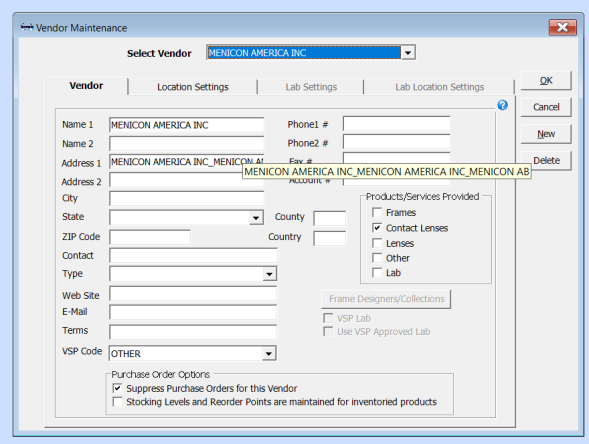
- In Admin, we added a tool tip to the Vendor Address field that displays the complete address when you hover over it.
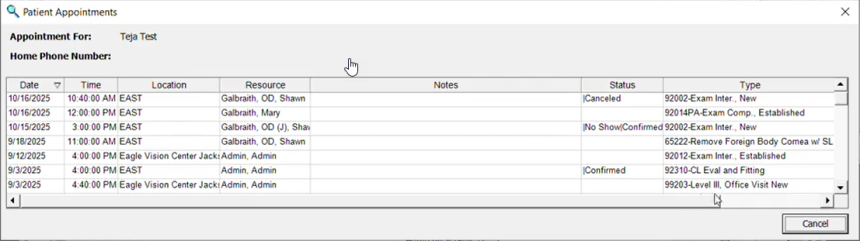
- We added a 'Type' column to the Find Appt selection in Demographics to save you time when reviewing upcoming appointments. Previously, you had to navigate to the Scheduler to view information regarding appointment type.
- The SQL Server Express service now installs to 'C:\Program Files\Microsoft SQL Server', and you can install the database in the drive of your choice.
OfficeMate Fixed Issues
- We fixed an issue in the Appointment Scheduler in Demographics that prevented updates to Insurance Type from saving correctly.
- When printing an audit log review in OfficeMate Administration, you can now select a printer other than your default printer. Previously, the system reverted back to the default printer if a different one was selected.
- We corrected an issue that caused the Scheduler to close after closing Administration, even if the Scheduler wasn't opened in Administration. Now, the Scheduler stays open after being launched elsewhere.
- The product forms in several product types are now properly scaled to the form size.
- We fixed an issue that prevented the Receipts Journal and Fee Slip Detail reports from sorting by date. Additionally, the Batch No column in the Receipts Journal report now appears again.
- The Posting Date column header in the Fee Slip Adjustment Detail and Payment Detail reports no longer cuts off after wrapping to a second line and appears as normal.
- We corrected an issue that duplicated options on the Report Details drop-down list on the Unapplied Amounts report. Now, available options to select are only listed once.
- Patient authorizations now appear correctly on Custom Appointment Scheduler reports. Previously, authorization numbers sometimes displayed as 'N/A' or were underlined needlessly.
- We fixed an issue that prevented you from selecting all usage type options when recording an RX order for a single vision lens.
- File Labels printed from Patient Demographics on the Insurance tab no longer display primary insurances that have been deactivated.
- We fixed an issue that caused the first patient name listed on Statement reports exported to CSV files to replicate for the rest of the statements listed on the report.
- Selecting a different Marketing category when printing labels from Internal Marketing now prints with the criteria you select. Previously, criteria selected for another label printed instead.
- When selecting a lens on a prescription, the Find Product window now resets to the top of the item list when you go to make a selection for the other lens.
- We fixed an issue that prevented fee slips from printing the correct number of quantities if more than one copy was printed. Now, printing quantities larger than one copy results in the correct number of requested quantities printing.
- We updated the help link on the Product windows to the Maintaining Product & Service Information page in the help center.
- We fixed an issue that prevented statements from correctly showing for 60 days aging. Statements now show the correct dates for 60-day time periods.
- Closing charges on fee slips now results in those line items being removed from patient open charges. Previously, an error prevented closed items from being removed from fee slips.
- We updated the message in the ERA window that appears when you check for VSP and TriZetto ERA files.
ExamWRITER Enhancements
- We added a Patient Request menu selection to ExamWRITER to allow patients to request restricted access to their medical information and prevent it from being distributed without their permission.
ExamWRITER Fixed Issues
- We corrected an error that prevented modifier lists from appearing correctly when attempting to add a modifier to services with a 92002 code.
- We corrected an error that prevented the correct calculation of data for MIPS measure 236 - Controlling High Blood Pressure. The data now calculates correctly so you can measure and report patient data accurately.
- Coding window forms opened in ExamWRITER now display scaled to the dimensions of the windows they open in.
- Final Rx's now copy over correctly to Alternate Rx Usage. Previously, an error prevented Rx's with a special character in the name or that didn't include CYL and Axis selections from transferring.
- We fixed an issue that prevented information from saving when adding or updating key words in the Common Ocular Complaints menu selections.
- We corrected an error that displayed encrypted patient address and SSN information at the top of the Change Patient on Exam window.
Equipment Interface Fixed Issues and Enhancements
- We fixed an issue with the Marco export folder that prevented files there from deleting, and the interface from functioning correctly.
- We fixed an issue in the 15.3.6200 Release Notes that prevented the Equipment Interface from launching correctly when opening from a patient visit.
Regulatory Enhancements
- We updated gender mapping in the various Demographics locations to reflect SNOMED codes that will be in effect starting December 1st, 2025.
- We updated alcohol use mapping in the Social History screen to reflect LOINC coding requirements.
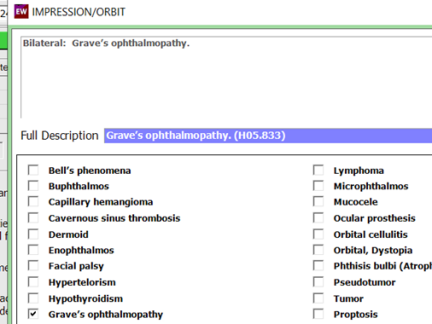
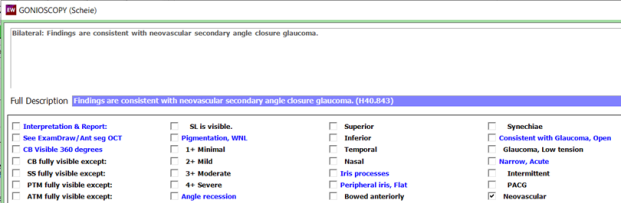
- In accordance with 2026 ICD-10 updates, we updated autocoding in the following areas:
- Demodex infestations
- Graves and Thyroid Eye Disease
- Gonioscopy and Provocative Testing selections in the Neovascular section
- We updated our software to support the USCDI Version 3 requirements.