
What's New in Eyefinity Encompass 7.14
Released June 16, 2026
Sandbox Released May 15, 2026
Watch the What's New video to see highlighted features in action.
This page describes the enhancements, fixes, and known issues in the latest Eyefinity Encompass™ release.
- Release Highlights
- iPad and Web Enhancements
- iPad-Only Enhancements
- Web-Only Enhancements
- Administration Enhancements
- Equipment Interface
- Patient Portal Enhancements
- Fixed Issues
- Known Issues
- Encompass 7.14.3 Update
- Encompass 7.14.3.1 Update
- Encompass 7.14.6 App Update
- Encompass 7.14.4 Update
- Encompass 7.14.5 Update
- Encompass 7.14.6 Update
- Encompass 7.14.7 App Update
- Encompass 7.14.7 Update
- Encompass 7.14.8 App Update
- Encompass 7.14.9 Update
- Encompass 7.14.2 iPhone Update
- Encompass 7.14.9.1 Update
- Encompass 7.14.10 Update
- Encompass 7.14.11 Update
- Encompass 7.14.9 App Update
- Encompass 7.14.11.2 Update
- Encompass 7.14.11.3 Update
- Encompass 7.14.11.4 Update
- Encompass 7.14.11.5 Update
- Encompass 7.14.12 Update
- Encompass 7.14.12.1 Update
Release Highlights
We heard you! This release includes the following high-impact updates requested by Encompass users:
- Document New Vision Exam Tests from the Detailed Visit Overview
- Display Your Most Frequently Used Selections
- Alerts Button Replaced by Quick View
- Improved Workflows for Invalid and Unspecified ICD-10 Codes
Document New Vision Exam Tests from the Detailed Visit Overview
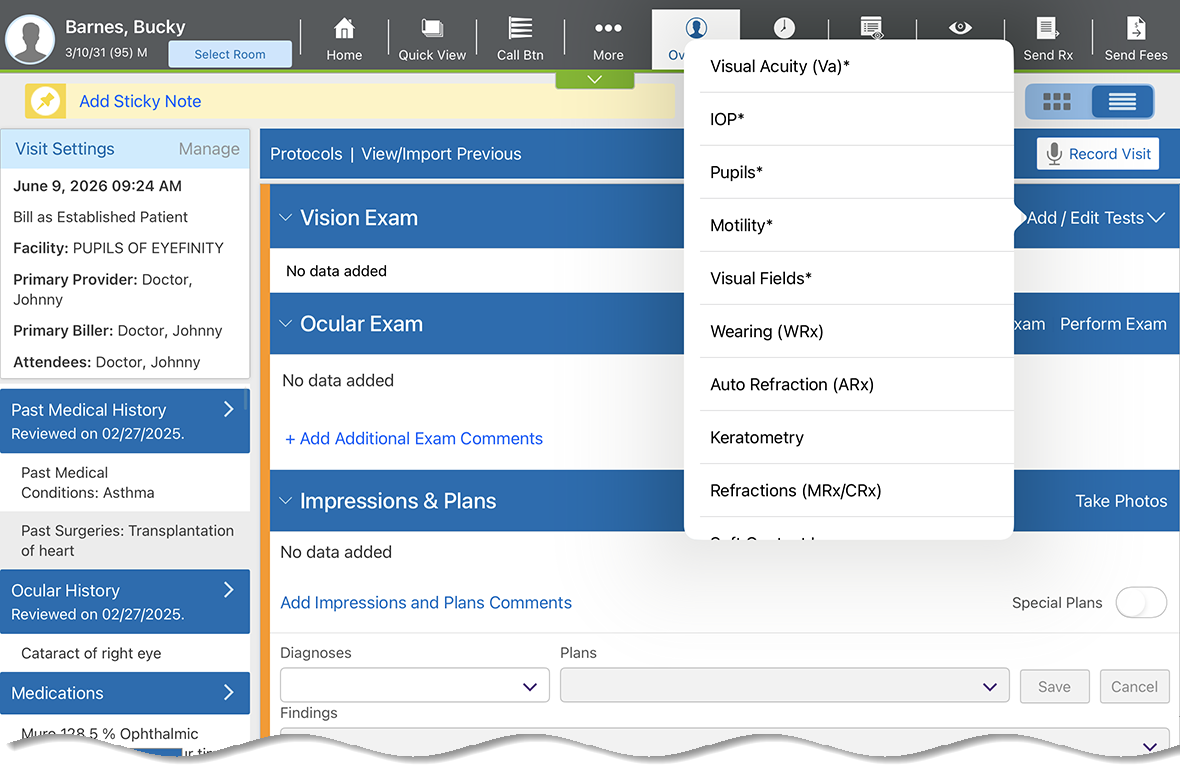
You can now add new vision exam tests more quickly and with less disruption when using the detailed visit overview workflow. On the iPad you'll be redirected to the vision exam when tapping to add a test and will be returned to the detailed visit overview when you're finished adding all relevant information. Previously you had to tap the vision exam button and navigate to a different screen, but this feature allows you to flow more smoothly between different sections of exams to save you time and taps!
Display Your Most Frequently Used Selections
We now automatically display your top six most frequently used selections at the top of the Product drop-down for specialty contact lenses and the Usage Type drop-down for glasses prescriptions. This new enhancement greatly reduces the need to scroll through a list searching for options you use frequently, saving you clicks, taps, and time spent scrolling!
Alerts Button Replaced by Quick View
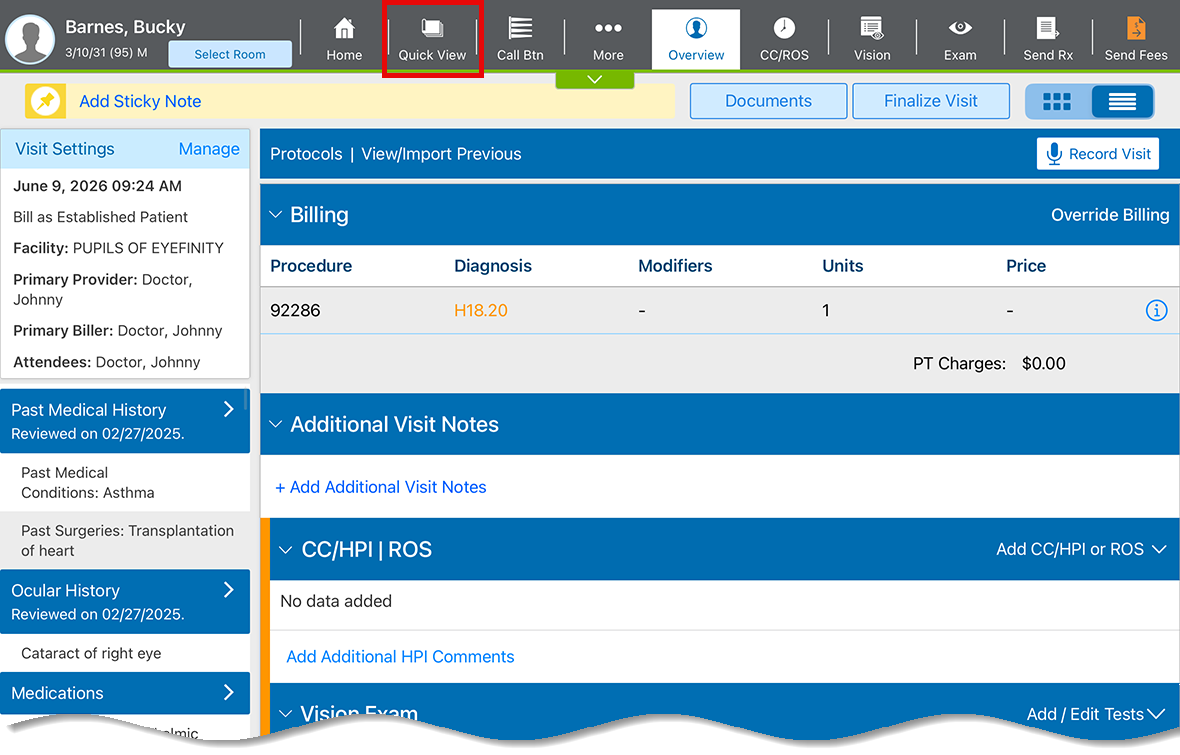
To improve usability and reduce clutter, we removed the Alerts button from the action bar. Alerts are now rolled into Quick View, which turns orange if there are any alerts that need your attention. For more information, see Configuring and Accessing Quick View.
Improved Workflows for Invalid and Unspecified ICD-10 Codes
Invalid or unspecified ICD-10 codes now trigger an error message to help clarify which information is missing when you finalize visits.
Click or tap the link that describes the missing information to navigate directly to the appropriate area in the exam where you can fix the coding and proceed with finalizing the visit or sending fees. You also have the option to bypass the error message by clicking or tapping Continue in the upper right corner of the message. This feature will become available the week of July 13.
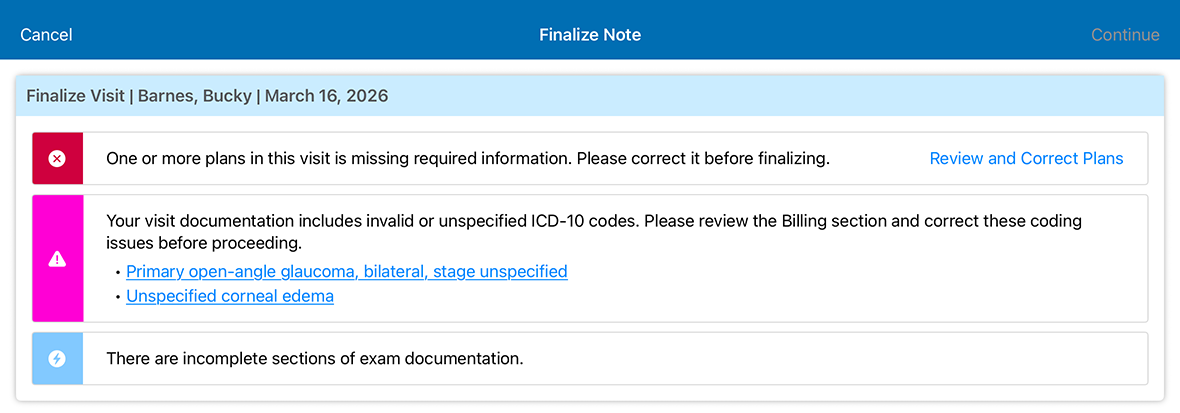
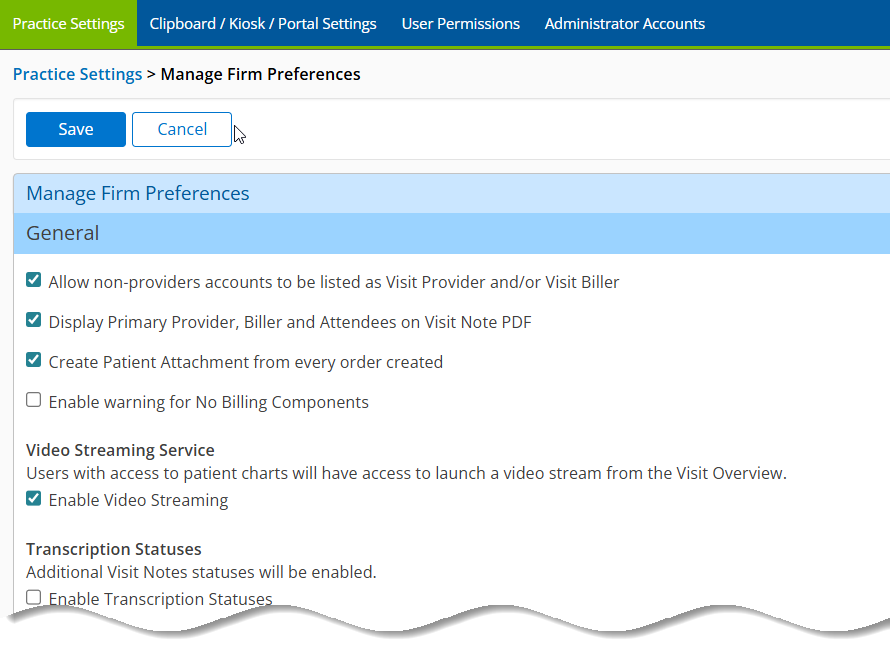
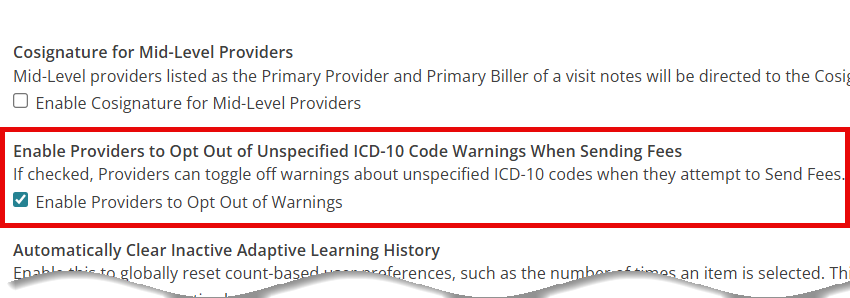
Practice administrators can enable providers to opt out of the invalid or unspecified ICD-10 code warnings. To learn how, go to Managing Unspecified ICD-10 Code Warnings.
iPad and Web Enhancements
The following enhancements apply to both the iPad app and the web application:
- Use Additional PDF Manager/Kit Smart Tags
- Use Expanded Quick Sig Capabilities
- Hold Results on Sent Orders
- Improve Security with New MFA Parameters
- Select Essilor Stellest Lenses
- Reorder Special Plans in the Virtual Exam Room
- Save Your Most Frequently-Used Medications as Favorites
Use Additional PDF Manager/Kit Smart Tags
We added additional PDF Manager/Kit smart tags for patient, visit, and workers' comp data. This will result in less administrative work for you as more precise data is pulled from patient records into the appropriate carrier-specific and state-mandated forms. If your case doesn't involve workers' comp, those tags won't display.
Use Expanded Quick Sig Capabilities
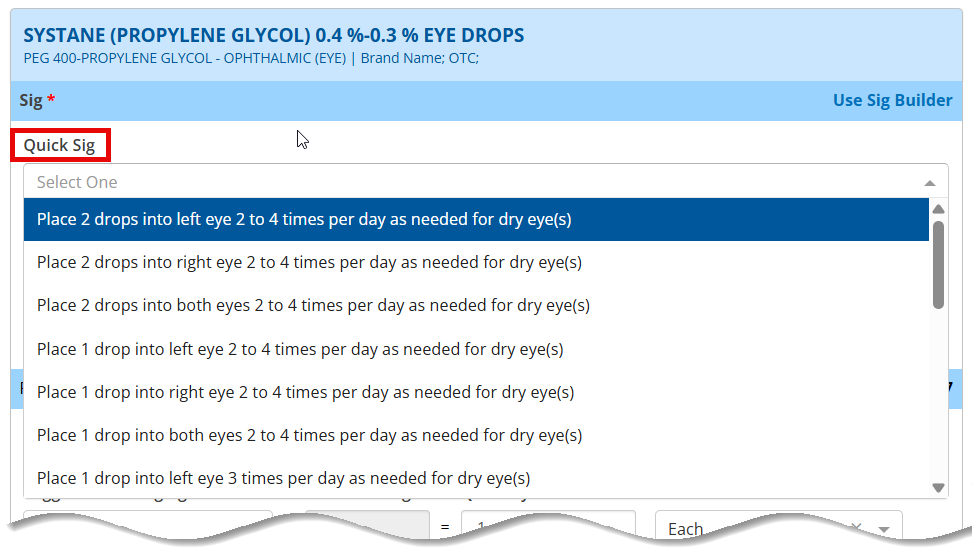
We added a Quick Sig field to the Sig section, allowing you to quickly pull medication sigs from the database and reducing the potential for errors due to typos. All applicable fields in a prescription are automatically filled in based on the quick sig you select. There are some limitations:
- You can only select one quick sig per prescription.
- You can't combine a quick sig and a structured sig.
- Quick sig doesn't apply to compound medications.
Hold Results on Sent Orders
We added the ability to edit the Hold Result Before Sending to Patient Portal and Reason for Withholding fields for sent orders. Previously this option was only available at the time the order was placed on the orders log. This update allows you to comply with state regulations that require results to be held for a specific period of time when you add a reason for holding.
Improve Security with New MFA Parameters
We made some changes to our Multi-Factor Authentication (MFA) parameters. Previously, MFA could remember devices and login credentials indefinitely, but moving forward the maximum amount of time you can be authenticated is 30 days. If your practice uses MFA, you'll enter the code to begin the initial cycle and to reiterate it each time a cycle ends.
Select Essilor Stellest Lenses
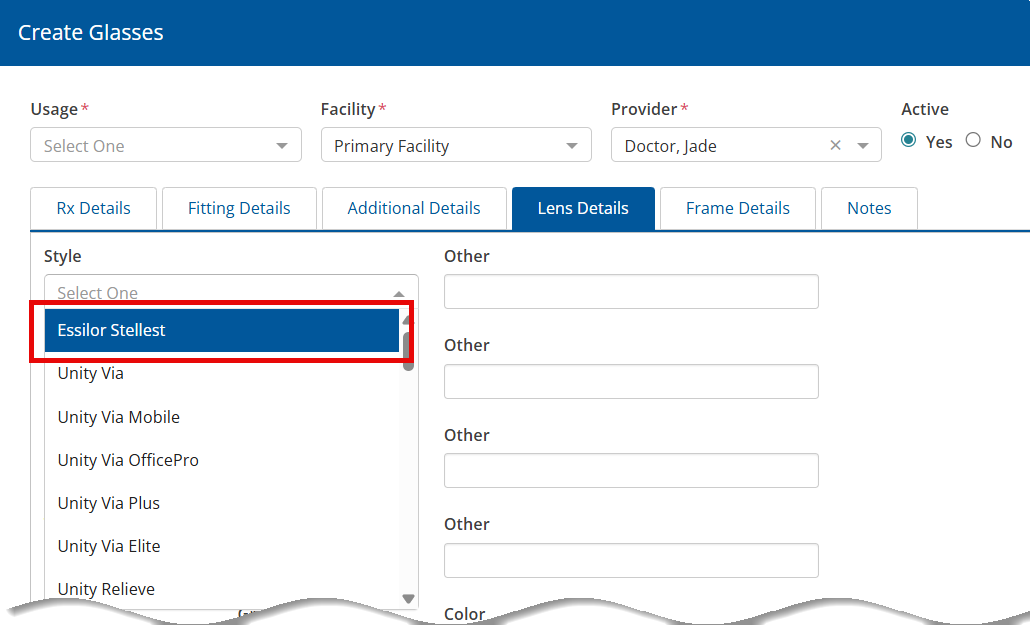
Essilor Stellest lenses are now available for selection under the Lens Options drop-down when creating final glasses prescriptions, allowing you to utilize a popular lens more quickly and accessibly.
Reorder Special Plans in the Virtual Exam Room
Locate and select your most frequently-used special plans more quickly by organizing them to suit your needs when selecting Reorder Impressions in the Virtual Exam Room.
Save Your Most Frequently-Used Medications as Favorites
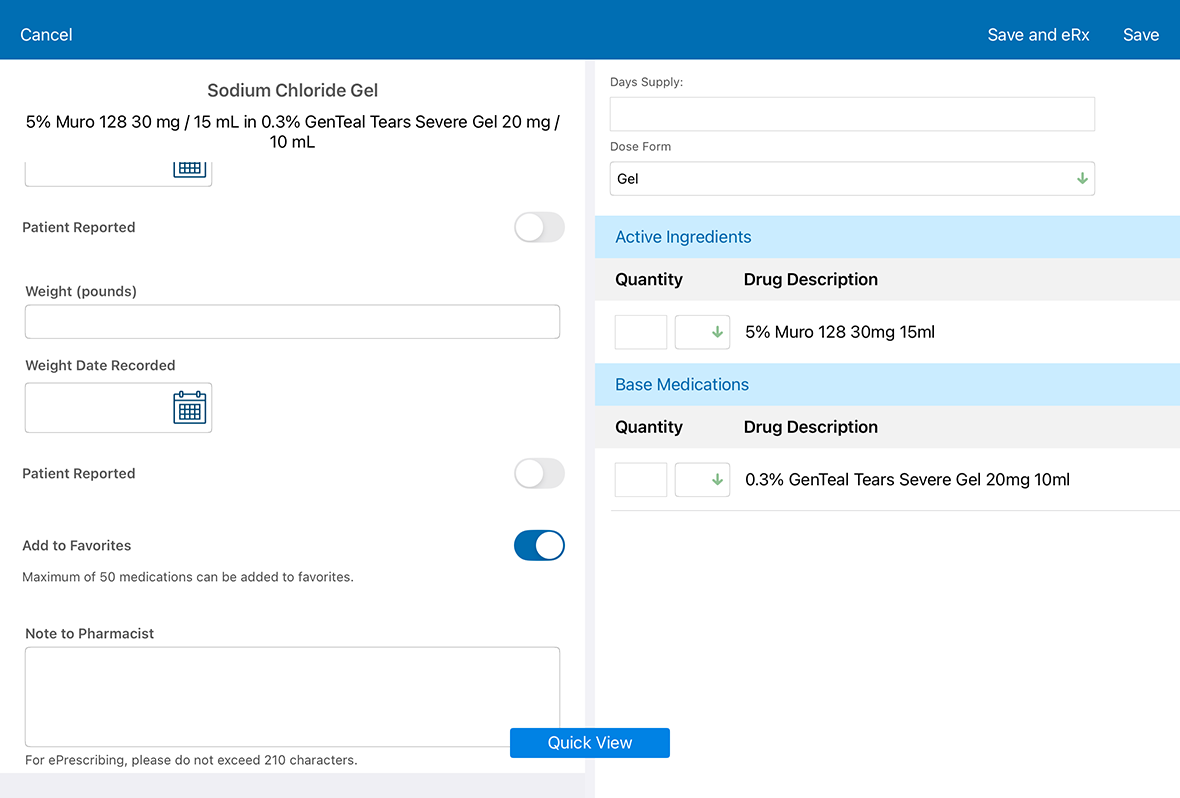
You can now save up to 50 favorite medications, both regular and compound, per user as favorites. Any notes to pharmacists or vitals attached to a compound saved as a favorite aren't retained and if one of the drugs in a compound becomes obsolete or is deleted at the firm level, you'll see a message stating that the compound can't be selected.
iPad-Only Enhancements
We modified the following features in the iPad to create parity with the web app, including:
- adding the Diagnosis Narrative to the Cancer Log Overview
- removing the Download CCD's (All Patients) button from the Advanced Patient Search screen
Web-Only Enhancements
-
Font size is now automatically reduced when data populated in smart tags exceeds the defined length of the field. This ensures the data fits on the form or PDF without cutting it off and resulting in incomplete data.
-
Dose Form data can now be included with printed and electronic prescriptions. Previously this field was only functional as a record for providers, and the data wasn't displayed anywhere else. This feature is active by default.
-
You can now change contact lens manufacturers without losing measurements. You'll still need to review the information, as measurements sometimes aren't the same among different manufacturers, but any missing information or differences in measurement options will be highlighted in red for greater visibility. The following fields will remain the same:
-
Base Curve
-
Diameter
-
Sphere
-
Cylinder
-
Axis
-
Add
-
Color
-
MF Power
-
-
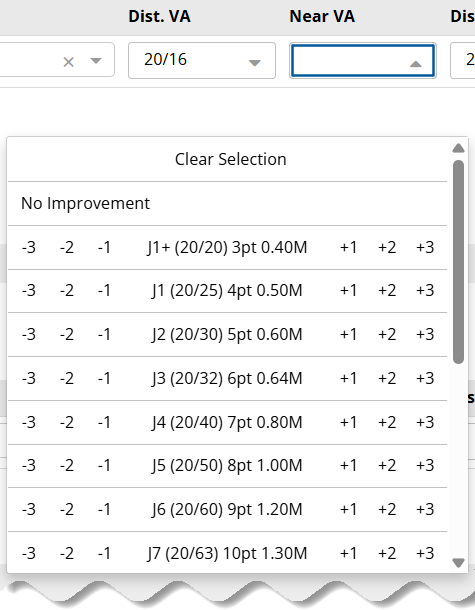
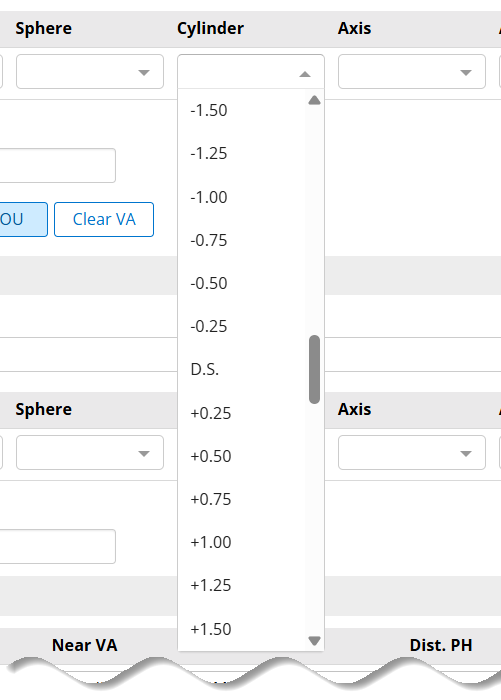
To reduce the time you spend scrolling, we increased the number of drop-down entries in the sphere, cylinder, and axis fields to 13 and visual acuity fields to 10 entries, with 20/20 always being visible due to its high selection frequency.
-
We updated the Add CC/HPI link and the Create Chart Note button to open in separate windows rather than the current page, making it easier for you to resume the exam where you left off once you're finished adding relevant information.
Administration Enhancements
- You can enable providers to opt themselves out of unspecified ICD-10 code warnings when sending fees by logging in as an administrator and navigating to Manage Firm Preferences. For more information, see Managing Unspecified ICD-10 Code Warnings.
Equipment Interface
- We corrected file access issues that were occurring with Topcon CL300 devices using a LAN connection.
- We completed back end changes and updates to enable a secure EncompassID experience.
- We corrected an issue with the Zeiss icom interface that caused incorrect rounding of sphere data upon import. Previously, a value of -0.96 might round down to -0.75, but now it correctly rounds up to -1.00.
Patient Portal Enhancements
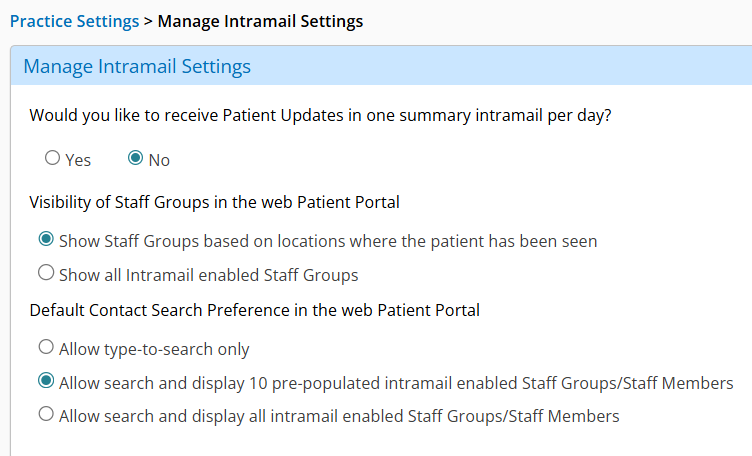
- Patients can now customize how staff and group contacts are displayed when they compose intramail in the patient portal. Previously the only option was a static list of ten staff and groups, but we created the option to utilize a search-driven workflow of all enabled contacts. For more information, see Setting Patient Portal Intramail Search Preferences.
Medical Enhancements
- We added the Choroidal Nevus Monitoring plan to the Impressions and Plans section.
Fixed Issues
- We fixed an issue that was occurring for some web users where visit finalization wasn't completing with the addition of a second exam.
- We corrected an issue that prevented visits from finalizing when overrriding bills to add charges.
- We resolved an Error 500 experienced by some users when ordering tests from the Virtual Exam Room.
- We disabled the Manual Prior Authorization feature to refine it and correct multiple errors.
- We resolved a 404 error that occurred when clicking the transition of care CCD/Referral Note.
- We corrected an issue where viewing patient attachments from the More menu in the iPad app displayed attachments for all patients, not only the selected patient chart.
- We fixed an issue that allowed impressions and procedures existing in previous visit notes to be deleted or otherwise modified in the original note when copied forward to a current visit.
- We resolved an issue in the web application where EncompassScribe wasn't showing suggested body locations under a given plan when not enough detailed information was given during an exam.
- We updated some verbiage in the installation instructions for EncompassScribe.
- We corrected an issue in the app where saving photos to a patient chart sometimes made the app crash.
- We updated the kiosk platform to adhere to WCAG accessibility guidelines.
- We resolved an issue in the app that where EncompassScribe settings couldn't be accessed or updated in Trial mode.
- We corrected an issue that occurred within Patient Attachments where the app crashed when users scrolled through images.
- We fixed the following items regarding prescriptions:
- An issue where a previously printed prescription remained in Replacement Pending status in the Rx > Refill Req. tab and couldn't be voided
- An issue where documenting height and weight in a prescription didn't display in the Vitals section of the visit note
- An issue where a supervising provider was required for a prescription when it wasn't actually needed
- An issue where prescribing a new prescription for a patient resulted in an error
- We fixed the following items in regarding the visit overview:
- An issue where the Data Reviewed section didn't display correctly on the Visit Overview screen on the iPad
- An issue where intermittent errors occurred when saving a section in the Visit Overview screen on the iPad
- We corrected an issue where the selected chief complaint/HPI body location didn't display in the Virtual Exam Room.
- We fixed an issue where not all Associated Dx Complexity options displayed for applicable impressions.
- We corrected an issue where the patient header displayed Unspecified for allergies when No Known Allergies had been selected in the patient clipboard.
- We fixed an error that sometimes occurred when saving after accepting updates in the Patient Updates screen.
- We corrected an error that sometimes occurred when selecting a Supervising Provider in Manage Visit Settings.
- We resolved the following items regarding MIPS measures:
- An issue where QM 374 didn't appear on the MIPS dashboard when there were qualifying visits
- An issue where filters within a quality measure were duplicated
- We corrected an issue where clicking the Note link from the home page filtered to preliminary visits takes you to the visit overview rather than opening the PDF of the visit note.
- We removed an impediment that was preventing thumbnails from loading on the iPad app.
- We fixed an issue where diagnosis codes didn't appear when editing overridden bills.
- We resolved an issue that pulled Facilities drop-down menu selections on the Manage Visit Settings window to incorrectly pull from the individual user settings for the staff member currently logged in, rather than from the primary provider settings.
- We corrected an issue where the body picker sometimes displayed the wrong image and body location hints based on the chief complaint.
- We resolved an issue where existing users were presented with Intelligent Medical Objects terms of service and Analytics terms and conditions windows when logging in.
- We fixed an issue where documenting both of the following plans for each eye suggested 66984-55-RT-LT instead of separate codes, 66984-55-RT and 66984-55-LT:
- Comanagement
- Set Global Period
- We fixed an issue where wasted units were not included in the suggested billing when documenting a medication and selecting Yes for "Bill for wasted drug?" in the Details tab of the Intravitreal Tap and Injection plan.
- We fixed an issue where documenting 1.25 mg as the Dose in the Details tab suggested HCPCS C9257 with 1 unit instead of 5 units for the Intravitreal Avastin plan.
- We fixed an issue where modifier 79 was not suggested with CPT 15823 when documenting the Blepharoplasty, Functional plan for a patient in an active global period.
- We fixed an issue where associating an impression with a special plan did not link the ICD-10 code to the suggested CPT code in the billing card.
Known Issues
We're investigating the following issues and looking for solutions as quickly as possible:
- The "Is this a new presentation, or a follow-up?" question in the Chief Complaint window is listed at the bottom rather than the top.
- The Quick List is showing only 10 patients by default instead of 25 or 50.
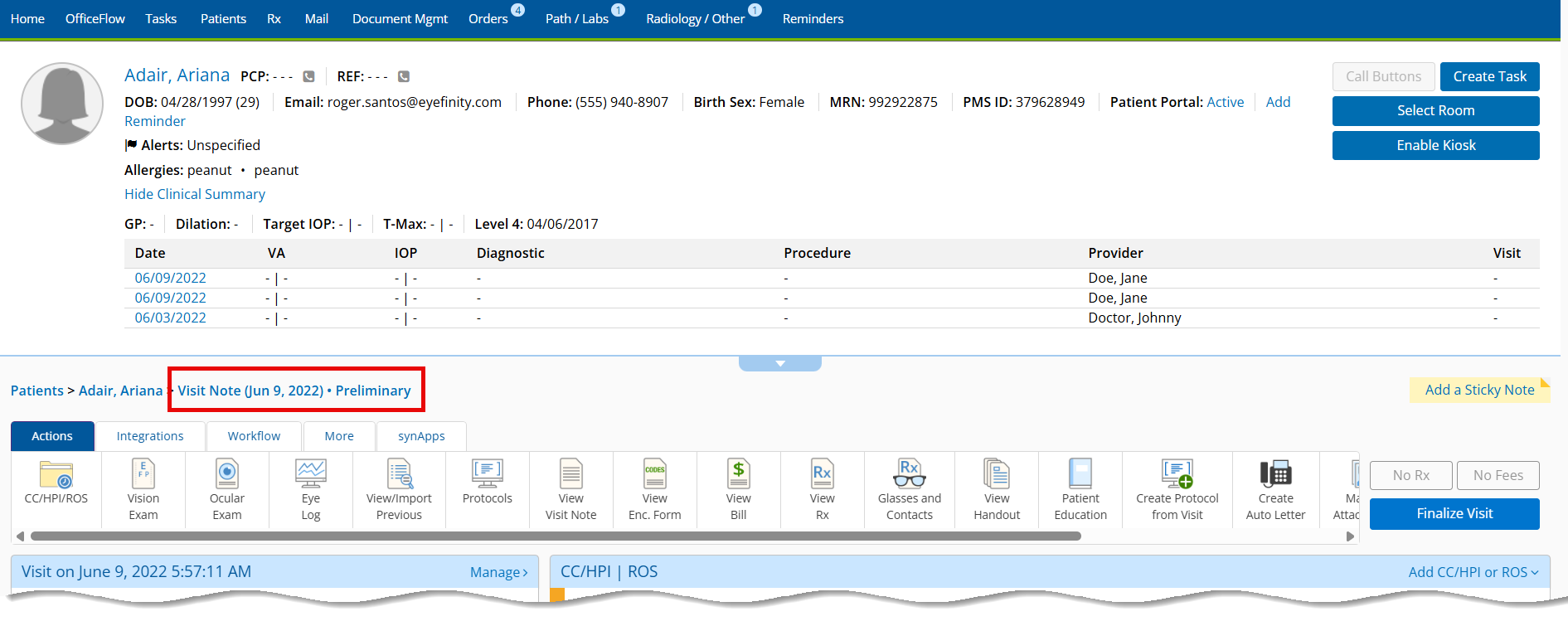
- The Back to Visit Overview button in the vision exam has been replaced with a Visit Note button. Until we find a solution, click the Visit Note link in the page path at the top of the screen to return to the visit overview.
- Clicking Continue as Patient loops users back to the home screen.
- The final Rx from an imported Rx doesn't update with today's date.
- Cookies aren't saving login screen options for some users.
- Time stamps are no longer visible with IOPs on the historical data Eye Log.
- On the iPad, vision exam tests can't be documented from the detailed visit overview.
- Some users are unable to log into Encompass EHR or are showing previous versions after rollbacks were implemented to find solutions.
- Errors have been reported when entering chief complaints after upgrading to the new release.
- Attachments aren't showing from within a visit, but they do show when not in a visit.
- Codes that have been overridden sometimes revert back to the automatically populated codes.
- The 'X' that appears in checkboxes in the PDF Manager reduce in size significantly when printed.
- PQRS codes sometimes transfer over as CPT codes when users attempt to move them to Eyefinity PM.
- The ICD-10 functionality is missing in production environments, although it appears to be functioning correctly in training environments.
- On the iPad, the Wearing RX isn't showing the plus symbol on recorded positive powers.
- The Soft Contacts 20/20 OU button is incorrectly documenting 'Other' for Near VA values. Only the Distance VA fields should be populating.
- Marking Yes for a review of systems item also toggles alerts to Yes randomly. Only the selected section should be impacted by toggling Yes.
Encompass 7.14.3 Update
Released June 19, 2026
This express release includes the following enhancements and bug fixes:
- We updated verbiage on the EncompassScribe Quick Training windows.
- Videos no longer automatically play when opening Training Video windows for EncompassScribe.
- We added a checkbox to the EncompassScribe Training Video windows so you can confirm you watched the video and close the window to continue.
- We updated the EncompassScribe menu to include training videos and the EncompassScribe master link.
- We updated the Clinical Summary feature to default to 'On' for practice settings and 'Off' for user preferences to minimize its chance of being used without review or training materials by individual users.
- We corrected an error that prevented the View Clinical Summary link below the header in patient charts from and in Quick View from displaying correctly.
- We fixed an issue that prevented MIPS Quality categories from updating correctly for some practices.
- We corrected an issue with adaptive font scaling that was present in PDF forms containing long text fields.
- We resolved an issue where removing an allergy deleted the value in the Date Recorded field associated with it.
- We increased the length of the EncompassScribe summary generation timeout from 60 seconds to 120 seconds to prevent the system from triggering a timeout error.
- We corrected an issue that prevented some finalizations from completing successfully when images are attached to the visit.
Encompass 7.14.3.1 Update
Released June 19, 2026
This hotfix fixed the login issues some users were experiencing after upgrading to Encompass 7.14.
Encompass 7.14.6 App Update
Released June 26, 2026
This optional update contains minor updates and performance improvements.
Encompass 7.14.4 Update
Released June 26, 2026
This express release includes the following content:
- We realigned the Accept and Add checkbox in the EncompassScribe reconciliation screen under Impressions and Plans > Associated Diagnoses.
- We corrected an issue where EncompassScribe sometimes listed both a previously existing procedure and a new one meant to replace it, rather than deleting the previous one and only keeping the new procedure.
- We fixed an issue where an image interpretation applied a diagnosis type and duplicated it as an associated diagnosis as well when in the reconciliation screen.
- We created a toggle that lets you enable or disable transcription while recording during exams. More information about this feature is forthcoming.
- We resolved an issue with smart merge that only populated body location meta data but not procedure meta data, which is now being captured and populated appropriately.
- We addressed an issue with earliest fill dates for prescriptions prescribed on an earlier date than providers reconciled exam information on a later date than the visit occurred. The system now automatically updates old earliest fill dates to today's date.
- We fixed an issue with quantities being calculated to too many decimal places, which caused a 500 error when trying to save.
- We resolved an issue where the information box describing conflicting information was no longer present in the Impressions and Plans section of the reconciliation screen.
- You can now record visits using your android phone, giving you another tool to use instead of an iPad.
- We fixed an issue experienced by some users where a timeout error occurred before EncompassScribe output generation even though recording was completed.
- We ensured that existing body locations on a visit are visible and still present on the reconciliation screen after using EncompassScribe to record a visit.
Encompass 7.14.5 Update
Released July 1, 2026
This regulatory release includes the following content:
- We added Iheezo as an anesthesia type with an automatic billing amount of 800 units per body location.
- We added the Waggoner method as an option under Details > Method of Testing in the Color Vision Testing - Extended plan.
- We added the following options on the Details > Fundus Photos Device drop-down menu in the Screening Retinal Photos and Fundus Photos plans:
- Visionix
- EyRIS
- We added Accutite as a new plan to help you document patients who undergo this cosmetic procedure.
- We added a CPT Modifiers drop-down menu with an E1-E4 selection to the Billing tab of the Blepharitis plan so you can document body location and bill appropriately.
Encompass 7.14.6 Update
Released July 8, 2026
This medical update includes the following content:
- We fixed an issue that caused visit dates for appointments made after 8 pm EST to incorrectly advance to the next day.
- We fixed an issue where a warning message displayed prompting users to select a body location even though a body location had just been selected.
- We added 'Bill for Iopidine?', 'Lot #', 'Expiration Date (Month Year)', and 'Number of vials used (0.1 mL/vial)' fields to the Details tab for the following plans:
- Selective Laser Trabeculoplasty
- Micropulse Laser Trabeculoplasty
- Noncontact ND:YAF Cyclophotocoagulation
- Laser Peripheral Irdotomy
- YAG Laser Posterior Capsulotomy
- YAG Laser - Anterior Capsule
- YAG Laser - IOL Opacities
- YAG Laser vitreous strands, adhesions, membranes, or opacities
- YAG Laser Anterior Hyaloid Membrane
- YAG Laser Vitreous Floater
- We added 'Iheezo' as an Anesthesia option in the Details tab for applicable office procedure plans.
Encompass 7.14.7 App Update
Released July 14, 2026
This optional update contains the following content:
- We removed confusing verbiage on the EncompassScribe Quick Training window.
- We fixed bullet list presentation on the Clinical Summary tab to improve organizational flow.
- We expanded Patient Attachment search criteria to include attachments that aren't linked to a visit in search results.
Encompass 7.14.7 Update
Released July 14, 2026
This express release includes the following updates:
- We corrected an issue where an error message displayed informing users that some required information was missing when attempting to finalize a visit, even though no required information was actually missing.
- We fixed an issue where the Confirm Identity and Login buttons were still functional after entering invalid login credentials on the patient portal.
- We updated the following measures in line with 2026 regulatory guidelines:
Encompass 7.14.8 App Update
Released July 24, 2026
This hotfix includes bug fixes and performance enhancements.
Encompass 7.14.9 Update
Released July 24, 2026
This medical release includes the following content:
- We fixed an issue where searching for a patient with a pending reconciliation produced an error.
- We fixed an issue where the primary provider and primary biller fields in visit notes weren't autopopulating after updating to 7.14.
- We added OptiLight Treatment Self Pay - Custom Code to the list of plans.
- We added the following fields to the Details tab of the Audio Only (Telephone E/M) plan:
- Does this patient have Medicare?
- Visit description
Encompass 7.14.2 iPhone Update
Released July 25, 2026
This optional update fixes an EncompassScribe error that occurred when saving a recording.
Encompass 7.14.9.1 Update
Released July 31, 2026
This hotfix includes minor bug fixes and performance improvements.
Encompass 7.14.10 Update
Released August 5, 2026
This medical release includes the following updates:
- When documenting a prescription plan and selecting Vitamin E, the MDM risk credit is now listed as 'low.' Previously, the risk credit was listed as 'moderate.'
- We added a Myopia Management plan to help you track patient progress and ensure continuity of care. This plan appears by default for the following diagnoses:
- Myopia
- Undercorrected Myopia
- High Myopia
- Hypermetropia
- Hyperopia
- Degenerative Myopia
- High Myopia, Degenerative
- Myopic Retinal Degeneration
- Multiple Ocular Motor Nerve Palsies
- Choroidal Neovascularization
- We added conjunctival granuloma selections under Parinaud Syndrom > Findings.
- We added the Castle DecisionDx - Uveal Melanoma plan to the Uveal Melanoma diagnosis.
- We added a Medication Injection, NEW plan.
Encompass 7.14.11 Update
Released August 11, 2026
This update includes the following content:
- We updated the Patients > Quick List window to display up to 50 appointments by default, with the option to change the results displayed to 10, 25, or 100 appointments.
- All existing and historical patient result files are now routed into the Patient Attachments section to ensure every patient record is complete and accessible in one central location.
- We fixed an error that prevented the AI Output Ready link on the web from functioning correctly and allowing you to view reconciliation information after recording in trial mode.
- The PDF manager now respects custom font sizes for PDF tags set by individual practices.
- Administrators can now select providers to exclude from seeing the trial offer prior to being able to view the EncompassScribe data table.
- New users opting to trial EncompassScribe are now directed to an AI setting screen with information on device compatibility, to reduce the likelihood or proceeding through training with mobile devices that aren't compatible with this feature.
- The EncompassScribe training video and download window now operate separately, allowing you to start the download and watch the training video simultaneously rather than having to wait for the video to complete before the download can begin.
- We removed the checkbox and verbiage requiring user confirmation that they watched the training video to allow you to move past the confirmation window.
- We fixed an issue where receiving an updated lab result for an existing order caused the previously signed result to be overwritten and the provider's signature to be removed.
Encompass 7.14.9 App Update
Released August 11, 2026
This optional update includes minor bug fixes and performance improvements.
Encompass 7.14.11.2 Update
Released August 14, 2026
This hotfix includes minor bug fixes and performance improvements.
Encompass 7.14.11.3 Update
Released August 18, 2026
This hotfix resolves a 'zero date value prohibited' error experienced by some users.
Encompass 7.14.11.4 Update
Released August 21, 2026
This hotfix includes minor bug fixes and performance improvements.
Encompass 7.14.11.5 Update
Released August 26, 2026
This hotfix addresses a firm administration bug causing a 500 error when creating a new account.
Encompass 7.14.12 Update
Released August 28, 2026
This medical release contains the following updates:
- The modifier 79 is now automatically applied to CPT code 66850 RT when documented on a different eye or laterality during an active global period of a prior surgery.
- Documenting comprehensive strabismus surgery in more than one location on the same date of service now bills both 67311 and 67312 CPT codes with the modifier 69.
- We added the following new NDCs to the existing Intravitreal Cimerli plans:
- Intravitreal Cimerli 0.3mg: 613-140624-94
- Intravitreal Cimerli 0.5mg: 613-140625-94
- We added corresponding lower eyelid options to the Recession of Levator Aponeurosis plan > Details tab.
- We added a Vitreous Syneresis diagnosis selections to the OCT, Retinal plan and the findings section for both right and left eyes.
- We added a 300 ml vial option for Dysport to the Comprehensive Chemodenervation plan > Details tab > Drug drop-down menu.
- We removed AI tags from patient-specific counseling blocks to prevent the occurrence of over-predicting and causing redundant visit documentation.
- CPT 67255 is no longer suggested when documented with the same laterality as CPT 66180 or CPT 66185 during the same visit for the plans below. Additionally, both codes continue to be suggested with modifier 59 when documented with different laterality.
- Scleral Reinforcement
- Tube Shunt
- Canaloplasty
- Revision of Aqueous Shunt
- We updated the Corneal Collagen Cross-Linking plan to support the new Epithelium-On (Epi-on CXL) procedure utilizing Epioxa and Boost Goggles, replacing the former Epithelium-Off (Photrexa) protocol workflow options.
- We added the following medications to the Postop Cataract chief complaint > Provide Details tab > What medication(s) do you currently use OD/OS field:
- Prednisolone acetata 1%
- Moxifloxacin 0.5%
- Nepafenac 0.1%
- We added a new IOL - Custom tab to the Cataract Extraction plan. This new tab contains several sticky fields you can customize with the IOLs you use, and selecting these custom sticky fields will render them in the visit note.
- We added the following new chief complaints:
- Undereye bags
- Aging Skin
- Wrinkles
- The Botox Hemifacial Spasm plan no longer automatically categorizes as Cosmetic, allowing you to populate procedure codes 64612 and J0585 on the billing card.
- We expanded the selection in the Cataract Extraction plan > LRI tab > Degree(s) of Arcuate Cuts drop-down menu up to 60 degrees.
- Cataract Comanagement billing for both eyes in one visit now generates the codes 66984-55-RT and 66984-55-LT. Previously, the code generated was 66984-55-RT-LT.
- The Intravitreal Tap & Injection plan now documents all medications used with a wasted units modifier added to the CPT codes.
- Associating an impression with a special plan now results in the ICD-10 code correctly linking to the CPT code on the billing card.
- When using chemodenervation agents, the plan lookup now prioritizes the Comprehensive chemodenervation plan rather than the Botox, cosmetic plan.
- We added Iheezo as an option for anesthesia to ophthalmology office procedures.
- When documenting a blepharoplasty procedure for patients in active global periods, the modifier 79 now appends to CPT code 15823.
- Documenting the Intravitreal Avastin plan and billing HCPCS C9257 now results in five units being billed. Previously, only one unit was billed.
- We added the following devices and findings to the OCT Angiography plan:
- Details tab > Retinal OCT Device drop-down menu
- Solix
- Visionix
- Findings tab > Findings - OD and Findings - OS checkbox selections:
- Capillary vessel dropout (normal)
- Capillary vessel dropout (mild)
- Capillary vessel dropout (moderate)
- Capillary vessel dropout (severe)
- Foveal shape, regular
- Foveal shape, irregular
- Details tab > Retinal OCT Device drop-down menu
- We added the following device and result option to the Full Field ERG plan:
- Details tab > System drop-down menu > RETeval
- Results tab > DR Score field
- When selecting Iopidine in the Details tab > Pre-treatment Drops selections in relevant plans, the HCPCS code J2374 and the modifier JZ automatically append to billing.
- We added the OptiLight Treatment Self Pay - Custom Code plan.
- When documenting Humphrey Visual Field values into the automated perimetry plan, the Mean Deviation, Pattern Standard Deviation, and Visual Field Index numbers immediately render and are visible in the visit overview.
Encompass 7.14.12.1 Update
Released September 1, 2026
This hotfix corrects an issue in the single screen workflow where selecting or resuming the Inventory plan prompts users to enter a Supervising Provider in a text field that isn't functional, preventing you from adding products and items during a visit or at checkout.