
Required Scanner Driver Update (May 2026)
Practices and users who scan documents directly into Encompass are required to update a piece of software on each workstation used for scanning. Practices will have access to the updated driver on a rolling basis and is tied to when practices receive the Encompass practice management 10.54 release.
We've made the update process simple for most practices; however, large practices need to coordinate with their IT departments to schedule a deployment across workgroups.
The update process requires actions by
- an Encompass administrator; AND
- staff who scan documents OR
IT staff who deploy software across practice locations.
The following topics explain how to update the scanner software in your practice.
Users of Encompass practice management and Encompass EHR must ensure they are running practice management 10.54 or later prior to updating the driver.
Users of earlier versions will be prompted to install the old scanner driver the next time they attempt to scan a document. The workaround is to scan the document outside of the practice management system and upload the scanned document manually.
These steps are required only for large practices that manage software deployments centrally. Practices that don't manage software deployments centrally should not follow these instructions.
- Download the distributable TWAIN software:
- Coordinate a deployment date with an administrator who can initiate the update in Encompass by performing the steps in the next topic.
It's important to minimize the time between IT deploying the TWAIN software and an Encompass administrator initiating the update. In the intervening time between these two events, your practice users will experience the following:
- If the TWAIN software is deployed first, Encompass will continue to look for the old TWAIN software. Practice users will be prompted to download and install the old TWAIN software.
- If the Encompass initiates the update first, Encompass will look for the new TWAIN software. Practice users will be prompted to download and install the new TWAIN software.
Encompass practice management and later supports the updated driver.
Users of earlier versions of the practice management software will be prompted to install the old scanner driver the next time they attempt to scan a document. The workaround is to scan the document outside of Encompass practice management and upload the document. Uploading a Document in Encompass practice management.
An Encompass administrator must initiate the scanner software update. Before initiating the update, you should notify your practice users that they may be prompted to download and install a small software package the next time they attempt to scan a document in Encompass. If you work in a larger practice, coordinate with your IT team to schedule a deployment of the scanner software. Regardless of whether you're in a small practice or a large one, choose a time that is least disruptive to patient care.
Initiating the update cannot be undone. Follow the steps below only at the desired time. Once the update is initiated, practice users will be prompted to update the scanner software the first time they attempt to scan on each workstation.
Here's how to initiate the scanner software update:
- Log in to the Encompass web application as an administrator.
- Locate the banner at the top of the page announcing the scanner software update and click Click Here.
OR scroll down to the bottom of the page to locate the Scanning Settings tile.
- Select the Update to Dynamsoft Version 19.2 check box and click Save.
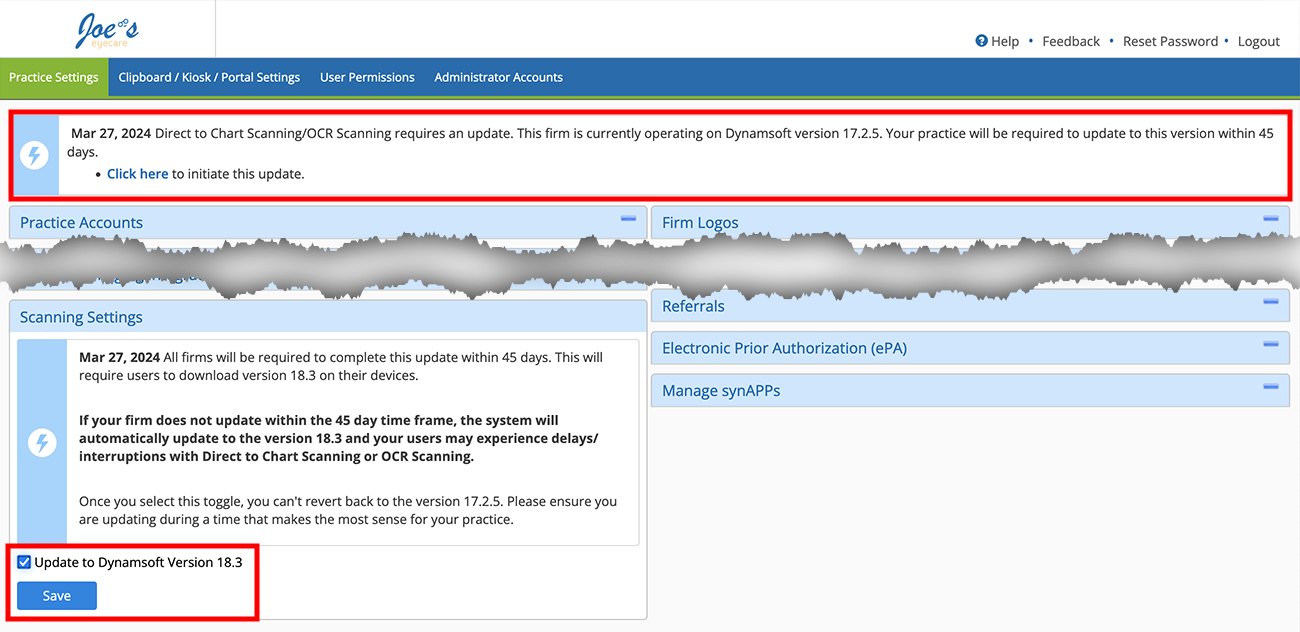
If you don't see the option to update your DynamSoft version, Eyefinity hasn't yet enabled it for your practice. Check back soon.
- A banner appears at the top of the page confirming the update and the Scanning Settings tile confirms the update.

- Notify your practice users that they will be prompted to update the scanner software the next time they attempt to scan a document in Encompass. The download and installation will take 2–3 minutes.
OR notify your IT team that they can deploy the scanner software update.
These steps are intended for users in small practices or practices that do not centrally manage software installations. When the Encompass administrator initiates the update, you will be prompted to download and install the scanner software the first time you attempt to scan a document directly into Encompass. The installation process takes 2–3 minutes.
You can update the scanner software at any time by following these steps:
- Log in to the Encompass web application.
- Navigate to an area of the program where you scan documents. For example, Document Mgmt menu > Upload New Attachment > Scan and Upload Document.
The one-time setup message displays and prompts you to download the scanner software.
- Click Download.
The installer is saved to your browser's downloads folder.
- Locate and double-click the DynamsoftServiceSetup installation file on your hard drive.
- Follow the on-screen prompts to install the scanner software update.
- When the installation is complete, return to the Encompass web application and click Click Here to Connect Again.
The Scan Settings dialog displays. You have successfully completed the scanner software update on this workstation.
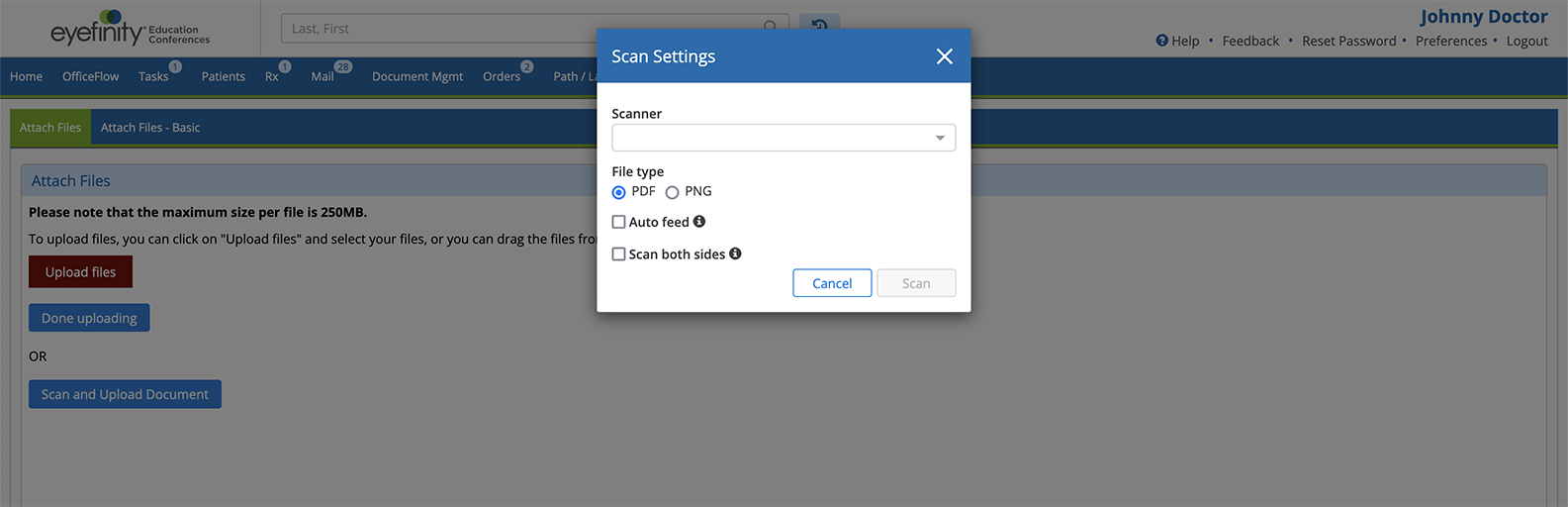
If the Scan Settings dialog does not display, here are some troubleshooting tips:
- Disconnect from the VPN. If your workstation is connected to a virtual private network (VPN), the scanner software may not be able to bridge the connection between your scanner and the web page.
- Restart your computer. If the scanner software was unable to register with your operating system, you may need to restart your computer to enable the services to register.
- Scan the document outside of Encompass and upload the scanned document manually.