
Eyefinity Practice Management 10.21 Release Notes
Release Date: June 23, 2020
Eyefinity announces the newest version of Eyefinity Practice Management. This updated version improves upon your system's robust attributes and offers new features and expanded functionality.
This section includes:
Front Office Enhancements
Eyefinity Practice Management 10.21 Front Office includes enhancements to the following areas:
- Bad Phone Number Check Boxes in Demographics
- Carrier Names on Patient Demographics and Billing Dashboards
- Improved Quick List
- Last Exam Date in Search Patients
- Change Password Update
Bad Phone Number Check Boxes in Demographics
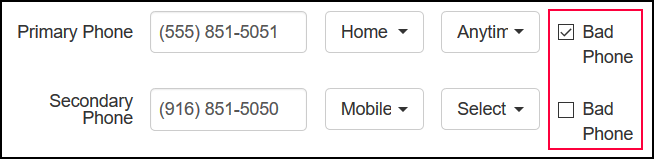
New Bad Phone check boxes have been added next to the Primary Phone and Secondary Phone fields in Demographics, to enable you to indicate when the patient's provided phone number is incorrect. If you select the Bad Phone check box, the Primary Phone field is no longer required.
Carrier Names on Patient Demographics and Billing Dashboards
The Carrier Distribution chart on the Patient Demographics Dashboard and the Payments Per Carrier chart on the Billing Dashboard have been enhanced to display the names of the insurance carriers.
Improved Quick List
The Service column in the Quick List now displays the Service Name you entered in Service Setup.
Last Exam Date in Search Patients
The Office column in the Search Patients results list has been renamed Last Exam Purchase and now includes both the date and office location of the patient's last exam.

Change Password Update
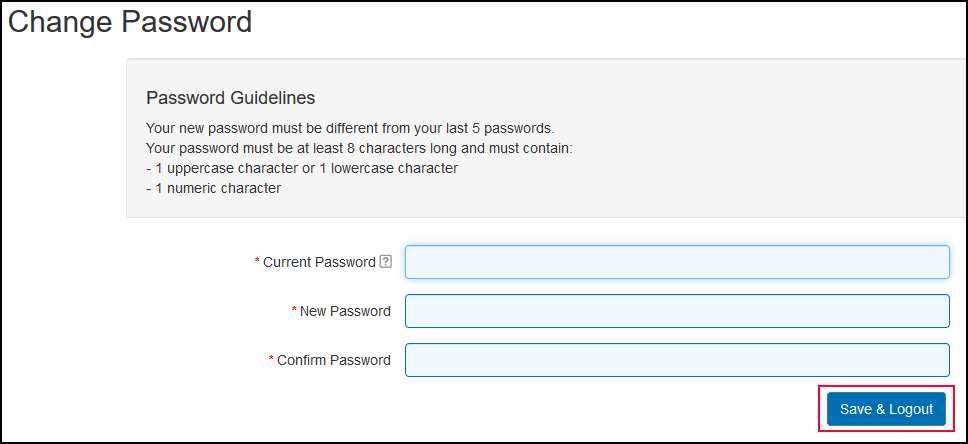
When you save a new password in the Change Password screen, you are now automatically logged out of Eyefinity Practice Management. This allows your browser to save your new password, if you have that feature turned on in your browser's options. For more information, see the online help for your browser.
Administration Enhancements
Eyefinity Practice Management 10.21 Administration includes enhancements to the following areas:
Improved Worldpay Setup Screen
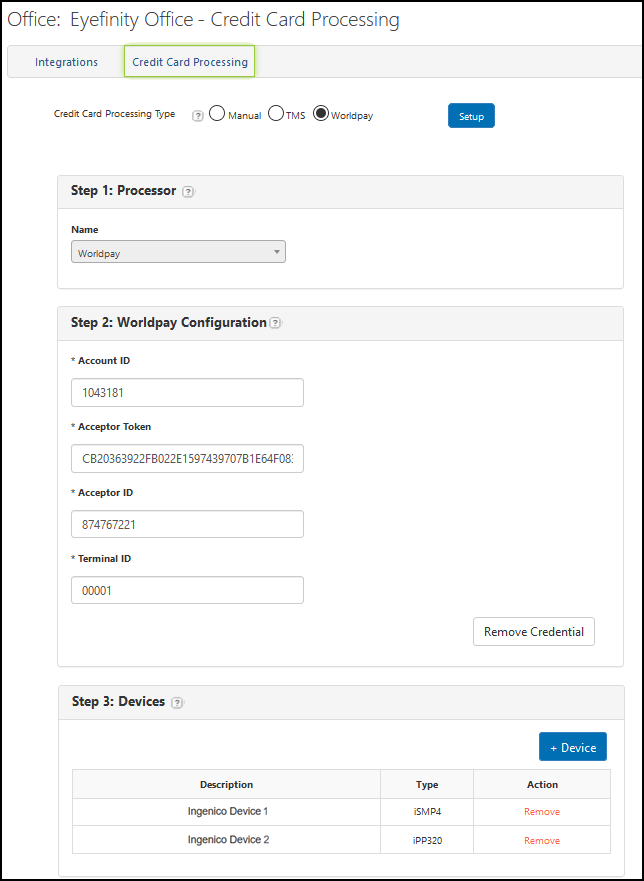
Some functions in the Worldpay setup screen in Credit Card Processing Integration Setup have been renamed for clarity.
- The Delete button under Step 2: Worldpay Configuration is now labeled Remove Credential.
- The Add button under Step 3: Devices is now labeled + Device.
- The UnPair link in the device list is now labeled Remove.
For more information on setting up the Worldpay integration, see Activating the Worldpay Integration.
Unlimited Number of Consecutive Holidays
The system has been enhanced to allow you to schedule an unlimited number of consecutive holidays. This update enables you to close your practice for an extended period of time, while allowing you to continue processing transactions. For more information on entering holidays, see Setting Up Holidays.
Claims Management Enhancement
Eyefinity Practice Management 10.21 Claims Management includes enhancements to the following area:
Backdate Patient Payments, Carrier Payments, and Electronic Remittances
When you add or edit patient payments, carrier payments, and electronic remittances, you can now enter dates in the Deposit Date field that are up to 12 months in the past. For information on entering or editing deposit dates, see Processing Patient Payments, Editing Carrier and Patient Payment Information in Claims Management, and Editing Remittance Details.
Fixed Issues
Front Office
- Medically necessary contact lens orders for VSP are no longer put on hold due to missing CPT codes.
- The Patient Statements Report now downloads as a CSV file without errors.
- Patient addresses are now printed correctly on patient letters. Previously, the Address 2 line would not be printed.
- The system no longer incorrectly changes the Your Cost amount you enter for a frame in Inventory to match the Wholesale Cost.
- The Order Summary for invoiced orders now continues to show the correct invoiced price for items when the retail price for the item is updated in Administration. Previously, the Order Summary would change to display the price entered for the item in Administration, instead of the price originally invoiced.
- Errors no longer occur when you apply payments to old system balances.
- The Patient Marketing Dashboard now displays results correctly when only one Referred By option is selected.
- All safety frames now have the Safety Frame check box selected in the Add Frame screen in Material Orders.
- Orders and claims for two-week disposable contact lenses using VSP pediatric plans no longer fail due to Contact Lens Modality errors.
- The Add Additional Styles feature in the Choose Lenses screen now correctly populates the Style and Color fields, and saves the style to the order.
Administration
- You can now access all pages in the Date Range Setup window when a provider has more than 7 pages of date ranges.
Claims Management
- An error no longer occurs when you change a claim's status from Billed-No Activity for 60 Days to Ready to Bill.
-
The primary cataract diagnosis code for material order claims is no longer changed automatically to Z96.1 for Medicare insurance carriers.
- The Print New CMS Form action in the claim search list now correctly opens the CMS form for printing.