
Encompass 10.53 Release Notes
Release Date: February 19, 2026
Eyefinity announces the newest version of Eyefinity Encompass. This updated version improves upon your system's robust attributes and offers new features and expanded practice management functionality.
Watch the What's New video below to see highlighted features in action.
- Release Highlights
- Other Enhancements
- Fixed Issues
- Encompass 10.53.2
- Encompass 10.53.3
- Encompass 10.53.3
Release Highlights
We heard you! This release includes the following high-impact updates requested by Encompass users.
Quickly Transfer Overpayments to Patient Credit in Claim Detail
You can now select Credit Over Payment Balance to Patient for the Adjustment Type when adjusting line items in the Claim Detail screen. Use this adjustment type to credit the patient's account for any amounts owed back to them, for example if they were originally overcharged in Front Office and no credit transfer was performed during payment reconciliation when processing the carrier payment or ERA.
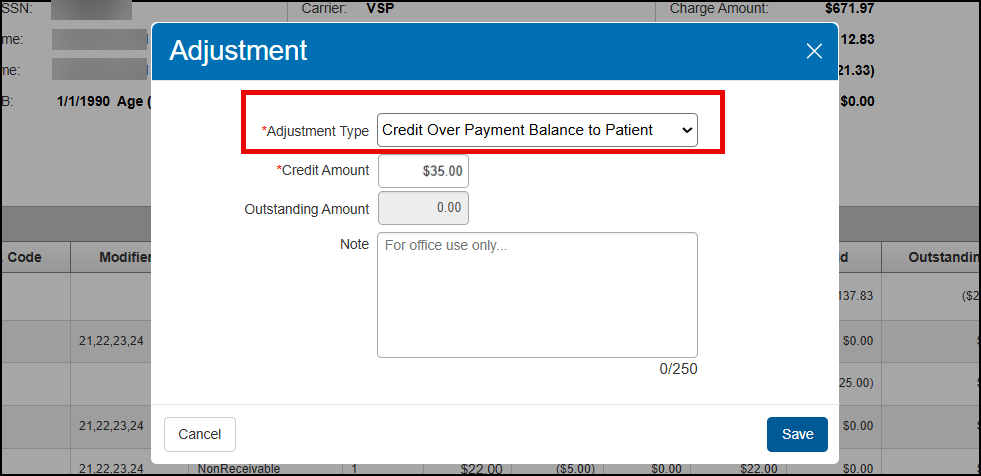
This new option is available only for line items with a negative insurance receivable balance. The Credit Amount cannot be more than what the patient originally paid in Front Office.
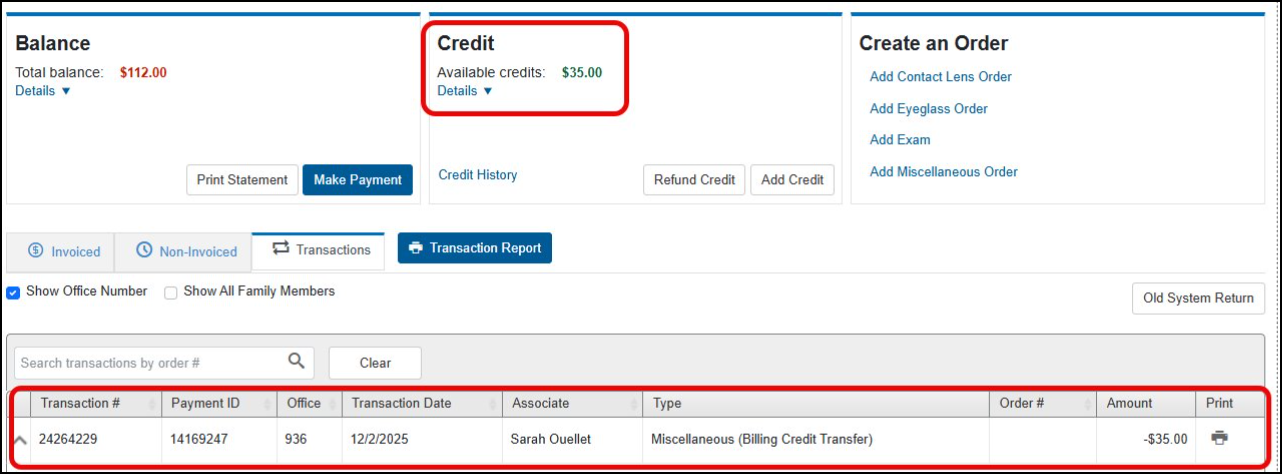
After you save the adjustment, the credit transfer is shown in the patient's Front Office records. The credit amount is added to the patient's available credits and the credit transaction is displayed as a Miscellaneous (Billing Credit Transfer) type transaction in Material Orders.
Find Patients Easier - Search by MRN
We added a new search field, making it easier to find the patient you are searching for. The MRN (medical record number) field is now available on the Patients: Search / Add Patient screen, the Add Appointment search screen, and the Add Dependent search.
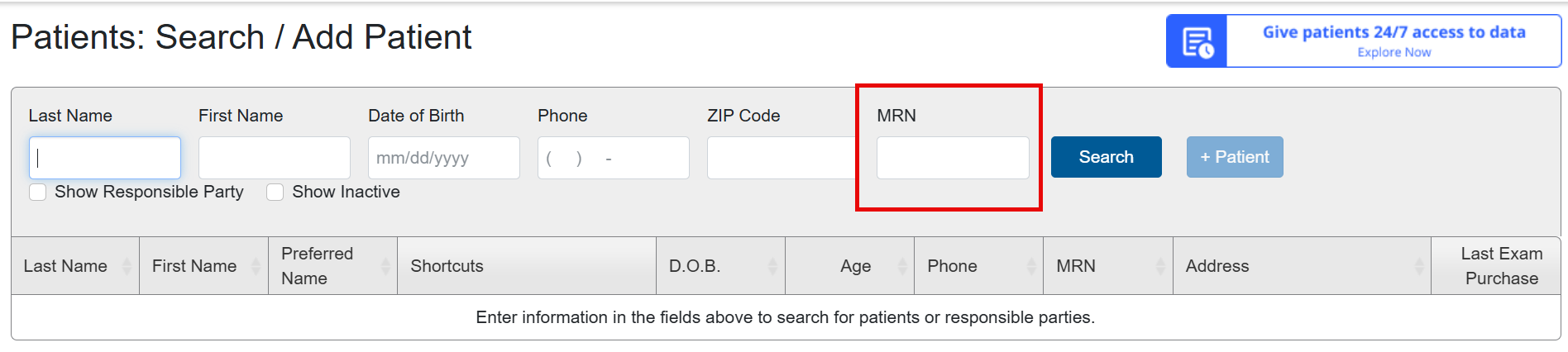
The MRN field has also been added to the Merge Duplicate Patients search, as a column in the results, and the Patients Selected details screen; making it easier for you to determine which patient record to keep.
Other Enhancements
This release also includes enhancements to the following areas:
System Enhancements
This release includes the following system enhancement:
Performance Improvements
To make your system more efficient to use, we've improved screen load and/or data retrieval times in the following areas:
-
Claims Management
-
Eyeglass Order
Front Office Enhancements
This release includes the following Front Office enhancements:
Improvements to VSP Bulk Authorizations
We've renamed the VSP Authorizations screen to VSP Bulk Authorizations, to better reflect that it enables you to pull authorizations for multiple patients with VSP insurance at once and for up to seven days in the future. You'll see this new name in the Patients drop-down menu on the top menu bar, and at the top of the screen when you open it.
We also added a new Patients with No Active Insurance Authorizations check box that filters the patient list to display only those patients that need new authorizations. The check box is selected by default when the screen opens, to reduce the time the screen takes to load, but you can deselect it to see all VSP patients with appointments on the selected date, regardless of authorization status.
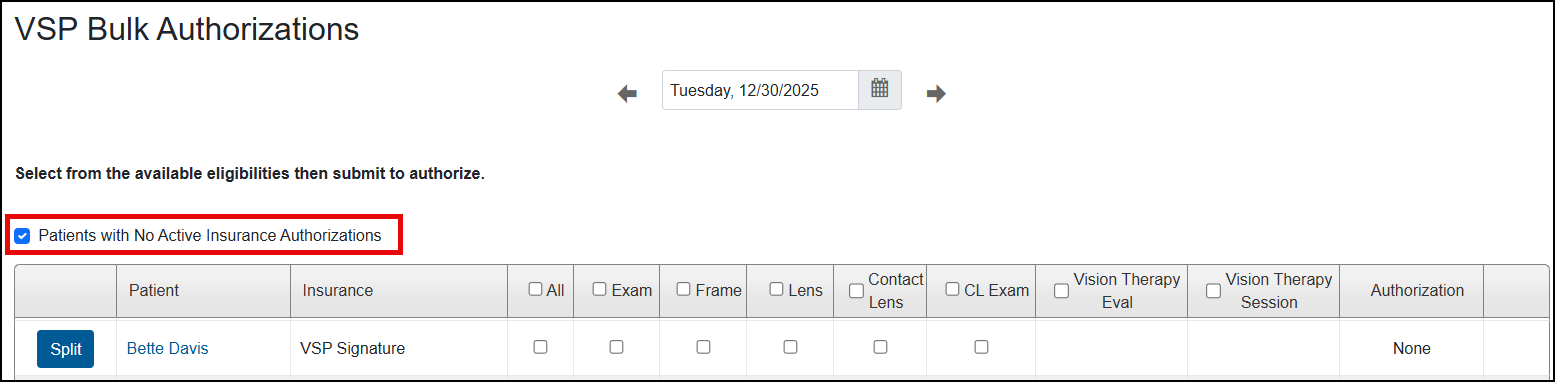
If this check box is selected, once you successfully pull an authorization, the screen refreshes and the patient no longer displays.
Confirmation Message for Deleting VSP Authorizations
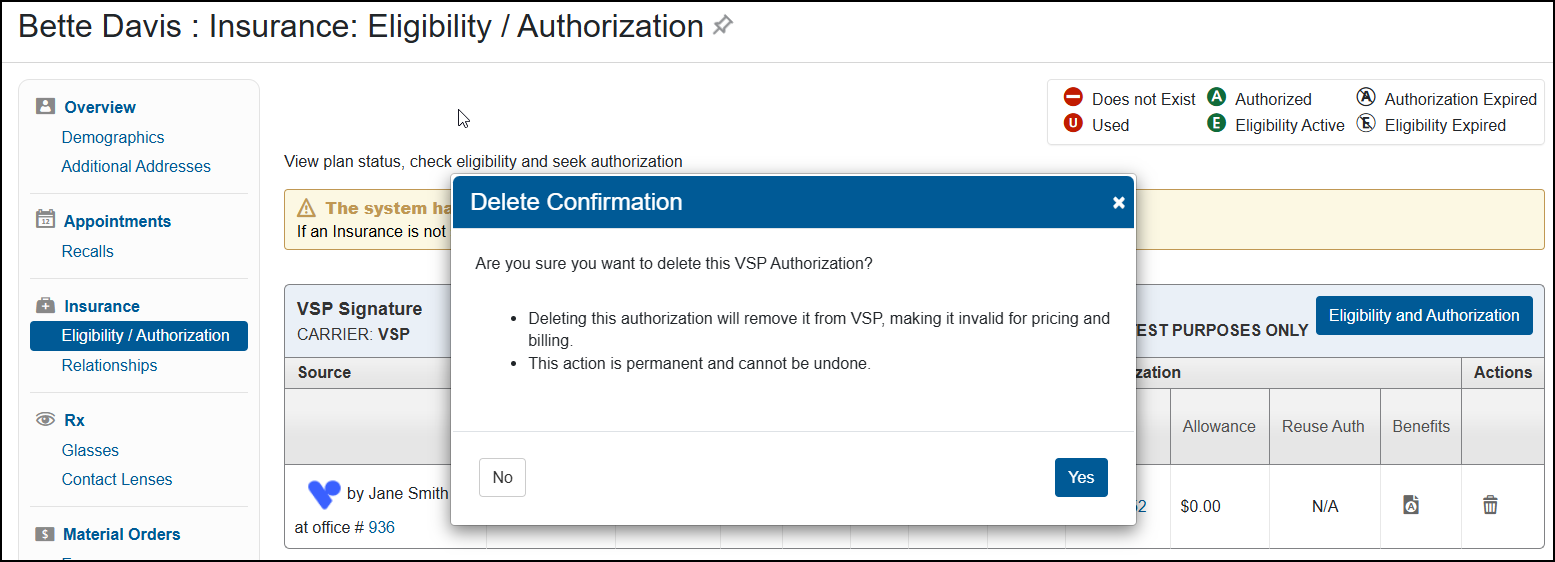
With this release, you'll see a new confirmation message when you delete VSP authorizations that were pulled electronically through the VSP integration. The message is a reminder that deleting the authorization from Encompass also deletes it from the VSP system, and that the deletion cannot be undone. This update is intended to help prevent failed claims due to staff deleting electronic authorizations and then later re-entering the invalidated authorizations manually using VSP Override.
Notification of Missing Authorization in Ordering Screens
We've updated the message that displays on the insurance selection screen when you start an order for a patient who doesn't have any active authorizations. The message now includes a link to the patient's Eligibility/Authorization screen, enabling you to easily add an authorization. You'll see this updated message when you start a new eyeglass, contact lens, or exam order.

Order Number on Summary Patient Statements
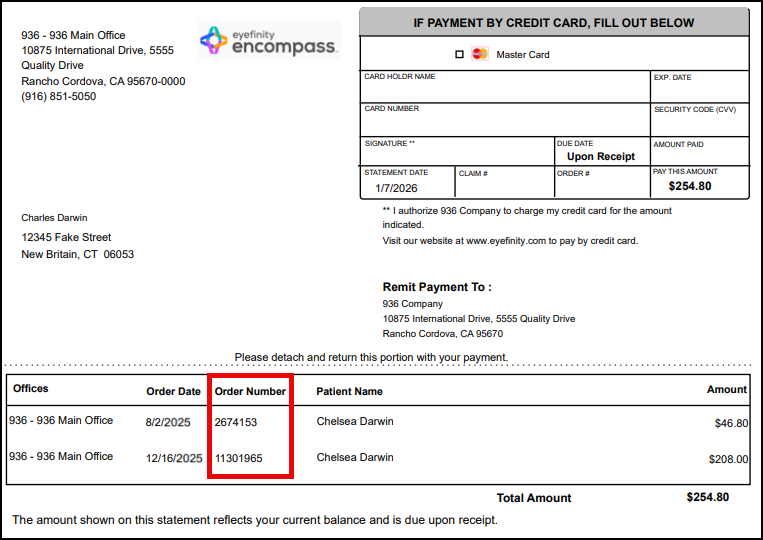
If your company is set up to generate patient statements in summary format, the statements will now include order numbers. For information on selecting the statement format, see Setting Up Patient Statements and Statement Notifications.
Improved Readability of Appointment Notes
We've improved the spacing of text in appointment notes, making them easier to read.
Enhanced Appointment Note Security
To ensure security and prevent malicious code, the use of brackets and any text within them (for example: </br>, <b>, or <patient request>) is no longer allowed when entering appointment notes.
Encompass Automatically Looks for Frames Data (Jobson) Subscription Renewal
If using Frames Data (Jobson), when your office license expires, the system will look once every hour for up to 10 days to see if the license has been renewed. Once the API verifies the license is renewed, the Frames Data subscription status is updated. Before this release, there was a delay in Encompass getting Frames Data subscription renewal information, resulting in Encompass displaying the license as expired, even though customer had renewed.
Claim Management Enhancement
This release includes the following Claim Management enhancement:
Ready to Bill Patient Claim Status Update
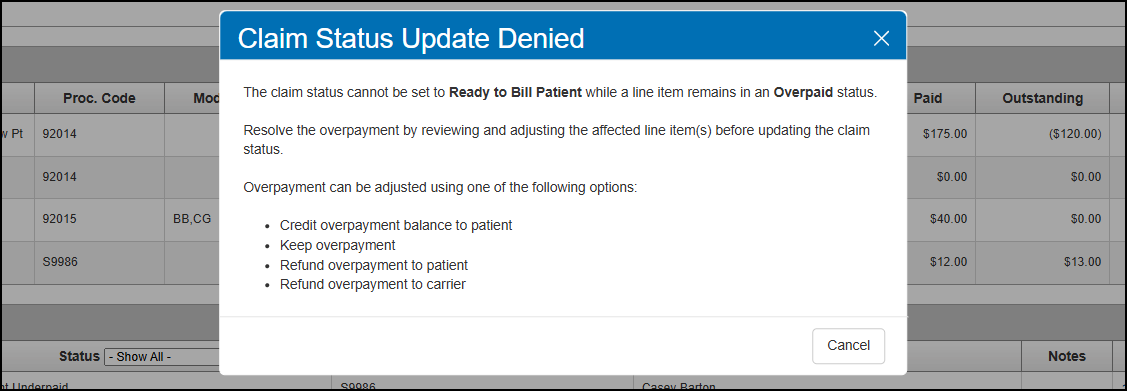
The system now stops you from incorrectly changing a claim's status to Ready to Bill Patient when one or more line items on the claim has a negative insurance receivable (Overpaid status). A new message displays when you click the Ready to Bill patient button, instructing you to adjust the affected line items to resolve the overpayment. This update prevents patient statements from being generated in error when the patient is owed a refund or a credit to their account.
Reporting Enhancement
This release includes the following reporting enhancement:
Old System Transactions Included on Monthly Production Report
If your company is set up to include Old System transactions in your reporting, the Monthly Production Report by Provider now includes amounts added to the system using the Old System Return feature. The Monthly Production Summary Report already includes these amounts, so you will see improvement in the way the two reports reconcile.
If your company uses Old System Return but is not set up to include Old System transactions in your reporting, the reports will no longer include amounts from Old System transactions. Practices not using Old System Return will not see any changes.
To change your company's Old System transactions reporting settings, contact Eyefinity Customer Care.
Patient Engagement Enhancements
Patient Engagement includes the following enhancements:
-
EncompassMessage Voice Appointment Reminder Confirmations Update Appointment Status
-
EncompassMessage Updates the Bad Email Option when an Email Fails
Improved Viewing of Submitted Pre-Visit Forms
When viewing an online submitted Pre-Visit form on the Patient Documents Page, the following fields now display:
-
Insurance Identification Number
-
Insurance Related To Insured (e.g. Self)
-
Insurance Additional Information
The form also now displays when the patient leaves the insurance information, medical surgeries information or the insured party phone field empty.
Improved Schedule Manager Support of Appointment Duration
Schedule Manager now supports appointment durations outside of the expected intervals of 15, 20 and 30 minutes (for example: 25 minutes). Now, all appointment durations are supported and returned for the patient to select.
EncompassMessage Voice Appointment Reminder Confirmations Update Appointment Status
Patients can now confirm their appointment by responding to a voice message. When a patient receives an appointment reminder via voice message, they can press 1 to confirm the appointment. When they press 1, the appointment status in Encompass is updated toConfirmed.
EncompassMessage Updates the Bad Email Option when an Email Fails
When an email sent via EncompassMessage fails, the system checks the bad email option in the patient's demographics.
Integration Enhancement
This release includes the following integration enhancement:
Improved Messaging for WorldPay and EncompassPay Transaction Errors
When any credit card transaction is processed via WorldPay or EncompassPay, if the processor returns an error code, Encompass displays the error message to help guide the user. For example: if a user swipes a lost card, Encompass displays the message: This card was declined because it's reported as lost or stolen. Please try again with a different card.
API Enhancement
This release includes the following API enhancement:
Schedule Manager Swagger Updated
For our API Partners - We updated the Schedule Manager Swagger document to recommend you provide at least one resourceId when making an API request. This helps to prevent overloading the API which can cause system timeouts.
Fixed Issues
This release includes fixed issues in the following areas:
Front Office
-
The Choose Lenses screen now saves the price you enter for the Other Non-VSPLens style. Previously, the price you entered would be replaced with the amount set for the style in Administration when you proceeded to the Order Summary screen.
-
Deselecting coatings and misc. extras in the updated pricing screen no longer deselects all the lens items.
-
Prices greater than $999.99 can now be entered and displayed for miscellaneous fees in the updated pricing screen.
-
When adding the same accessory twice with two different prices in the updated pricing screen, the correct prices are now saved. Previously, both would save with the price entered for the accessory added last.
-
We fixed an issue that was causing the wrong information to display in the Item Name column in the Add Accessory window opened from the updated pricing screen.
-
Custom captions are now shown on reprinted invoices.
-
Misc. extras no longer incorrectly display in the Order Summary screen when they have been removed from the order.
-
We fixed an issue that was preventing patient credit card details from saving for certain practices.
-
A "Welcome to the Angular SPA" message no longer displays when trying to reload a non-invoiced order that has timed out.
-
The Order Number fields on the Miscellaneous tab in the Material Orders: Make Payment screen now displays an error message if you try to enter non-numeric characters or more than 10 characters.
-
Receipts for patient insurance balance payments now print all the payment details. Previously, the Payment History section of the receipt would be blank.
-
During pricing, Total Patient Out of Pocket amounts are now calculated correctly for the VSP Tech Frame benefit.
-
The Seg Height fields in the Choose Lenses screen no longer allow you to enter values outside the range allowed for the selected lens.
-
The Additional Coating Required message window no longer incorrectly displays when no lens type has been selected in the Choose Lenses screen.
-
When ordering eyeglasses, the Base Curve recorded on the eyeglass prescription now automatically displays in the Choose Lenses screen. Previously, the value would be blank.
-
We fixed an issue impacting VSP In-Network offices where the system was not recording the correct Consumer ID for dependent VSP patients, causing errors when pulling authorizations, calculating benefits, and processing claims.
-
When adding VSP insurance to an eyeglass order, the window prompting you to select a valid VSP lab now lists all valid labs. Previously, the drop-down list would be empty.
-
When a hard contact lens prescription is sent from electronic health records with a note, the note displays in the prescription notes in Encompass. If the prescription is incomplete, the prescription information displays in the prescription notes.
-
When the Disable Office Sharing feature flag is applied to an office, the Home Office defaults to the office where the patient record was created and the drop-down is disabled. This includes the drop-down on the Patient Demographics page, the Change Responsible Party screen and the Appointment Add New Patient screen.
-
When the Disable Office Sharing feature flag is applied to an office, the office cannot perform a stock transfer. Also, for offices that are sharing information, you cannot transfer stock to an office that does not share patient information.
-
When entering correspondence notes, you can now use angled brackets around text (for example: <text in brackets>) and the text within and after the brackets displays. Previously, the text was omitted.
-
When you print a note, the date and time stamp on the printed note, match what is displayed in the system. Previously, different time zones would cause a discrepancy between the printed date/time and the display date/time.
-
We have increased the max size limit from 4 MB to 50 MB when uploading documents using the browser or iPad.
-
When adding a frame to a stock receipt, you can enter the UPC and press tab to continue and the system will find and display the active frame. Previously, when you pressed tab, the information was deleted and no frame was found.
-
We updated the patient search process to improve the speed of the search when searching using only the first and last name.
Claim Management
-
Clicking Reset in the EDI Transmission screen no longer incorrectly causes the Create EDI File and Create and Send buttons to display.
-
Clicking Reset in the Generate CMS Form screen no longer incorrectly causes the Generate Form button to display.
-
We fixed an issue that was preventing some error messages from being displayed when calculating VSP benefits.
-
ERAs no longer time out during posting.
-
Failed claims older than 365 no longer display in the list on the Failed Claims screen. Previously, these claims were listed and could be selected to retry when they were not eligible to be retried, and an error would occur.
Administration
-
We corrected an issue causing duplicate employee records for telehealth providers. Previously, the duplicate employee record was created with null as the UserID.
-
When viewing access options for the Store Manager, the default System Admin role displays.
Reporting
-
Patients with credit balances now only print on the Patient Credit Balances Report for the office(s) where they have transactions. Previously, they would print on the report for every office in the company. The correct credit balances are now shown, including when Family Checkout was used.
-
The counts and on-hand totals on the Physical Inventory Variance Detail (INV105) report and the Physical Inventory Variance Summary (INV104) match; previously, there was a discrepancy between reports.
Patient Engagement
-
EncompassMessage patients with communication preference All and Communication Mode as Phone, receive both a text and an email notification and the email notifications are listed on the Notification History Page. Previously, some patients didn't show an email was sent.
-
Order Ready for Pick Up text notifications are successfully sent to patients and display without a logo. Previously, patients were not receiving the text.
Integrations
-
When using the WorldPay integration, we have improved processing of reverse pending authorizations, which prevents patients from being double-charged.
-
We corrected an issue causing WorldPay payments to be finalized on orders that have not been invoiced.
Encompass 10.53.2
Release Date: February 23, 2026
The 10.53.2 release fixes the following issues:
-
Practices using manual credit card processing can now successfully complete refunds for ATM/Debit card payments. Previously, the system would incorrectly prompt you to select a device.
-
When applying manual carrier payments to claims, the claim search now correctly returns all claims that meet the search criteria, regardless of carrier. Previously, the search results would return only claims for the carrier associated with the posted payment.
-
The Total Patient Accounts Receivable Aging Report no longer incorrectly includes patients who do not have balances due.
-
Statements generated using Batch Patient Statements now show the correct total balance due, as well as the correct amounts for payments, transfers, and adjustments.
-
The Carrier/Plan search feature in Carrier & Plan Setup now works correctly. Previously, the search would return no results.
Encompass 10.53.3
Release Date: March 19, 2026
This release includes the following fixed issues:
-
Line item claim adjustments with the Credit Over Payment Balance to Patient adjustment type now correctly credit the patient's account.
-
Selecting search criteria in the Related Claims section of the Process Payments: Carrier Payments screen no longer causes the Status filter to automatically change from Billed to ALL.